Electronics / Cameras
User Manual for Canon RF 100-400mm F5.6-8 IS USM Lens
Quick guide for the Canon RF 100-400mm F5.6-8 IS USM lens. Learn how to attach the lens, use the zoom lock, adjust focus modes, and understand image stabilizer settings.
Table of contents
Manual images
Click an image to enlargeQuick guide from the manual
This document provides essential instructions for the Canon RF 100-400mm F5.6-8 IS USM lens. Ensure your camera firmware is updated to the latest version before use. Always handle the lens with care, avoiding extreme temperatures and direct sunlight, and use the provided lens cap and dust cap when the lens is detached.
Nomenclature
The lens features several key controls:
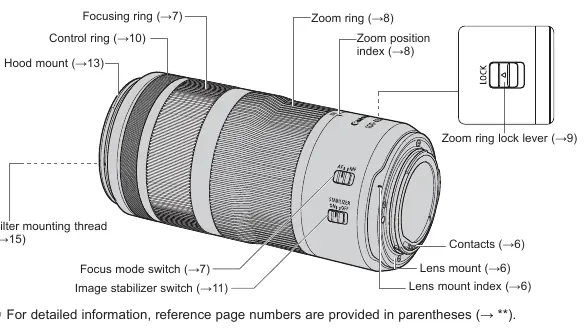
- Focusing ring: Used for manual focusing.
- Zoom ring: Adjusts the focal length.
- Zoom ring lock lever: Fixes the lens at the 100mm position for transport.
- Focus mode switch: Toggles between AF (Autofocus) and MF (Manual Focus).
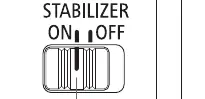
- Image stabilizer switch: Enables or disables the image stabilization function.
- Control ring: Customizable ring for camera settings like aperture or shutter speed.
Attaching and Detaching the Lens
To attach the lens:
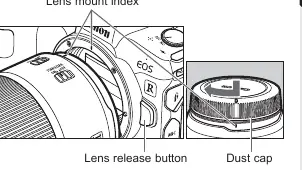
- Align the lens mount index on the lens with the index on the camera.
- Turn the lens clockwise until it clicks into place.
To detach the lens, turn it counterclockwise while pressing the camera's lens release button. Always attach the dust cap after detaching to protect the contacts.
Focusing
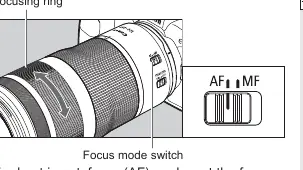
Set the focus mode switch to AF for autofocus or MF for manual focus. When in MF mode, rotate the focusing ring to adjust focus. Note that the focusing ring is electronic; quick turns may result in delayed focus.
Zooming and Locking
Rotate the zoom ring to adjust the focal length. To lock the lens at the 100mm position for carrying, turn the ring to the wide end and slide the zoom ring lock lever in the direction of the arrow. The lens cannot be locked at any other focal length.
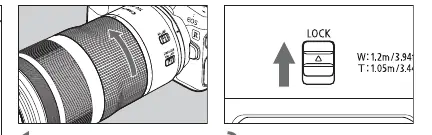
Image Stabilizer
Set the image stabilizer switch to ON to use the function. It is recommended to turn the stabilizer OFF when using a tripod. The stabilizer is effective for hand-held shots in low light, panning shots, and situations where fast shutter speeds are not possible.
Hood and Accessories
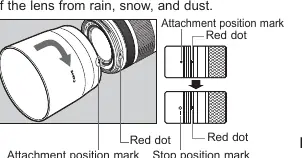
The custom lens hood reduces flare and protects the front element. Align the red attachment position mark on the hood with the red dot on the lens and turn until it clicks. The hood can be reverse-mounted for storage. You can attach a 67mm filter to the front of the lens; only one filter should be attached at a time.
Specifications
The lens features a focal length of 100-400mm with an aperture range of f/5.6-8. It has a minimum focusing distance of 0.88m (at 200mm) and a maximum magnification of 0.41x (at 400mm). The filter diameter is 67mm, and the lens weighs approximately 635g.
Manufacturer information
Canon Inc.
Practical help
Common problems
Lens won't focus
Check if the focus mode switch is set to AF. If using MF, ensure you are turning the focusing ring.
Blurry images
Ensure the Image Stabilizer is ON for hand-held shots. If using a tripod, turn the Image Stabilizer OFF.
Zoom ring is stuck
Check if the zoom ring lock lever is engaged. Slide it in the opposite direction of the arrow to release.
Vignetting (dark corners)
Ensure the lens hood is attached properly and fully rotated until it clicks.
Before use
- Update camera firmware to the latest version.
- Ensure the lens mount indexes are aligned before attaching.
- Remove the lens cap before shooting.
- Check that the zoom ring lock lever is released before attempting to zoom.
- Clean contacts with a soft cloth if they are soiled.
Specs in practice
- Focal Length
- 100-400mm zoom range.
- Minimum Aperture
- f/32-45 depending on zoom.
- Filter Diameter
- 67mm thread size for filters.
Images and diagrams
- Zoom ring lock lever: Slide to lock the lens at 100mm for transport.
- Focus mode switch: Toggle between AF (Autofocus) and MF (Manual Focus).
- Image stabilizer switch: Toggle ON/OFF for vibration reduction.
Model compatibility
- Designed for EOS R series cameras.
- Extenders RF1.4x and RF2x are supported (sold separately).
- Close-up Lens 250D/500D are not compatible.

Manual page author
Emily Carter
User documentation editor
Prepares concise manual descriptions and highlights the most useful setup, operation, and maintenance information for readers.