Electronics / Cameras
Canon RF-S 18-45mm f/4.5-6.3 IS STM Lens User Manual
Quick guide for the Canon RF-S 18-45mm f/4.5-6.3 IS STM lens. Learn how to attach the lens, use the retraction mechanism, configure the focusing/control ring, and understand the MF-only range for close-up shots.
Table of contents
Manual images
Click an image to enlargeQuick Guide
The Canon RF-S 18-45mm f/4.5-6.3 IS STM lens features a retraction mechanism. Shooting is not possible when the lens is stored. To prepare for shooting, rotate the zoom ring in the direction of the white arrow until you hear a click. To store the lens, rotate the zoom ring in the opposite direction until the lens retraction position indicator aligns with the zoom indicator.
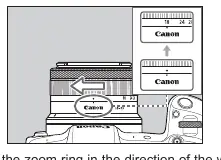
Attaching and Detaching the Lens
Always set the camera's power switch to OFF before attaching or detaching the lens.
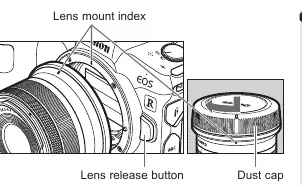
- Attaching: Align the lens mount indexes on the lens and camera, then turn the lens clockwise until it clicks.
- Detaching: Turn the lens counterclockwise while pressing the camera's lens release button.
Always attach the dust cap after detaching the lens to protect the contacts and lens surface.
Focusing/Control Ring
The ring serves a dual purpose, which can be switched via the camera menu:
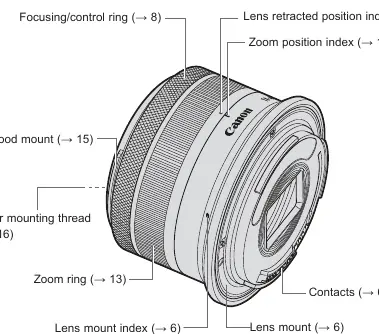
- Focusing Ring: Used for manual focus. If AF does not operate, ensure the focus is not in the [MF-only range] (0.15m-0.2m at wide end). If it is, turn the ring towards infinity.
- Control Ring: Can be assigned functions like shutter speed or aperture settings in the camera menu.
Taking Close-up Shots (MF-only range)
The lens has an [MF-only range] (0.15m to less than 0.2m at the wide end). To shoot in this range:
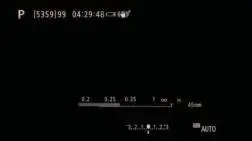
- Set the ring to focusing mode.
- Set the camera focus mode to [MF].
- Turn the focusing ring to move the focus into the [MF-only range].
- Manually focus and take the picture.
Note: Image quality may decline in this range, and remote shooting via PC/smartphone is not supported.
Zooming and Image Stabilizer
Zooming: Turn the zoom ring to adjust the focal length. Finish zooming before focusing to avoid focus shifts.
Image Stabilizer (IS): Turned ON/OFF via camera settings. It is recommended to turn IS OFF when using a tripod. It remains effective with a monopod.
Accessories
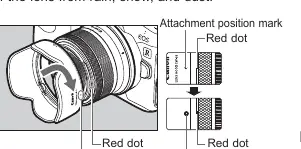
- Lens Hood (EW-53): Sold separately. Reduces flare and protects the front element. Align the red dot on the hood with the red dot on the lens and turn until it clicks.
- Filters: 49mm diameter. Only one filter may be attached at a time.
Specifications
- Focal Length: 18-45mm (29-72mm equivalent).
- Filter Diameter: 49mm.
- Weight: Approx. 130g.
- Compatibility: Designed for EOS R series cameras. Extenders and Close-up Lens 250D/500D are not compatible.
Manufacturer information
Canon Inc.
Practical help
Common problems
Lens will not take pictures
Ensure the lens is not in the retracted position. Rotate the zoom ring until it clicks into the shooting position.
Autofocus (AF) not working
Check if the focus is in the [MF-only range]. Turn the focusing ring towards infinity until it enters the [AF in-focus range].
Blurry images
If using a tripod, ensure the Image Stabilizer is set to OFF in the camera settings.
Vignetting (dark corners)
Ensure the lens hood is attached properly. If not aligned correctly, it may block the light path.
Before use
- Update camera firmware to the latest version.
- Rotate the zoom ring to the shooting position.
- Align lens mount indexes before attaching.
- Check that the lens hood is securely attached.
- Verify camera settings for Control Ring functions.
Specs in practice
- Focal Length
- 18-45mm (equivalent to 29-72mm on 35mm format).
- Filter Diameter
- 49mm; use this size for screw-on filters.
- Min. Focusing Distance
- 0.15m (at 18mm focal length in MF mode).
Images and diagrams
- Nomenclature diagram identifies the zoom ring, focusing/control ring, and lens mount index.
- Retraction mechanism diagram illustrates the rotation required to unlock the lens for shooting.
Model compatibility
- Compatible with EOS R series cameras.
- Extenders cannot be used.
- Close-up Lens 250D/500D cannot be attached.

Manual page author
Michael Turner
Technical manual editor
Reviews PDF manuals for structure, safety notes, and practical product details so readers can find the right information quickly.