Electronics / Cameras
User Manual for Canon RF-S 18-150mm F3.5-6.3 IS STM Lens
Quick guide for the Canon RF-S 18-150mm F3.5-6.3 IS STM lens. Learn how to attach the lens, use the focusing/control ring, manage image stabilization, and understand specifications.
Table of contents
Manual images
Click an image to enlargeQuick guide from the manual
The Canon RF-S 18-150mm F3.5-6.3 IS STM is a high-magnification zoom lens designed for EOS R series cameras. This guide provides essential information on handling, focusing, and using the lens features. Always ensure your camera firmware is updated to the latest version for optimal performance.
Safety Precautions
- Do not look directly at the sun or strong light sources through the lens to avoid loss of sight.
- Do not leave the lens in the sun without the lens cap attached to prevent fire or malfunction.
- Avoid exposing the lens to extreme temperatures.
- Do not insert fingers into the product.
Attaching and Detaching the Lens
Always set the camera power switch to OFF before attaching or detaching the lens.
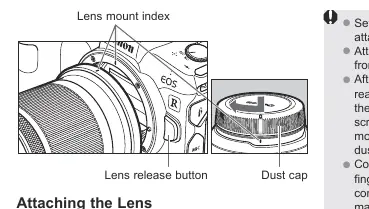
- Attaching: Align the lens mount index on the lens with the index on the camera. Turn the lens clockwise until it clicks into place.
- Detaching: Press the camera's lens release button and turn the lens counterclockwise until it stops.
- Storage: Always attach the dust cap after detaching the lens to protect the contacts and lens surface.
Focusing and Control Ring
The lens features a dual-purpose ring that functions as either a focusing ring or a control ring, depending on camera settings.
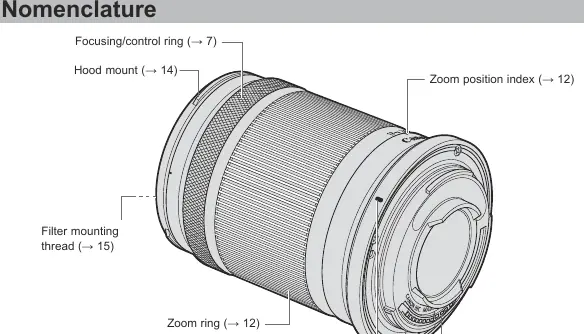
- Focusing: Set the camera to AF or MF mode. In MF mode, turn the ring to focus.
- Control Ring: Assign functions like shutter speed or aperture via the camera menu.
- Note: If AF does not operate after switching from MF to AF, turn the focus ring towards [Infinity] until the focus position is within the AF in-focus range.
Taking Closeup Shots (MF Mode)
You can achieve closer focusing distances in Manual Focus (MF) mode at the wide end (less than 50mm).
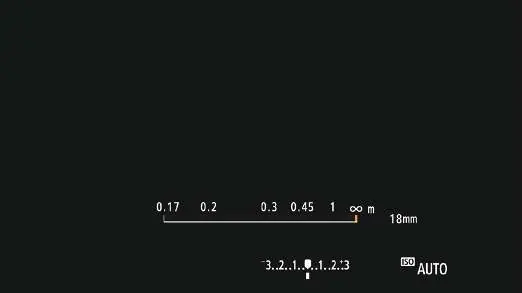
- AF in-focus range: 0.17m to infinity.
- MF-only range: 0.12m to less than 0.17m.
- To shoot in the MF-only range, set the camera to MF, set the focal length wider than 50mm, and turn the focusing ring to the short-range direction.
Image Stabilizer
The Image Stabilizer (IS) is controlled via camera settings.
- Tripod use: It is recommended to turn IS OFF when using a tripod.
- Dynamic IS: Automatically activates during movie shooting, effective for walking and wide-angle shots.
- Panning: The lens compensates for camera shake during panning shots.
Accessories
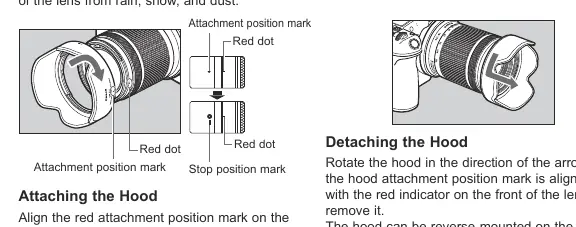
- Hood (Sold separately): Use the EW-60F hood to reduce flare and protect the lens. Align the red dot on the hood with the red dot on the lens and turn until it clicks.
- Filters: You can attach a 55mm filter to the front thread. Only one filter may be attached at a time.
Manufacturer information
Canon Inc.
Practical help
Common problems
AF does not operate after switching from MF to AF
Turn the focus ring in the direction of [Infinity] until the focusing position is within the [AF in-focus range].
Condensation on lens
Place the lens in an airtight plastic bag before moving it between cold and warm environments to allow it to warm up gradually.
Vignetting (darkening of the picture perimeter)
Ensure the lens hood is attached properly.
Before use
- Check that camera firmware and applications are up to date.
- Ensure camera power is OFF before attaching or detaching the lens.
- Align lens mount indexes before twisting the lens.
- Set the desired focus mode (AF/MF) on the camera body.
- Remove the lens cap before shooting.
Specs in practice
- Focal Length
- 18-150mm (equivalent to 29-240mm in 35mm format).
- Filter Diameter
- 55mm thread size for attaching filters.
Images and diagrams
- The lens features a focusing/control ring, zoom ring, and lens mount index.
- The camera's focusing distance display shows the current focus range, with specific markings for MF-only and AF-compatible ranges.
Model compatibility
- Compatible with EOS R series cameras.
- Not compatible with extenders.
- Close-up Lens 250D/500D cannot be attached.

Manual page author
Michael Turner
Technical manual editor
Reviews PDF manuals for structure, safety notes, and practical product details so readers can find the right information quickly.