Electronics / Cameras
User Manual for Canon RF 16-28mm F2.8 IS STM Lens
Quick guide for the Canon RF 16-28mm F2.8 IS STM lens. Learn how to attach the lens, use the retraction mechanism, set focus modes, configure the control ring, and operate the image stabilizer.
Table of contents
Manual images
Click an image to enlargeQuick Guide from the Manual
This document provides essential instructions for the Canon RF 16-28mm F2.8 IS STM lens. Key operational requirements include ensuring the lens is in the shooting position (extended) before use, keeping firmware updated on your EOS R series camera, and handling the lens with care to avoid condensation and damage.
Nomenclature
The lens features several key components:
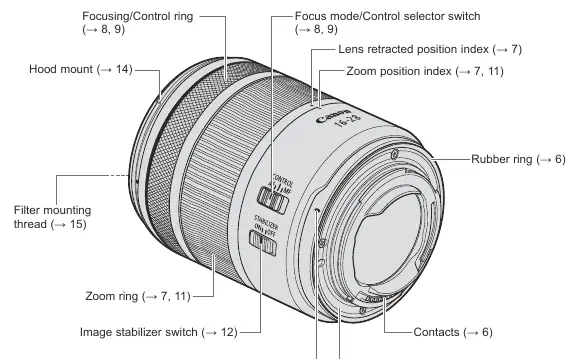
- Focusing/Control ring: Used for manual focus or custom control functions.
- Focus mode/Control selector switch: Toggles between AF, MF, and Control modes.
- Zoom ring: Used to adjust focal length and extend/retract the lens.
- Image stabilizer switch: Turns the IS function ON or OFF.
- Lens mount index: Used for aligning the lens with the camera body.
Attaching and Detaching the Lens
Attaching: Align the lens mount index on the lens with the index on the camera body. Turn the lens clockwise until it clicks into place.
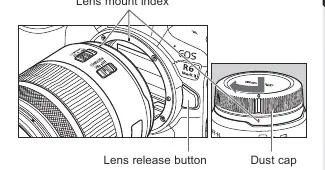
Detaching: Press the camera's lens release button and turn the lens counterclockwise until it stops, then remove it.
Important: Always turn the camera power OFF before attaching or detaching the lens. Attach the dust cap immediately after removal to protect the contacts.
Shooting Preparations and Retraction
This lens features a retraction mechanism to shorten its length for storage.
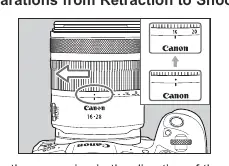
- To shoot: Rotate the zoom ring in the direction of the white arrow until you hear a click.
- To store: Rotate the zoom ring in the opposite direction, past the 16mm position, until the retraction indicator aligns with the zoom indicator.
Setting the Focus Mode
Use the focus mode/control selector switch to choose your preferred method:
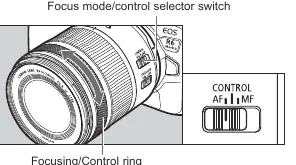
- AF: Autofocus mode.
- MF: Manual focus mode. Turn the focusing ring to adjust focus.
- CONTROL: Assigns the focusing ring to a custom control function (e.g., aperture or shutter speed) via the camera menu.
Image Stabilizer
Set the switch to ON to use image stabilization. This is effective for hand-held shots in low light or when using slower shutter speeds. Set to OFF when using a tripod, as the stabilizer may not be effective or could cause issues depending on the tripod type.
Accessories
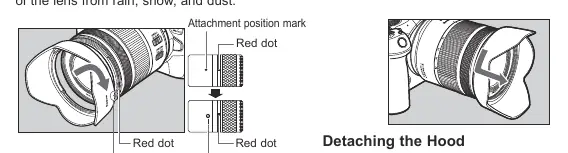
- Hood: The custom lens hood (sold separately) reduces flare and protects the front element. Align the red dot on the hood with the red dot on the lens and turn to lock.
- Filters: You can attach 67mm filters to the front thread. Only one filter should be attached at a time.
Manufacturer information
Canon Inc.
Practical help
Common problems
Lens will not shoot
Ensure the lens is extended from the retracted position by rotating the zoom ring.
Blurred images when using a tripod
Set the Image Stabilizer switch to OFF.
Manual focus not working
Ensure the focus mode switch is set to MF. If set to CONTROL, manual focus is disabled.
Vignetting in photos
Ensure the lens hood is attached properly and not misaligned.
Before use
- Check that your camera firmware is up to date.
- Ensure the lens is extended for shooting.
- Clean lens contacts with a soft cloth if they are soiled.
- Set the focus mode switch to the desired position (AF/MF/CONTROL).
Specs in practice
- Focal Length
- 16-28mm wide-angle zoom range.
- Filter Diameter
- 67mm (size for screw-in filters).
- Min. Focusing Distance
- 0.2m (at 28mm focal length).
Images and diagrams
- The nomenclature diagram identifies the zoom ring, focus mode switch, and lens mount index.
- The retraction diagram illustrates how to rotate the zoom ring to extend the lens for shooting.
Model compatibility
- Designed for Canon EOS R series cameras.
- Not compatible with extenders.
- Close-up Lens 250D/500D cannot be attached.

Manual page author
David Miller
Documentation analyst
Organizes user manual content into clear summaries, with attention to model details, product context, and everyday usability.