Electronics / Camera Lenses
Instructions for Canon RF 20mm, 24mm, 35mm, and 50mm F1.4 L VCM Lenses
A comprehensive user guide for Canon RF F1.4 L VCM series lenses. Learn how to attach the lens, operate the iris ring, use the control ring, install filters, and understand compatibility and safety precautions.
Quick answers from the manual
Quick answer
- This manual provides operating instructions for the Canon RF 20mm, 24mm, 35mm, and 50mm F1.4 L VCM lenses, covering installation, focus modes, aperture control, and filter usage. p. 1, 6
Key actions
- Attaching the lens p. 7
- Using the Iris Ring p. 10
First start
- Update camera firmware p. 2
Show 3 more answers Show less
Problems and fixes
Condensation
Use an airtight plastic bag when moving between temperature extremes.
p. 4Technical specifications
| Parameter | Value | Meaning | Pages |
|---|---|---|---|
| Filter Diameter | 67mm | Front filter thread size | p. 20, 21 |
Where to find it in the PDF
- Nomenclature p. 6
- Specifications p. 20, 21
Table of contents
Manual images
Click an image to enlargeQuick guide from the manual
Before using your lens, ensure your camera firmware is updated to the latest version to avoid compatibility issues. The lens features a Voice Coil Motor (VCM) for autofocus. Note that for certain camera models (EOS R, RP, and others), specific limitations regarding iris ring operation and autofocus performance may apply. Always handle the lens with care, avoiding direct sunlight and extreme temperatures.
Nomenclature
The lens includes several key controls:
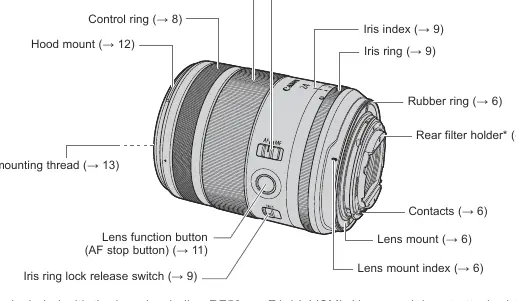
- Focusing ring: Used for manual focus.
- Focus mode switch: Toggles between AF and MF.
- Control ring: Assignable to functions like shutter speed or aperture.
- Iris ring: Used for manual or auto aperture control.
- Lens function button: Defaults to AF stop.
- Hood mount: For attaching the lens hood.
- Rear filter holder: Available on most models (excluding RF50mm F1.4 L VCM).
Attaching and Detaching the Lens
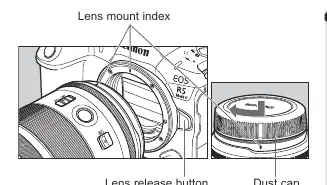
To attach the lens, align the lens mount index on the lens with the index on the camera body and turn the lens clockwise until it clicks. To detach, press the camera's lens release button and turn the lens counterclockwise.
Focus Mode
Set the focus mode switch to AF for autofocus or MF for manual focus. When in MF, use the electronic focusing ring to adjust focus. Note that the focusing ring is electronic, and quick movements may result in delayed focus.
Manual/Auto Aperture Operation
The iris ring allows for aperture control. To switch between modes:
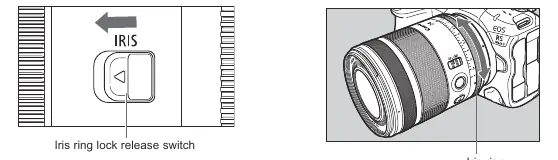
- Manual aperture: Slide the iris ring lock release switch and turn the ring to select an aperture value between 1.4 and 16.
- Auto aperture: Slide the lock release switch and turn the ring to the A position.
Filters
The lens supports two types of filters:
- Front threaded filters: 67mm filters can be attached to the front of the lens.
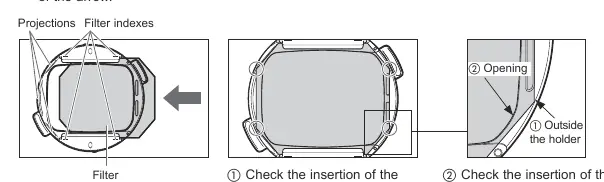
- Rear sheet type filters: A rear filter holder is included (not available on RF50mm F1.4 L VCM). You must cut the filter to match the provided template and insert it into the holder.
Safety and Handling
Avoid looking directly at the sun through the lens. If moving the lens between cold and warm environments, place it in an airtight plastic bag to prevent condensation. The lens emits low-level magnetic flux; consult a doctor if you use a pacemaker.
Manufacturer information
Canon Inc.
Practical help
Common problems
Condensation on lens
Place the lens in an airtight plastic bag before moving it between cold and warm environments to allow it to warm up gradually.
AF speed is slow during movie recording
Adjust the AF speed on the camera by setting Movie Servo AF to Enable.
Iris ring does not set aperture for still images
This is a limitation on certain cameras (e.g., EOS R, RP, R5, R6). Use the camera controls instead.
Before use
- Update camera firmware to the latest version.
- Ensure the lens mount index is aligned with the camera.
- Check if your camera model supports all lens features (e.g., iris ring operation).
- Attach the lens hood properly to prevent vignetting.
Show more Show less
Images and diagrams
- The nomenclature diagram identifies the focus ring, control ring, iris ring, and lens function button.
- The filter template diagram shows the exact dimensions required for cutting rear sheet-type filters.
Model compatibility
- Not compatible with extenders.
- Close-up Lens 250D/500D cannot be attached.
- Rear filter holder is not available on the RF50mm F1.4 L VCM.

Manual page author
David Miller
Documentation analyst