Electronics / Camera Lenses
Instruction Manual for Canon RF 200-800mm f/6.3-9 IS USM Lens
Quick guide for the Canon RF 200-800mm f/6.3-9 IS USM lens. Learn about lens attachment, focusing modes, zoom ring adjustment, image stabilization, and compatibility with extenders and filters.
Quick answers from the manual
Quick answer
- The Canon RF 200-800mm f/6.3-9 IS USM is a telephoto zoom lens for EOS R series cameras. It features an electronic focusing/control ring, image stabilization, and a tripod mount. p. 1
Key actions
- Attaching the lens p. 6
- Detaching the lens p. 6
First start
- Ensure camera power is OFF, align lens mount indexes, and rotate clockwise until it clicks. p. 6
Problems and fixes
Condensation
Place lens in airtight bag when moving between temperature extremes.
p. 3Maintenance and reset
- Clean contacts with a soft cloth if soiled. p. 6
Technical specifications
| Parameter | Value | Meaning | Pages |
|---|---|---|---|
| Focal Length | 200-800mm | Zoom range | p. 19 |
| Filter Diameter | 95mm | Filter size | p. 19 |
Where to find it in the PDF
- Nomenclature p. 5
- Attaching/Detaching p. 6
- Specifications p. 19, 20
Table of contents
Manual images
Click an image to enlargeQuick Guide from the Manual
This manual provides instructions for the Canon RF 200-800mm f/6.3-9 IS USM lens. Key operations include attaching the lens to EOS R series cameras, adjusting the zoom ring tension, using the focus/control ring, and utilizing the image stabilizer. Always ensure the camera power is OFF before attaching or detaching the lens.
Nomenclature
The lens features several key controls:
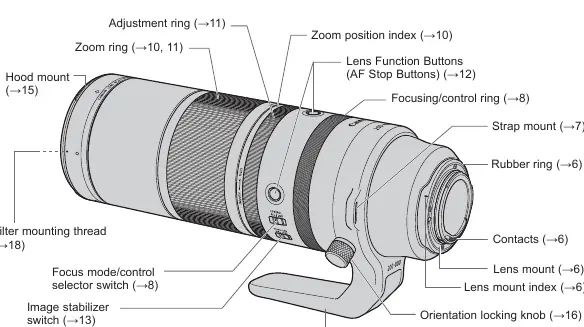
- Zoom ring: Used for adjusting focal length.
- Focusing/control ring: Can be assigned to focus or camera functions.
- Focus mode/control selector switch: Toggles between AF, MF, and Control modes.
- Image stabilizer switch: Turns image stabilization ON or OFF.
- Lens function buttons: Default to AF stop.
- Adjustment ring: Adjusts the operational feeling (weight) of the zoom ring.
- Tripod mount: Used for mounting the lens to a tripod or monopod.
Attaching and Detaching the Lens
Attaching: Align the lens mount indexes on the lens and camera, then turn the lens clockwise until it clicks.
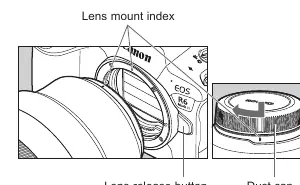
Detaching: Turn the lens counter-clockwise while pressing the camera's lens release button.
Important: Always set the camera's power switch to OFF before attaching or detaching the lens. Keep the rear end of the lens up when detached and attach the dust cap to protect the contacts.
Focusing/Control Ring
The focusing/control ring can function as a focusing ring or a control ring depending on the position of the focus mode/control selector switch:
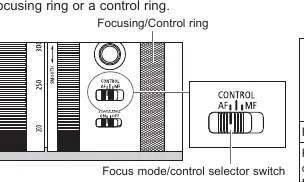
- AF: Functions as a focusing ring.
- MF: Functions as a focusing ring for manual focus.
- CONTROL: Functions as a control ring (assignable via camera menu).
Zooming
To zoom, turn the zoom ring. Note that the minimum focusing distance changes according to the focal length (0.8m at 200mm to 3.3m at 800mm). Be sure to finish zooming before focusing, as zooming after focusing can affect the focus.
Adjusting the Zoom Ring Operational Feeling
You can adjust the resistance of the zoom ring using the adjustment ring. Turn toward SMOOTH to lighten the movement or toward TIGHT to increase resistance. It is recommended to turn fully to TIGHT when not in use to prevent the lens from extending unintentionally.
Image Stabilizer
Set the image stabilizer switch to ON to use the feature. It is effective for hand-held shots in low light, situations where flash cannot be used, or for panning shots. Set to OFF when using a tripod if the stabilizer is not needed or if it causes issues with specific tripod setups.
Hood
The lens hood reduces flare and protects the front element. Align the red attachment position mark on the hood with the red dot on the lens and turn until it clicks. The hood can be reverse-mounted for storage.
Extenders and Filters
Extenders: Compatible with Canon RF 1.4x and RF 2x extenders. Note that AF speed will be slower when an extender is attached.
Filters: The lens accepts 95mm screw-on filters. Only one filter may be attached at a time.
Specifications
- Focal Length: 200-800mm
- Lens Construction: 17 elements in 11 groups
- Filter Diameter: 95mm
- Weight: Approx. 2050g
- Compatible Cameras: Canon EOS R-series
Manufacturer information
Canon Inc.
Practical help
Common problems
Lens won't focus
Check the focus mode/control selector switch. Ensure it is set to AF if autofocus is desired. Verify camera settings.
Vignetting (darkening of corners)
Ensure the lens hood is attached properly. If not aligned correctly, it may cause vignetting.
Condensation on lens
When moving between cold and warm environments, place the lens in an airtight plastic bag until it warms up gradually.
Before use
- Set camera power to OFF before attaching or detaching the lens.
- Check that the strap is attached securely and is not damaged.
- Ensure lens mount indexes are aligned before attaching.
- Check that the firmware on the camera is up to date.
Specs in practice
- Focal Length
- 200-800mm zoom range.
- Filter Diameter
- 95mm, the size of screw-on filters compatible with this lens.
Images and diagrams
- The nomenclature diagram identifies the zoom ring, focus mode switch, image stabilizer switch, and tripod mount location.
Model compatibility
- Compatible with Canon EOS R-series cameras.
- Compatible with RF 1.4x and RF 2x extenders.
- Not compatible with 250D/500D close-up lenses.

Manual page author
David Miller
Documentation analyst
Organizes user manual content into clear summaries, with attention to model details, product context, and everyday usability.