Electronics / Camera Lenses
Instruction Manual for Canon RF 24-105mm F4 L IS USM Lens
Quick guide for the Canon RF 24-105mm F4 L IS USM lens. Learn how to attach the lens, use the focus mode, zoom lock, control ring, image stabilizer, and lens hood, along with technical specifications.
Quick answers from the manual
Quick answer
- The Canon RF 24-105mm F4 L IS USM is a standard zoom lens for EOS R series cameras. It features a customizable control ring, image stabilization, and a zoom lock mechanism. p. 2
Key actions
- Attaching the lens p. 7
- Locking the zoom ring p. 9
Problems and fixes
Condensation
Use an airtight plastic bag when moving between temperature extremes.
p. 4Show 3 more answers Show less
Maintenance and reset
- Cleaning contacts p. 7
Technical specifications
| Parameter | Value | Meaning | Pages |
|---|---|---|---|
| Focal Length | 24-105mm | Zoom range | p. 15 |
| Filter Diameter | 77 mm | Size of filter thread | p. 15 |
| Weight | Approx. 700 g | Lens weight | p. 15 |
Where to find it in the PDF
- Nomenclature p. 6
- Specifications p. 15
Table of contents
Manual images
Click an image to enlargeQuick guide from the manual
This manual provides essential instructions for the Canon RF 24-105mm F4 L IS USM lens. Ensure your camera firmware is up to date before use. Always handle the lens with care, avoiding direct sunlight through the lens and extreme temperatures to prevent damage.
Nomenclature
The lens features several key controls:
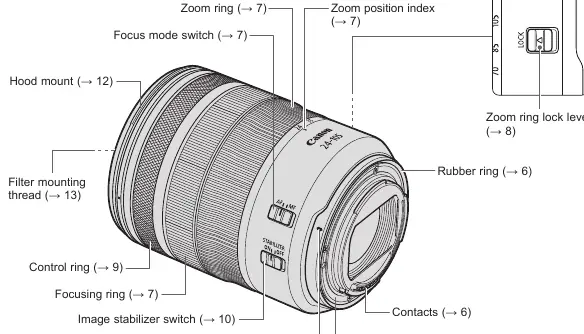
- Zoom ring: Adjusts the focal length.
- Focus mode switch: Toggles between AF (Autofocus) and MF (Manual Focus).
- Control ring: Customizable for settings like shutter speed or aperture.
- Image stabilizer switch: Turns the image stabilization function on or off.
- Zoom ring lock lever: Locks the lens at the 24mm position for transport.
Attaching and Detaching the Lens
To attach the lens:
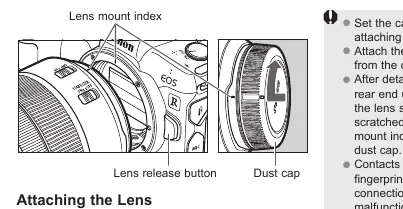
- Align the lens mount index on the lens with the index on the camera.
- Turn the lens clockwise until it clicks into place.
To detach the lens:
- Press the camera's lens release button.
- Turn the lens counterclockwise until it stops, then remove it.
Important: Always turn the camera power off before attaching or detaching the lens. Use the dust cap when the lens is not attached to the camera.
Focusing and Zooming
Set the focus mode switch to AF for autofocus or MF for manual focus. When in MF, rotate the focusing ring to adjust focus. For zooming, rotate the zoom ring. It is recommended to finish zooming before focusing to ensure accuracy.
Fixing the Zoom Ring
The zoom ring can be locked to prevent the lens from extending during transport:
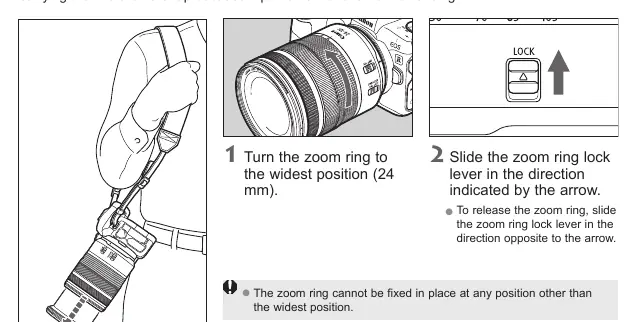
- Turn the zoom ring to the widest position (24mm).
- Slide the zoom ring lock lever in the direction of the arrow.
To release, slide the lever in the opposite direction.
Control Ring and Image Stabilizer
The control ring can be assigned to various camera functions. The Image Stabilizer helps reduce blur in hand-held shots. Set the switch to ON to activate. It is recommended to set the switch to OFF when using a tripod.
Hood
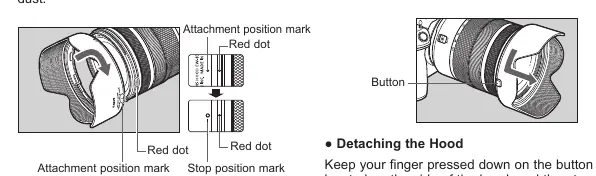
The custom lens hood protects the front element and reduces unwanted light. Align the red attachment position mark on the hood with the red dot on the lens, then turn clockwise until it clicks. To detach, press the button on the side of the hood and turn counterclockwise.
Specifications
Key technical parameters include:
- Focal Length: 24-105mm
- Aperture: f/4 (Minimum f/22)
- Filter Diameter: 77mm
- Minimum Focusing Distance: 0.45m
- Weight: Approx. 700g
Manufacturer information
Canon Inc.
Practical help
Common problems
Condensation on lens
Place the lens in an airtight plastic bag before moving it between cold and warm environments to allow gradual temperature adjustment.
Blurred images
Ensure the Image Stabilizer is ON for hand-held shots. If using a tripod, turn the Image Stabilizer OFF.
Vignetting (darkening of corners)
Ensure the lens hood is attached correctly.
Before use
- Check that your camera firmware is the latest version.
- Ensure the lens mount indexes are aligned before attaching.
- Remove the lens cap.
- Set the focus mode switch to AF or MF as desired.
- Ensure the zoom ring lock is released before shooting.
Show more Show less
Specs in practice
- Focal Length
- 24-105mm zoom range.
- Filter Diameter
- 77mm thread size for filters.
Images and diagrams
- The nomenclature diagram identifies the zoom ring, focus mode switch, control ring, and image stabilizer switch.
- The attachment diagram illustrates aligning the lens mount index with the camera body.
Model compatibility
- Designed for EOS R series cameras.
- Close-up Lens 250D is not compatible with this lens.
- Only one filter may be attached at a time.

Manual page author
Michael Turner
Technical manual editor