Electronics / Camera Lenses
User Manual for Canon EF-M 22mm f/2 STM Lens
A comprehensive user guide for the Canon EF-M 22mm f/2 STM lens. Includes instructions on mounting, detaching, manual focus, accessory usage, and technical specifications.
Quick answers from the manual
Quick answer
- To mount the lens, turn the camera OFF, align the lens mount index with the camera's index, and rotate the lens clockwise until it locks. p. 1
Key actions
- Mounting the lens p. 1
- Using manual focus p. 1
Problems and fixes
Lens contacts dirty
Clean the contacts with a soft cloth.
p. 1Technical specifications
| Parameter | Value | Meaning | Pages |
|---|---|---|---|
| Focal Length | 22mm | Fixed focal length | p. 2 |
| Aperture | f/2 | Maximum aperture | p. 2 |
| Filter Diameter | 43mm | Size of filter thread | p. 2 |
Where to find it in the PDF
- Lens Instructions p. 1, 2
Table of contents
Manual images
Click an image to enlargeQuick guide from the manual
This document provides essential instructions for the Canon EF-M 22mm f/2 STM lens. Key operations include mounting the lens to the camera, using manual focus, and attaching accessories like the EW-43 hood and filters. Always ensure the camera is turned off before mounting or detaching the lens.
Safety precautions
- Sunlight: Do not look at the sun or bright light sources through the lens, as this may cause vision loss or blindness.
- Fire hazard: Do not leave the lens under the sun without the lens cap attached, as the lens can concentrate sunlight and cause a fire.
- Condensation: If moving the lens from a cold to a warm environment, place it in an airtight plastic bag until it has gradually warmed to prevent condensation on internal parts.
- Heat: Avoid leaving the lens in excessive heat, such as in a car under direct sunlight, to prevent malfunction.
Mounting and detaching the lens
Always perform these actions with the camera turned OFF.
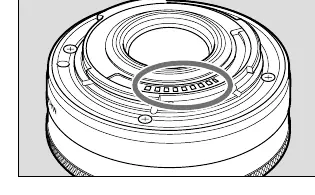
- Mounting: Align the lens mount index on the lens with the corresponding index on the camera. Turn the lens clockwise until it clicks into place.
- Detaching: To remove the lens, reverse the mounting procedure.
- Contacts: Keep the lens contacts clean. If they become soiled or scratched, the lens may not operate properly. Clean them with a soft cloth.
Manual focus
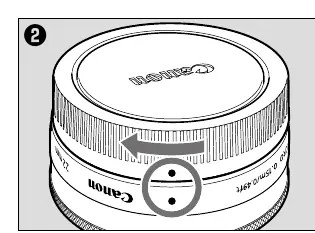
When the camera's focus mode is set to [MF], you can focus manually by rotating the focusing ring. Avoid rotating the ring too quickly, as this may result in delayed focus. In [AF+MF] mode, you can manually adjust focus by pressing the shutter button halfway and turning the focusing ring.
Accessories
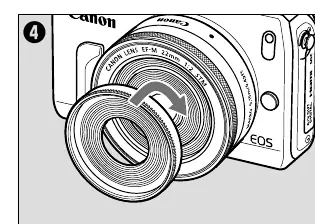
- Hood (EW-43): Sold separately. Protects the lens from rain, snow, and dust. Attach by screwing it into the lens filter thread or the filter thread of an attached filter. Do not grasp the rim of the hood when attaching/detaching to prevent deformation.
- Filters: Sold separately. Attach by screwing into the lens filter thread or the hood's front filter thread. Only one filter may be attached at a time.
Specifications
The lens features a focal length of 22mm and an aperture of f/2. The filter diameter is 43mm. The lens is compatible with EOS M series cameras.
Manufacturer information
Canon Inc.
Practical help
Common problems
Condensation on lens
Place the lens in an airtight plastic bag before moving it from a cold to a warm environment and let it warm up gradually.
Lens not operating properly
Check if the contacts are soiled, scratched, or have fingerprints. Clean them with a soft cloth.
Before use
- Ensure the camera is turned OFF before mounting or detaching the lens.
- Remove the lens cap and dust cap.
- Align the lens mount index with the camera index.
- Ensure the lens is locked by turning it clockwise.
Specs in practice
- Focal Length/Aperture
- 22mm f/2
- Filter Diameter
- 43mm
- Min. Focusing Distance
- 0.15m / 0.49ft
Images and diagrams
- Figure 1: Shows the lens mount index and contacts.
- Figure 2: Illustrates the focusing ring rotation.
- Figure 3: Shows the lens attached to the camera body.
- Figure 4: Demonstrates attaching the hood to the lens.
Model compatibility
- Compatible with EOS M series cameras.
- Extenders cannot be used with this lens.

Manual page author
David Miller
Documentation analyst
Organizes user manual content into clear summaries, with attention to model details, product context, and everyday usability.