Electronics / Cameras
Celestron PowerSeeker 127EQ Telescope Quick Setup Guide
Quick setup guide for the Celestron PowerSeeker 127EQ telescope, covering assembly, tripod setup, equatorial mount adjustment, finderscope alignment, and first-time lunar observation.
Table of contents
Quick guide from the manual
This document provides essential instructions for the initial assembly and setup of the Celestron PowerSeeker 127EQ telescope. It covers tripod installation, equatorial mount preparation, finderscope alignment, and initial observation techniques for the Moon.
Safety Warning
Solar Warning: Never attempt to view the sun through any telescope without a proper solar filter. Doing so can cause permanent eye damage.
Tripod and Mount Assembly
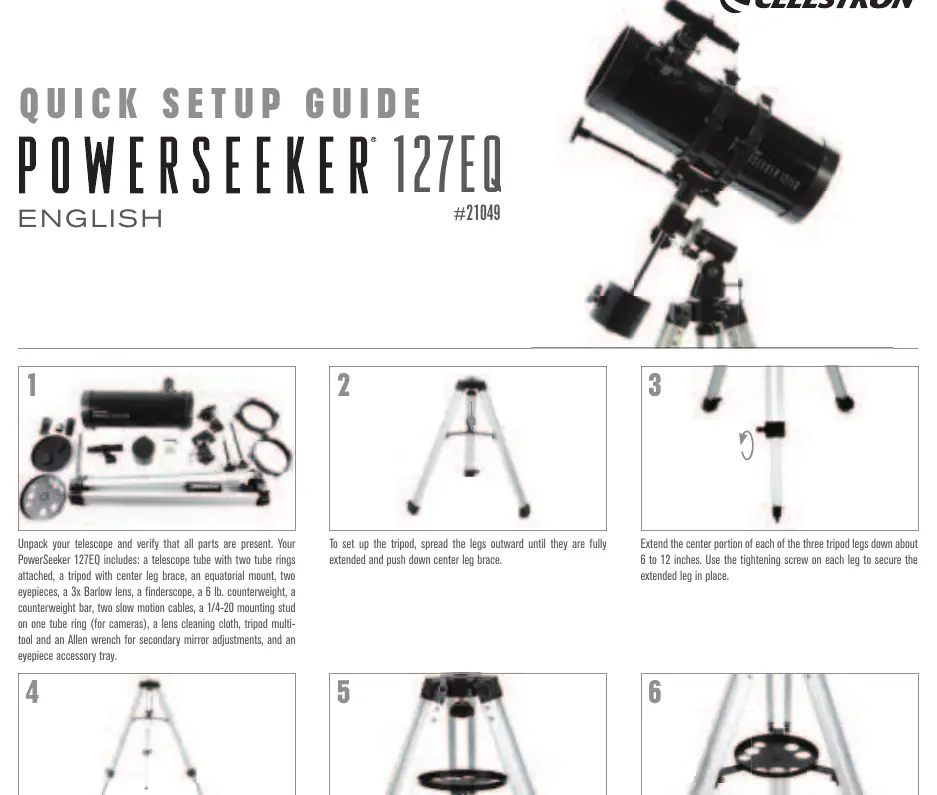
- Spread the tripod legs until fully extended and push down the center leg brace.
- Extend the center portion of each leg 6 to 12 inches and secure with the tightening screws. Ensure all legs are the same height for a level platform.
- Place the accessory tray on the center brace and thread it into the center hole until seated. Rotate counterclockwise if necessary to clear the brace arms.
- Place the equatorial mount base through the hole in the center of the tripod mounting platform.
- From underneath, thread the mounting bolt into the bottom of the equatorial mount.
- Look up your local latitude and thread the latitude adjustment screw into the mount until the correct latitude is indicated on the scale.
Telescope Tube and Accessory Setup
- Slide the counterweight halfway down the counterweight bar. Hold the counterweight and thread the bar into the mount until seated, then tighten the locking screw.
- Slide the chrome end of the slow-motion cables onto the mount gear shafts, aligning the set screw with the flat spot on the shaft, and tighten.
- Remove the tube rings from the telescope tube by loosening the latch knobs and removing the black wingnuts.
- Align the bottom half of the tube rings with the mount holes and secure with the wingnuts.
- Place the telescope tube into the bottom ring halves, hinge the top halves over, and secure with the latch knobs. Ensure the focuser end is over the counterweight assembly.
- Remove the knurled nuts from the focuser end of the tube, place the finderscope over the posts, and secure with the knurled nuts.
- Remove the plastic caps from the finderscope and the front lens cap of the telescope.
- Loosen the focuser set screws, remove the plastic cap, insert the 20mm eyepiece, and tighten the screws.
Aligning the Finderscope
- During the day, choose an easily recognizable object at least a quarter-mile away.
- Look through the 20mm eyepiece and center the object in the view. Adjust focus if necessary.
- Look through the finderscope. Without moving the telescope, use the three set screws on the finderscope bracket to move the finderscope until the crosshair is centered on the same object.
- Adjust one screw at a time, loosening one and tightening another by the same amount to ensure the finderscope is held securely.
First Night Out: The Moon
- Point the telescope toward the Moon.
- Look through the finderscope and move the telescope until the crosshair is over the Moon.
- Look through the 20mm eyepiece and turn the focus knobs to sharpen the image.
- For higher magnification, loosen the focuser screws, remove the 20mm eyepiece, insert the 3x Barlow lens, then insert the 4mm eyepiece into the Barlow and tighten the screws.
Technical Support
For further assistance, contact Celestron Technical Support at celestron.com/pages/technical-support.
Official resources from the manual
Manufacturer information
Celestron
Practical help
Common problems
Image is blurry
Gently turn the focus knobs on either side of the telescope until the image comes into sharp focus.
Finderscope is not aligned
Use the three set screws on the finderscope bracket to adjust its position until the crosshair matches the view in the main telescope eyepiece.
Image appears inverted
This is perfectly normal for an astronomical telescope.
Before use
- Verify all parts are present (tube, tripod, mount, eyepieces, Barlow lens, finderscope, counterweight).
- Ensure all three tripod legs are extended to the same height.
- Remove all plastic lens caps from the telescope and finderscope.
- Ensure the finderscope is aligned with the main telescope optics during the day.
- Check that the focuser end of the telescope is positioned over the counterweight assembly.
Specs in practice
- 20mm Eyepiece
- Lower power eyepiece, best for initial object location and wider field of view.
- 4mm Eyepiece
- Higher power eyepiece, provides significantly more magnification for detailed viewing.
- 3x Barlow Lens
- Increases the magnification of the eyepiece used by three times.
- Latitude Adjustment
- Required for proper equatorial mount alignment based on your observing site's latitude.
Images and diagrams
- Steps 1-9: Tripod and mount assembly.
- Steps 10-15: Counterweight and slow-motion cable installation.
- Steps 16-18: Attaching the telescope tube and finderscope.
- Steps 19-23: Eyepiece and Barlow lens installation.
- Finderscope Alignment: Shows the three set screws used to adjust the finderscope position.
Model compatibility
- The 1/4-20 mounting stud on the tube ring is for camera attachment.
- SkyPortal app is available for iOS and Android to help locate celestial objects.

Manual page author
Emily Carter
User documentation editor
Prepares concise manual descriptions and highlights the most useful setup, operation, and maintenance information for readers.