Power / Batteries & Chargers
Certa 150W Modified Sine Wave Can Inverter User Guide
Quick guide for the Certa 150W Modified Sine Wave Can Inverter. Learn how to install, operate, and safely use your power inverter in your vehicle with this concise manual.
Table of contents
Manual images
Click an image to enlargeQuick guide from the manual
This guide provides essential instructions for the Certa 150W Modified Sine Wave Can Inverter. Always ensure the inverter is used in a dry, dust-free environment. To prevent damage to your vehicle's battery, avoid using the inverter while the engine is off.
Overview
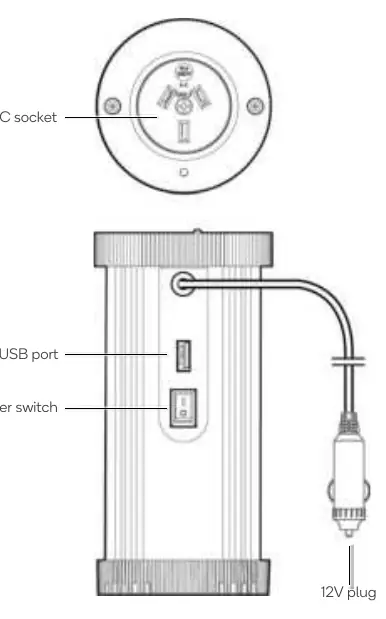
The inverter features an AC socket on the top, with a USB port and a power switch located on the side. It connects to the vehicle via a 12V plug.
Installation
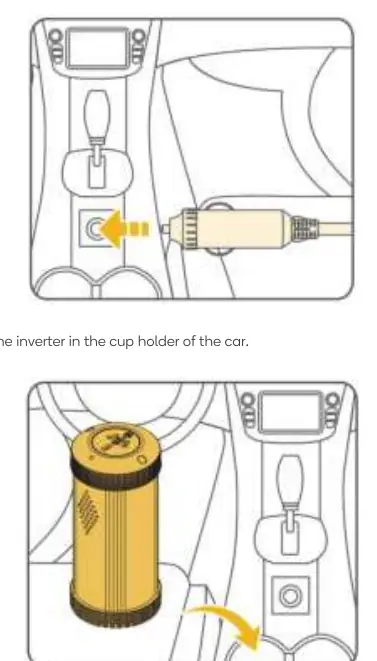
- Ensure the inverter power switch is in the OFF position.
- Plug the inverter into the vehicle's 12V socket.
- Place the inverter securely in the vehicle's cup holder.
Operation
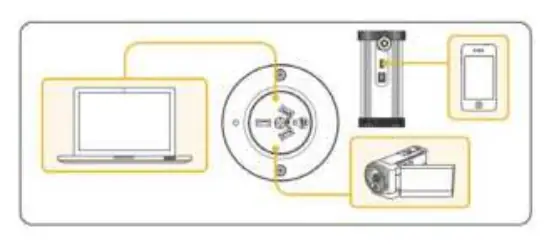
- Check the electrical requirements of your device by examining its compliance plate. Ensure the device's power needs do not exceed the inverter's continuous power rating.
- Turn on the vehicle, then switch on the inverter and the connected devices.
- Disconnect the devices and the inverter when they are no longer in use.
Note: If the self-protection system is activated, disconnect the inverter from the vehicle and wait approximately 30 seconds before reconnecting.
Specifications
- Input voltage: DC 12V
- Output voltage: AC 230V
- Continuous power: 150W
- Peak power: 300W
- Output waveform: Modified sine wave
- USB output: DC 5V, 2.1A
- Low voltage protection: DC 10.2 – 10.8V
- Over voltage protection: DC 15-16V
Safety Warnings
- Do not operate the inverter near water, with wet hands, or in high humidity.
- Do not attempt to open, modify, or disassemble the product.
- Do not operate near combustible gas, explosives, or fire.
- Do not connect appliances that may feed power back into the inverter.
- Keep out of reach of children.
Practical help
Common problems
Self-protection system activated
Disconnect the inverter from the vehicle and wait approximately 30 seconds before reconnecting.
Device not working or car battery damage
Ensure the vehicle engine is running while using the inverter to avoid draining the car battery.
Before use
- Ensure the inverter power switch is in the OFF position before plugging in.
- Confirm the input voltage matches the vehicle's 12V socket.
- Check that the appliance's rated power is within the inverter's range (150W continuous).
- Ensure the installation location is dry and dust-free.
Specs in practice
- Continuous power: 150W
- The maximum power the device can supply continuously.
- Peak power: 300W
- The maximum power the device can handle for short bursts.
- Output waveform: Modified sine wave
- Suitable for most standard electronics.
- Low voltage protection: 10.2 – 10.8V
- Protects the car battery from draining too low.
Images and diagrams
- The overview shows the AC socket on top, with the USB port and power switch on the side.
- Installation involves plugging the 12V plug into the vehicle's accessory socket and placing the unit in a cup holder.
Model compatibility
- Requires a 12V vehicle socket.
- Not suitable for appliances requiring more than 150W continuous power.

Manual page author
David Miller
Documentation analyst
Organizes user manual content into clear summaries, with attention to model details, product context, and everyday usability.