Power / Wireless Chargers
User Manual for TooQ 2-in-1 Charging Stand TQCD02W / TQCD02L
Quick guide for the TooQ 2-in-1 Charging Stand (TQCD02W and TQCD02L). Learn how to set up, use, and maintain your charging station, including LED indicator meanings and specifications.
Quick answers from the manual
Quick answer
- The TooQ 2-in-1 Charging Stand allows simultaneous charging of an Apple Watch and an iPhone. The TQCD02W model uses wireless charging (10W phone/5W watch), while the TQCD02L model uses a Lightning connector (18W phone/5W watch). p. 2, 7
Key actions
- Connect the power adapter and place devices on the stand. p. 5, 10, 15, 20
First start
- Connect the power adapter to the Type-C port on the base. p. 3, 4, 8, 9
Problems and fixes
Red and blue flashing light
Indicates an error in the charging base.
p. 3, 8, 13Maintenance and reset
- Clean with a fiber rag; avoid alcohol or liquids. p. 5, 10, 15, 20
Technical specifications
| Parameter | Value | Meaning | Pages |
|---|---|---|---|
| TQCD02W Output | 10W (Phone) / 5W (Watch) | Wireless charging power distribution. | p. 2, 7 |
| TQCD02L Output | 18W (Phone) / 5W (Watch) | Lightning charging power distribution. | p. 2, 7 |
Where to find it in the PDF
- TQCD02W Details p. 3, 8, 13
- TQCD02L Details p. 4, 9, 14
Table of contents
Manual images
Click an image to enlargeQuick guide from the manual
This manual provides instructions for the TooQ 2-in-1 Charging Stand, which is available in two versions: the TQCD02W (Wireless) and the TQCD02L (Lightning connector). Both models are designed to charge an Apple Watch and an iPhone simultaneously.
Product Overview
TQCD02W Specifications
- Magnetic wireless charging module for Apple Watch.
- Supports Qi wireless charging with a maximum output of 10W for the phone.
- Total output: 5W for Apple Watch and 10W for the phone.
- Material: Aluminum.
TQCD02L Specifications
- Magnetic wireless charging module for Apple Watch.
- Quick charge with C94 Lightning connector for iPhone.
- Total output: 5W for Apple Watch and 18W for the iPhone.
- Material: Aluminum.
Usage Instructions
- Connect the provided power adapter to the charging stand.
- Place your mobile phone and Apple Watch in their respective charging positions.
- Verify that your device begins to charge. If charging does not start, ensure the device is correctly positioned on the base.
LED Indicators (TQCD02W)
- Green light: The stand is connected to power.
- Red light: The stand is actively charging the devices.
- Blue light: The device is fully charged.
- Red and blue flashing: Error in the charging base.
Maintenance and Recommendations
- Clean the stand using a fiber rag.
- Do not use alcohol or other liquid cleaning agents.
- Avoid exposing the device to extreme heat, direct sunlight, moisture, water, or dust.
Warranty
TooQ offers a 36-month warranty from the date of purchase. Keep your receipt or invoice as proof of purchase. The warranty does not cover damages caused by misuse, modifications, or environmental factors like extreme temperatures or liquid contact.
Practical help
Common problems
Device not charging
Check that the device is correctly positioned on the charging base.
Red and blue flashing light (TQCD02W)
This indicates an error in the charging base.
Before use
- Ensure you have the power adapter included in the package.
- Place the charging stand on a stable, dry surface.
- Verify your device compatibility (Qi wireless or Lightning connector).
Images and diagrams
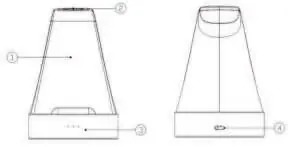
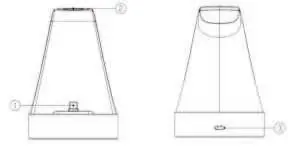
- 1: Wireless charging area (TQCD02W) or Lightning connector (TQCD02L)
- 2: Magnetic charging module for Apple Watch
- 3: Charging indicator (TQCD02W)
- 4: Type-C power input
Model compatibility
- TQCD02W supports Qi wireless charging.
- TQCD02L features a C94 Lightning connector for iPhone.

Manual page author
Michael Turner
Technical manual editor
Reviews PDF manuals for structure, safety notes, and practical product details so readers can find the right information quickly.