Music / Guitar Effects
Wampler Metaverse Programmable Delay Pedal Quick Reference Guide
Quick reference guide for the Wampler Metaverse programmable delay pedal. Learn how to use program selectors, primary controls, alternate functions, preset management, and tap tempo settings.
Table of contents
Quick Reference Guide
The Wampler Metaverse is a programmable delay pedal featuring 11 distinct delay programs. This guide provides an overview of the controls, program selection, and advanced functions to help you operate the device effectively.
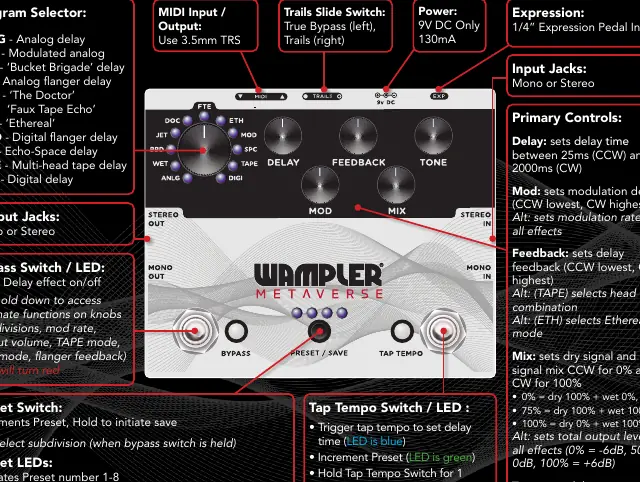
Program Selector
Use the Program Selector knob to choose between the following delay types:
- ANLG: Analog delay
- WET: Modulated analog
- BBD: Bucket Brigade delay
- JET: Analog flanger delay
- DOC: The Doctor
- FTE: Faux Tape Echo
- ETH: Ethereal
- MOD: Digital flanger delay
- SPC: Echo-Space delay
- TAPE: Multi-head tape delay
- DIGI: Digital delay
Primary Controls and Alternate Functions
The pedal features five main knobs. You can access alternate functions for these knobs by holding down the Bypass Switch (the LED will turn red).
- Delay: Sets delay time (25ms to 2000ms).
- Mod: Sets modulation depth. Alt: Sets modulation rate for all effects.
- Feedback: Sets delay feedback. Alt: Selects head combination (TAPE) or Ethereal mode (ETH).
- Mix: Sets dry/wet signal mix. Alt: Sets total output level (-6dB to +6dB).
- Tone: Sets delay tone. Alt: Sets modulation feedback for JET and MOD programs.
Switches and Presets
- Bypass Switch: Turns the delay effect on/off. Hold to access alternate knob functions.
- Preset Switch: Increments through presets 1-8. Hold to initiate the save process.
- Tap Tempo Switch: Triggers tap tempo to set delay time (LED is blue) or increments presets (LED is green). Hold for 1 second to toggle between modes. Pressing this switch exits the Preset save mode.
Connections and Power
- Power: Requires 9V DC only, 130mA.
- Input/Output: Supports Mono or Stereo connections.
- MIDI: Input/Output via 3.5mm TRS.
- Expression: 1/4" Expression Pedal Input.
- Trails Slide Switch: Selects between True Bypass (left) and Trails (right).
Practical help
Common problems
Cannot access alternate knob functions
Hold down the Bypass Switch. The LED will turn red, indicating that alternate functions are active.
Need to save a preset
Hold the Preset Switch to initiate the save process.
Tap Tempo LED is green instead of blue
The pedal is in Preset increment mode. Hold the Tap Tempo Switch for 1 second to toggle back to Tap Tempo mode.
Before use
- Ensure power supply is 9V DC only, 130mA.
- Check that the Trails Slide Switch is set to your preference (True Bypass or Trails).
- Verify input/output connections (Mono or Stereo).
- If using MIDI, ensure you have a 3.5mm TRS cable.
Specs in practice
- Output Level (Alt Mix)
- 0% = -6dB, 50% = 0dB, 100% = +6dB.
Images and diagrams
- The pedal interface includes a central Program Selector knob surrounded by 11 effect types.
- Five primary knobs control Delay, Mod, Feedback, Mix, and Tone.
- Three footswitches control Bypass, Preset selection, and Tap Tempo.
- LED indicators show preset numbers, subdivision, and tap tempo status.
Model compatibility
- Supports 1/4" Expression Pedal input.
- MIDI I/O requires 3.5mm TRS connection.

Manual page author
David Miller
Documentation analyst
Organizes user manual content into clear summaries, with attention to model details, product context, and everyday usability.