Music / Guitar Effects
Wampler Cory Wong Compressor and Boost Effects Pedal User Guide
Quick guide for the Wampler Cory Wong Compressor and Boost pedal. Learn how to use the compressor and boost controls, adjust settings for signature tones, and connect to your gear.
Table of contents
Manual images
Click an image to enlargeQuick guide from the manual
The Wampler Cory Wong Compressor is a dual-function pedal combining a compressor and a boost circuit. It is designed for both studio and stage use, offering features like an XLR output for direct connection to mixing desks or audio interfaces, and a ground lift switch to eliminate noise. The pedal features two independent footswitches, allowing you to engage the compressor and boost separately or together.
Controls Overview
The pedal features several controls to shape your tone:
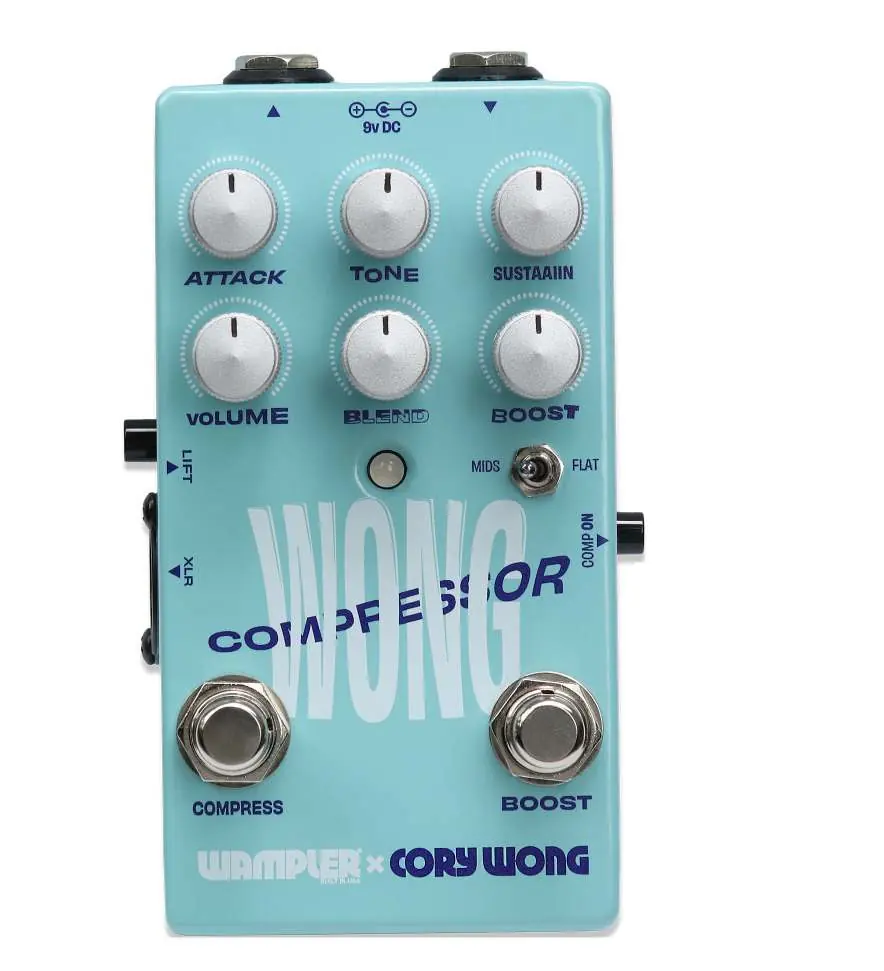
- Compressor Controls: Volume, Sustain, Attack, and Blend.
- Tone Control: Brian Wampler’s signature tone control to add sparkle and chime.
- Boost Control: A single rotary control to adjust the amount of boost.
- Boost Mode Switch: Toggles between a flat frequency boost and a rich, saturated mid boost.
- Comp On Switch: Permanently engages the compressor circuit.
- Footswitches: Independent switches for 'Compress' (left) and 'Boost' (right).
Signature Settings
The manual provides specific settings to achieve Cory Wong's signature sounds:
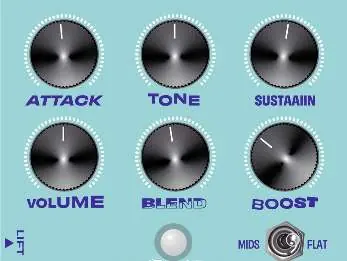
- The Cory Wong Signature Tone: A clean, powerful, and rich tone. Boost is set to Flat mode.
- Lead Tone: Higher sustain, with Blend and Attack dialed back. Use the boost in Mid mode for extra bite.
- Just hit the Tape!: Settings optimized for studio recording, suitable for both amplifiers and direct DAW/recording desk connections.
Connections and Power
To ensure proper operation and avoid damage to the pedal:
- Power: Use a 9V DC power source only. Do not exceed 9V DC, do not use center pin positive adapters, and do not use AC power. The pedal draws approximately 30mA.
- XLR Output: Connect directly to a PA system, mixing board, or audio interface using a separate XLR cable.
- Ground Lift: Engage this switch if you experience unwanted ground noise when using the XLR output.
Warranty and Support
Wampler offers a 5-year limited warranty to the original purchaser covering defects in material and workmanship. For support or warranty questions, contact Wampler at [email protected] or call (765) 352-8626. Register your pedal at wamplerpedals.com/warranty-registration.
Official resources from the manual
Practical help
Common problems
Unwanted noise when using the XLR output
Engage the Ground Lift switch on the side of the pedal.
Compressor not engaging
Ensure the 'Comp On' switch is depressed or the 'Compress' footswitch is active.
Before use
- Verify you are using a 9V DC power source intended for guitar pedals.
- Ensure the power adapter is not center pin positive.
- Do not use AC power.
- Check that the pedal draws approximately 30mA.
- Ensure you have a separate XLR cable if connecting to a PA or mixer.
Specs in practice
- Boost Mode Switch
- Selects between a flat frequency boost or a rich, saturated mid boost.
Images and diagrams
- The pedal features two footswitches: 'Compress' (left) and 'Boost' (right).
- LED indicators show active modes: Green for Compressor, Blue for Boost, and Rainbow white when both are active.
Model compatibility
- Designed for use with guitar pedal power supplies only.
- XLR output allows direct connection to PA, Mixer, or Audio Interface.

Manual page author
Michael Turner
Technical manual editor
Reviews PDF manuals for structure, safety notes, and practical product details so readers can find the right information quickly.