Music / Instruments
User Guide for Wampler Germanium Tumnus Deluxe Pedal
Quick reference guide for the Wampler Germanium Tumnus Deluxe pedal. Learn about controls, power requirements, suggested settings, and maintenance.
Table of contents
Quick guide from the manual
The Wampler Germanium Tumnus Deluxe is an overdrive pedal designed to add vintage sizzle and extra bite to your tone. It features a three-band EQ, switchable buffer, and two distinct overdrive modes. This guide provides essential information on setup, power requirements, and tone shaping.
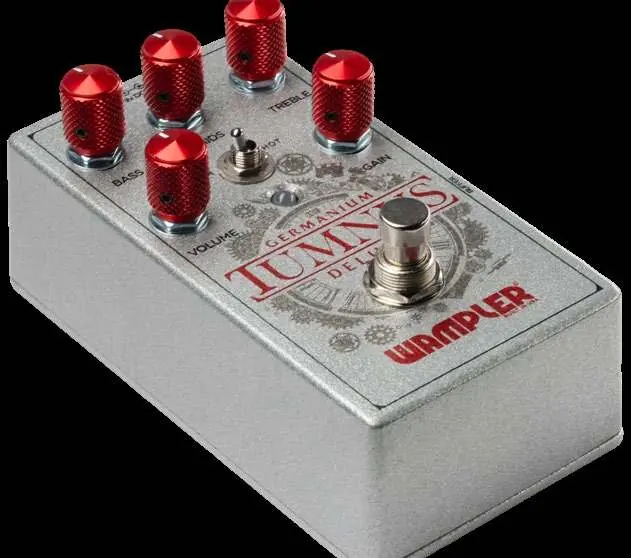
Controls and connections
- Input: Connect your instrument here.
- Output: Connect to your amplifier.
- Bass / Mids / Treble: Adjusts the low-end, mid-range, and high-end frequencies. Turning clockwise increases the level, counter-clockwise decreases it.
- Volume: Controls the total output volume.
- Gain: Adjusts the amount of gain applied. Turning clockwise increases gain.
- Norm / Hot: Selects between two overdrive modes. Normal provides standard gain, while Hot provides higher gain.
- Buffer: Toggles between Buffered (switch pushed in) and True Bypass (switch pushed out).
Power requirements
This pedal is designed to be used with a 9V DC power source. To prevent damage, adhere to the following:
- Use only a 9V DC power source intended for guitar pedals.
- Do not exceed 9V DC.
- Do not use AC power.
- Do not use center-pin positive adapters.
- The pedal draws approximately 80mA at 9V.
- If the pedal ships with a battery, it is recommended to remove it if you are using an external power supply by taking off the backplate.
Tips and tricks
- EQ Controls: The Mids and Bass controls are effectively off when in the middle position, as they are active gyrator-style EQ controls.
- Treble: This control functions the same as the standard Tumnus.
- Gain Behavior: The gain control operates a parallel clean blended circuit. As you turn the gain up, it turns down the clean blend; as you turn the gain down, it increases the clean blend.
Suggested settings
Use these settings as a starting point to find your perfect tone:
- Classic Klon Tone: Bass, Mids, Treble at 12 o'clock; Gain at 9 o'clock; Volume at 12 o'clock.
- High Gain Beef: Bass at 2 o'clock; Mids at 2 o'clock; Treble at 2 o'clock; Gain at 3 o'clock; Volume at 12 o'clock.
- Strat Neck Pickup Bite: Bass at 11 o'clock; Mids at 1 o'clock; Treble at 2 o'clock; Gain at 2 o'clock; Volume at 12 o'clock.
- Super Transparent Boost: Bass at 12 o'clock; Mids at 12 o'clock; Treble at 12 o'clock; Gain at 9 o'clock; Volume at 2 o'clock.
- Thin Out the Hums: Bass at 10 o'clock; Mids at 12 o'clock; Treble at 1 o'clock; Gain at 2 o'clock; Volume at 12 o'clock.
- Crank up a Single Coil: Bass at 1 o'clock; Mids at 1 o'clock; Treble at 1 o'clock; Gain at 3 o'clock; Volume at 12 o'clock.
Warranty and support
Wampler offers a 5-year warranty to the original purchaser against defects in material and workmanship. A dated sales receipt is required for coverage. For support, email [email protected] or call (765) 352-8626. Register your pedal at wamplerpedals.com/warranty-registration to ensure quicker service for future claims.
Official resources from the manual
Practical help
Common problems
Pedal will not power on
Ensure you are using a 9V DC power supply intended for guitar pedals. Verify the power supply is not AC and does not use a center-pin positive adapter.
Battery drain
If you are powering the pedal with an external power supply, remove the battery by taking off the backplate to prevent unnecessary drain.
Before use
- Ensure power supply is 9V DC.
- Verify power supply is center-negative (standard for guitar pedals).
- Remove battery if using an external power supply.
- Connect instrument to Input.
- Connect amplifier to Output.
Images and diagrams
- The pedal features 5 knobs: Bass, Mids, Treble, Volume, and Gain.
- There is a toggle switch for Norm/Hot overdrive modes.
- There is a push-button switch for Buffer/True Bypass selection.
Model compatibility
- Designed for use with 9V DC power sources only.
- Not compatible with AC power adapters.
- Not compatible with center-pin positive adapters.

Manual page author
Emily Carter
User documentation editor
Prepares concise manual descriptions and highlights the most useful setup, operation, and maintenance information for readers.