Software / Apps Services
FlexPod Datacenter Deployment Guide: End-to-End 100G, Intersight Managed Mode, IaC, VMware 7U3, NetApp ONTAP 9.11
Comprehensive deployment guide for FlexPod Datacenter featuring end-to-end 100G networking, Cisco Intersight Managed Mode, Infrastructure as Code (IaC) automation, VMware vSphere 7U3, and NetApp ONTAP 9.11.
Table of contents
Manual images
Jump to the sectionFlexPod Datacenter Solution Overview
The FlexPod Datacenter solution is a validated approach for deploying Cisco and NetApp technologies to build shared private and public cloud infrastructure. This guide covers the deployment of FlexPod Datacenter incorporating 5th Generation Cisco UCS components, managed from the cloud using Cisco Intersight Managed Mode (IMM). The solution provides a resilient, scalable, and modular design that supports modern applications and traditional workloads.
Key Advantages
- Simpler and programmable infrastructure: Infrastructure as code delivered through a single partner-integrable open API.
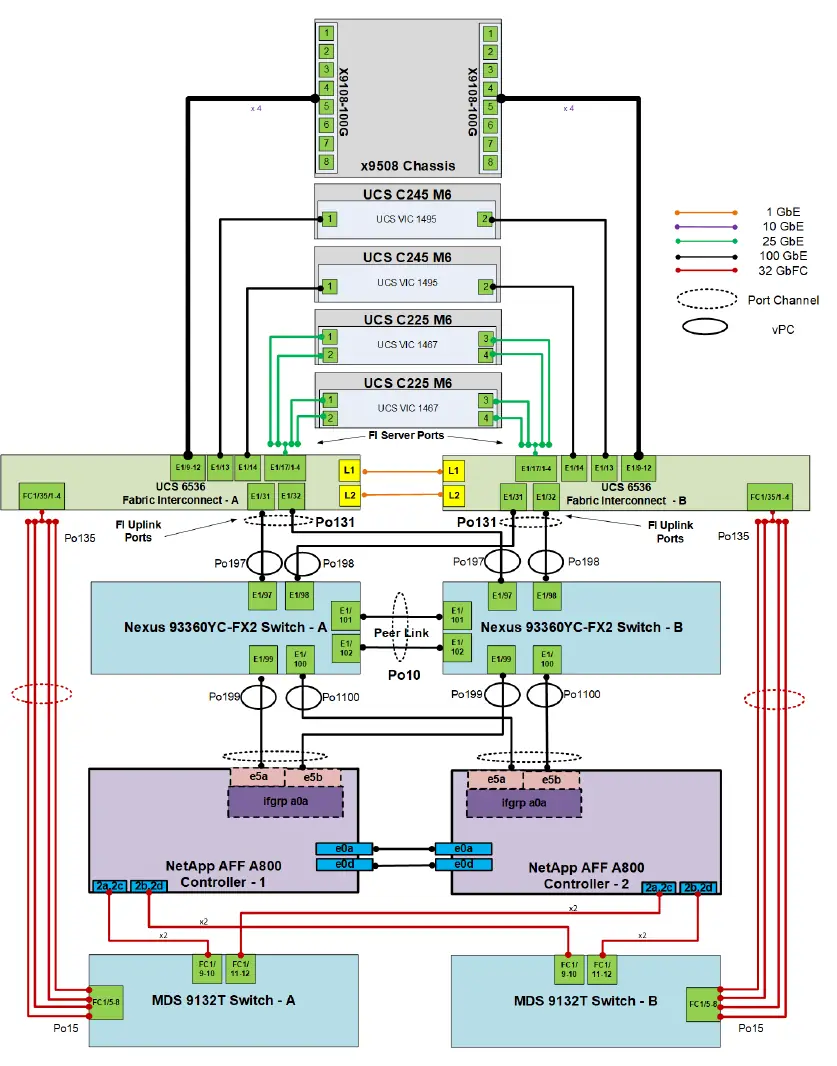
- End-to-End 100Gbps Ethernet: Utilizes 5th Generation Cisco UCS VIC 15231, Cisco UCS 6536 Fabric Interconnects, and UCSX-I-9108-100G Intelligent Fabric Modules.
- Innovative cloud operations: Continuous feature delivery via Cisco Intersight, eliminating the need for on-premise management virtual machines.
- Investment protection: Design ready for future technologies, including liquid cooling and high-wattage CPUs.
Deployment and Automation
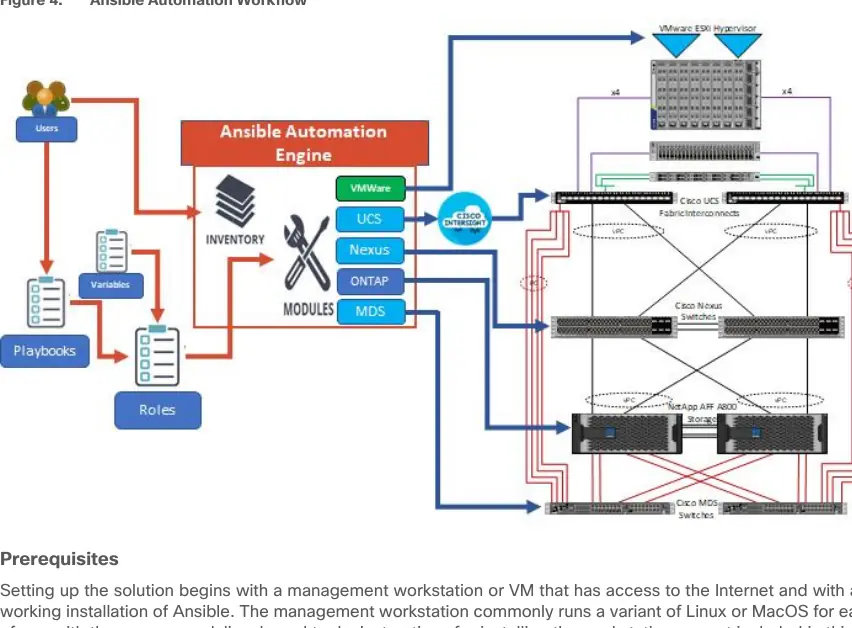
The deployment process leverages Ansible playbooks to automate the configuration of Cisco Nexus switches, NetApp ONTAP storage, Cisco UCS, Cisco MDS, and VMware ESXi. The guide details the preparation of a management workstation, cloning the necessary GitHub repositories, and executing playbooks for network, storage, and compute layers. For manual configurations, the guide provides step-by-step procedures for initial setup, VLAN configuration, and storage initialization.
Cisco Intersight Managed Mode
Cisco Intersight Managed Mode (IMM) is a new architecture that manages Cisco UCS fabric interconnect-attached systems through a Redfish-based standard model. This guide outlines the setup of Cisco Intersight accounts, licensing, resource groups, and organizations, followed by the claiming of Cisco UCS Fabric Interconnects. It also covers the configuration of Cisco UCS Domain Profiles, which streamline fabric interconnect pair configuration through reusable policies.
Storage and Virtualization
The solution integrates NetApp AFF A800/A400 storage with VMware vCenter. Detailed procedures are provided for ONTAP storage configuration, including boot storage setup, and the installation of VMware ESXi 7.0U3. The guide also highlights the use of NetApp ONTAP Tools for VMware vSphere to manage storage and data protection, including the deployment of the SnapCenter plug-in for application-consistent backups.
Manufacturer information
Cisco Systems, Inc.
Practical help
Common problems
ESXi installer fails to load due to certificate validation errors.
Reset the server, press F2 to enter BIOS, and set the system time and date to current.
Security violation error when moving server profiles between nodes.
Gather the recovery key using 'esxcli system settings encryption recovery list' and add it as a boot option 'encryptionRecoveryKey=recovery_key'.
vCenter VM network connectivity issues after moving to vDS.
Keep the vCenter VM on the IB-MGMT Network on vSwitch0; do not move it to a vDS.
Before use
- Ensure all hardware is physically racked, cabled, and powered.
- Verify management IP addresses are configured for all devices.
- Ensure the management workstation has internet access and Ansible installed.
- Verify Cisco Nexus switches are at release 10.2(3)F.
- Verify Cisco MDS switches are at release 9.2(2).
- Ensure NetApp storage cluster is online with aggregates configured.
- Obtain necessary VMware user credentials for software downloads.
Specs in practice
- server_cpu_type
- Specifies whether the server uses Intel or AMD CPUs for Ansible configuration.
Images and diagrams
- Figure 1: Physical topology for IP-based storage access showing connections between UCS, Nexus, and NetApp storage.
- Figure 2: Physical topology for FC-based storage access including MDS switches.
- Figure 3: Detailed cabling diagram for the validation lab using Cisco UCS 6536 fabric interconnects.
- Figure 4: Workflow diagram illustrating the Ansible-based implementation process.
- Figure 5: Overview of managing NetApp and VMware vCenter through Cisco Intersight Assist.
Model compatibility
- Consult the NetApp Interoperability Matrix Tool (IMT) for any modifications to the prescribed architecture.
- Cisco MDS 9132T and FC connectivity are not required for IP-based connectivity designs.
- SnapCenter Standard licenses are recommended for secondary storage destinations.
- vSphere Essentials/Essentials Plus licenses do not include Storage vMotion required for restore operations.

Manual page author
Michael Turner
Technical manual editor
Reviews PDF manuals for structure, safety notes, and practical product details so readers can find the right information quickly.