Lighting / Wireless Control
Quick Start Guide for City Theatrical 5905 Multiverse Studio Receiver
Quick start guide for the City Theatrical 5905 Multiverse Studio Receiver. Learn how to set up, configure SHoW IDs, and connect to transmitters for wireless DMX operation.
Quick answers from the manual
Quick answer
- The 5905 Multiverse Studio Receiver is a wireless DMX receiver. To set it up, you must match the SHoW ID, Universe, and SHoW Key settings on the receiver with those of your transmitter. p. 1, 2
Key actions
- Match settings p. 2
- Power on p. 2
First start
- Power on the receiver and match the SHoW ID, Universe, and SHoW Key to the transmitter. p. 2
Problems and fixes
No DMX signal
Verify that the SHoW ID, Universe, and SHoW Key match between the transmitter and receiver.
p. 2Where to find it in the PDF
- Quick Start Guide p. 1, 2
Table of contents
Quick Start Guide
The City Theatrical 5905 Multiverse Studio Receiver is designed to receive wireless DMX data in either a single universe system (using a Multiverse Node or SHoW Baby) or a multi-universe system (using a Multiverse Transmitter). This guide covers the basic setup and configuration required to establish communication between your transmitter and receiver.
Device Interface
The receiver features a user interface that displays critical status information. Key indicators include:
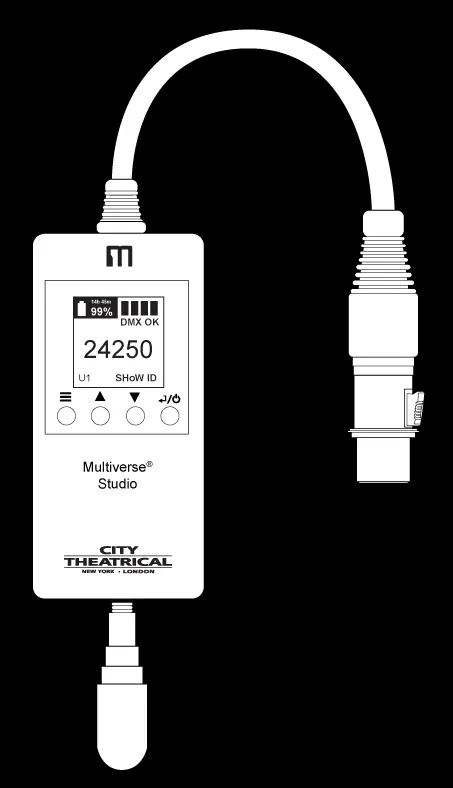
- Signal quality bars: Indicates the strength of the wireless connection.
- DMX status: Shows whether DMX data is being received (displays 'DMX' or 'NO DMX').
- Battery life: Displays remaining charge in hours/minutes and percentage.
- SHoW ID and Universe: Current configuration settings.
- Navigation buttons: Menu, Up, Down, and Power/Enter buttons for device control.
Setup with Multiverse Node or SHoW Baby
- Install the transmitter (Multiverse Node or SHoW Baby) in a convenient location, preferably high up and clear of obstructions. Connect the power supply and the DMX cable from your console.
- When the transmitter is powered and receives DMX from your controller, the TX symbol on its interface will stop blinking, indicating it is configured as a transmitter.
- Select a SHoW ID on the transmitter. If using a Multiverse SHoW Baby, you may need an RDM controller like a DMXcat to set the SHoW ID.
- Ensure the Universe number is set to 1.
- Match the SHoW ID, Universe, and SHoW Key (if used) on the receiver to match the transmitter settings.
Setup with Multiverse Transmitter
- In a multi-universe system, configure your Multiverse Transmitter to broadcast the desired universes from incoming Ethernet data.
- Assign specific SHoW IDs to the transmitter's radios and assign universes to those SHoW IDs.
- Set each Multiverse Studio Receiver to match the specific Universe number and SHoW ID that it is intended to receive from the transmitter.
Important Configuration Rules
For successful communication, the following parameters must match exactly between the transmitter and the receiver:
- SHoW ID: Must be identical on both units.
- Universe: Must be identical on both units.
- SHoW Key: If a key is used, it must be identical on both units.
Once communication is established, the 'NO DMX' symbol on the receiver will change to 'DMX', and the signal quality bars will light up.
Practical help
Common problems
Receiver displays 'NO DMX'
Ensure the SHoW ID, Universe, and SHoW Key match exactly between the transmitter and the receiver.
Transmitter not transmitting
Ensure the transmitter is connected to a DMX source; the TX symbol on the interface should stop blinking when DMX is sensed.
Before use
- Ensure the transmitter is placed in a high location clear of obstructions.
- Connect the power supply to the transmitter.
- Connect the DMX cable from your console to the transmitter.
- Verify that the SHoW ID, Universe, and SHoW Key are set to match on both units.
Images and diagrams
- The device interface includes a display for battery life, signal quality, DMX status, SHoW ID, and Universe.
- Navigation is handled via Menu, Up, Down, and Power/Enter buttons.
Model compatibility
- Compatible with Multiverse Transmitter, Multiverse Node, and Multiverse SHoW Baby.
- Multiverse SHoW Baby requires an RDM controller (e.g., DMXcat) to set the SHoW ID.

Manual page author
Emily Carter
User documentation editor
Prepares concise manual descriptions and highlights the most useful setup, operation, and maintenance information for readers.