Lighting / Wireless Control
User Manual for City Theatrical Multiverse Node 2.4GHz
Quick guide for the City Theatrical Multiverse Node 2.4GHz (P/N 5903). Learn about installation, configuration, SHoW ID settings, and troubleshooting for this wireless DMX/RDM transceiver.
Quick answers from the manual
Quick answer
- The Multiverse Node 2.4GHz is a wireless DMX/RDM transceiver. It functions as a transmitter when a DMX cable is connected to the input, or as a receiver when no input is detected. p. 4, 5
Key actions
- Set SHoW ID p. 5, 6
- Restore Factory Defaults p. 7
First start
- Connect power (5-30VDC). The unit boots to the main screen. Connect DMX cable to input for Transmitter mode, or leave disconnected for Receiver mode. p. 5
Problems and fixes
Unit does not power up
Check that power cable is properly installed. Test power outlet with another device.
p. 8
Fixtures connected to the receiver are not responding
Check that the Tx and Rx symbols on transmitters and receivers are solid. Check that SHoW ID and SHoW Key match. Check that Universe setting matches.
p. 8Maintenance and reset
- Hold the 'Menu' and 'Enter' buttons while on the main screen to restore factory defaults. p. 7
Technical specifications
| Parameter | Value | Meaning | Pages |
|---|---|---|---|
| Frequency Range | 2400 – 2480 MHz | Operating frequency band | p. 9 |
| Latency | 4 ms average | System delay | p. 9 |
| Input Power | 5-30VDC, 0.6W | Power requirements | p. 9 |
Where to find it in the PDF
- Installation p. 5
- Specifications p. 9
Table of contents
Manual images
Click an image to enlargeQuick guide from the manual
The City Theatrical Multiverse Node 2.4GHz is a wireless DMX/RDM transceiver. It functions as a transmitter when a DMX cable is connected to the input, or as a receiver when no input is detected. It is designed for professional use and requires a 5-30VDC power source.
Installation
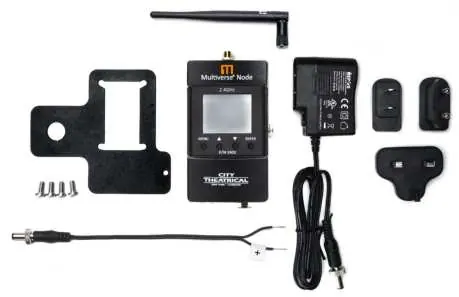
The unit can be powered via the included 12VDC locking power supply or any standard DC power source from 5-30VDC. The device features a rugged cast aluminum enclosure and includes a mounting plate for pipe or truss installation.
- Transmit Mode: Automatically selected when a DMX 5-pin cable is inserted into the input (male) port.
- Receiver Mode: Automatically selected when no DMX cable is connected to the input port.
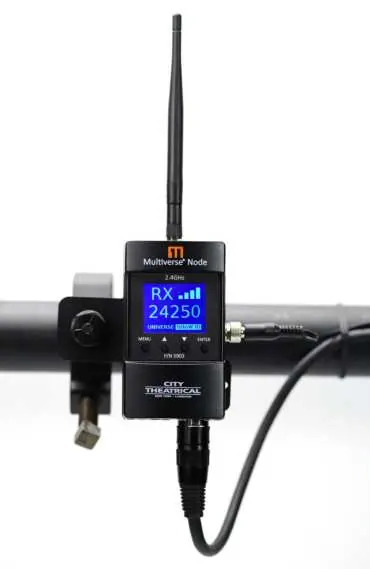
- Mounting: Use the included mounting plate with a c-clamp. Ensure the safety cable is attached.
- Termination: The unit is self-terminating if it is the last unit in the DMX512 chain. If not, ensure the end device is properly terminated with a 120Ω resistor.
Operation and User Interface
The device features an LCD screen and four buttons: Menu, Up, Down, and Enter.
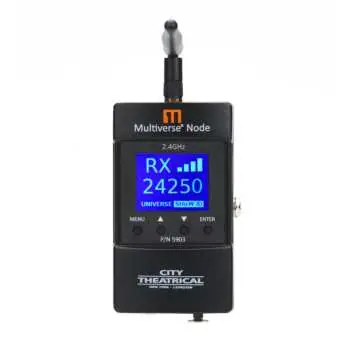
- Main Screen: Displays SHoW ID and connection status.
- Navigation: Use Up/Down to select universe or SHoW ID. Press Enter to edit and commit changes.
- Menu: Press Menu to access settings. Hold Menu to cancel an edit.
SHoW ID and Security
The SHoW ID determines the transmission method, data rate, and frequency hopping pattern. For a system to communicate, the transmitter and all receivers must be set to the same SHoW ID and Universe.
- SHoW Key Security: An optional 3-digit code (0-500) that prevents unauthorized systems on the same SHoW ID from interfering with your system.
- mDMX: Optimized DMX for wireless broadcast to reduce radio energy.
- Forward Error Correction: Helps correct errors in high-noise environments (set at the transmitter).
Settings and Maintenance
- Power: Output power can be adjusted (Low, Med, Hi, Maximum). Use the lowest power necessary for the show to reduce reflections.
- Antenna: If using a panel or Yagi antenna, select the correct antenna type in the menu to maintain compliance.
- Factory Reset: Hold the Menu and Enter buttons while on the main screen to restore factory defaults.
- Firmware: Updates are available via the USB port.
Practical help
Common problems
Unit does not power up
Check that the power cable is properly installed and test the power outlet with another device.
Fixtures connected to the receiver are not responding
Verify that the Tx and Rx symbols on the display are solid, ensure SHoW ID and SHoW Key match on all units, and confirm the Universe setting matches.
Before use
- Ensure the device is kept dry and used indoors.
- Verify power source is 5-30VDC.
- Ensure DMX cables are connected correctly for the desired mode (Transmitter vs Receiver).
- Set the SHoW ID and SHoW Key to match on all transmitters and receivers.
- Ensure the antenna is securely attached.
Images and diagrams
- Face Panel: Shows the LCD screen, navigation buttons (Menu, Up, Down, Enter), and status icons (TX/RX, Signal Quality).
- Pipe Mount: Illustrates how to attach the unit to a pipe using the included mounting plate and c-clamp.
Model compatibility
- Compatible with all Multiverse and SHoW DMX Neo products.
- Not compatible with SHoW Baby power supply connectors.

Manual page author
Emily Carter
User documentation editor
Prepares concise manual descriptions and highlights the most useful setup, operation, and maintenance information for readers.