Lighting / Controllers & Dimmers
User Manual for City Theatrical 5942 Multiverse 5x2.5A Dimmer
Quick start guide and setup instructions for the City Theatrical 5942 Multiverse 5x2.5A Dimmer. Learn how to configure wired and wireless modes, use RDM, and troubleshoot error codes.
Quick answers from the manual
Quick answer
- The 5942 is a 5-channel dimmer supporting 900MHz/2.4GHz wireless or wired DMX. It requires 5-30VDC power and is configurable via RDM or USB. p. 1, 2
Key actions
- Reset to factory defaults p. 2
- Revert to wired mode p. 2
First start
- Connect 5-30VDC power to PWR terminals. Connect load to OUTPUT terminals. Configure via RDM or USB. p. 2, 3, 4
Problems and fixes
Short circuit
Check wiring (1 blink)
p. 1, 5
Output overcurrent (>4A)
Check load (2 blinks)
p. 1, 5
Input overcurrent (>12.5A)
Reduce total load (3 blinks)
p. 1, 5
Over temperature
Check ventilation (4 blinks)
p. 1, 5
Under voltage
Check power supply (5 blinks)
p. 1, 5
Over voltage
Check power supply (6 blinks)
p. 1, 5Error codes
| Code | Meaning | Action | Pages |
|---|---|---|---|
| 1 | Short circuit | Check wiring | p. 1, 5 |
| 2 | Output overcurrent (>4A on any output) | Check load | p. 1, 5 |
| 3 | Input overcurrent (>12.5A on total device) | Reduce total load | p. 1, 5 |
| 4 | Over temperature on any output | Check ventilation | p. 1, 5 |
| 5 | Under voltage | Check power supply | p. 1, 5 |
| 6 | Over voltage | Check power supply | p. 1, 5 |
Maintenance and reset
- Reset all factory defaults: Hold A+E for 5 seconds. p. 2
Technical specifications
| Parameter | Value | Meaning | Pages |
|---|---|---|---|
| Input Voltage | 5-30VDC | Required power input | p. 2 |
| Max Output | 2.5A per output | Maximum current per channel | p. 1 |
| Total Device Max | 12.5A | Maximum total current | p. 1 |
Where to find it in the PDF
- Quick Start Guide p. 1
- Introduction and Setup p. 2
- Configuration p. 3, 4
Table of contents
Quick Guide from the Manual
The City Theatrical 5942 Multiverse 5x2.5A Dimmer is a versatile device capable of operating in both wired and wireless DMX modes. It requires a DC power supply between 5-30VDC. The unit features five output channels, each capable of 2.5A, with a total device maximum of 12.5A. Configuration is performed via RDM controller or the City Theatrical USB Configurator software.
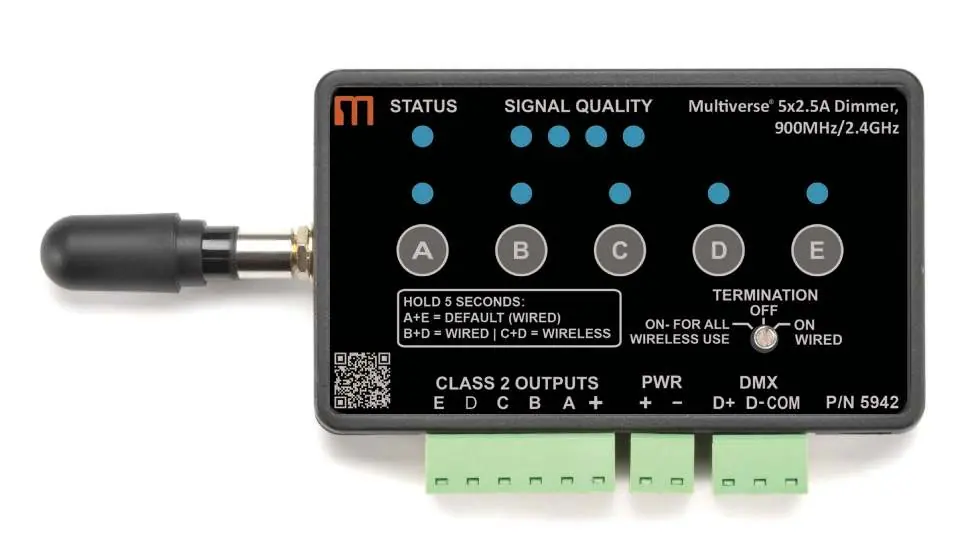
Introduction and Power
The device requires standard DC power from 5-30VDC. The input voltage must match the requirements of the load connected to the output ports. Connect your power supply's DC positive (+) and negative (-) leads to the terminals labeled PWR + and -.
Wiring and Connections
The unit features removable terminal connectors for ease of wiring. Ensure all connections are secure before reinserting the connectors. Connect the positive (+) lead of your load device to the + OUTPUT terminal, and the negative (-) leads to the respective A, B, C, D, or E OUTPUT terminals.
DMX Termination Switch:
- ON FOR ALL WIRELESS USE: Use this setting for wireless operation.
- OFF: Use when the dimmer is wired and DMX is passing through to another device.
- ON WIRED: Use when the dimmer is wired and is the last device in the DMX chain.
Configuration
The unit defaults to Wired mode. You can configure the device using an RDM controller or the USB Configurator software.
Wired Mode Configuration
Connect an RDM controller (such as the City Theatrical DMXcat) to the device using an XLR5M to three-position Phoenix jumper. Discover the 5942 via RDM to adjust settings like DMX Address, Universe, and Dimmer Curves.
Wireless Mode Configuration
To switch to wireless mode, ensure the SHoW ID, SHoW Key, and Universe match your transmitter settings. Change the DMX Input Mode from Wired to Wireless in the Multiverse tab. Note that you will lose control over the device via the current connection once it switches to wireless mode.
Resetting Defaults
- Reset all factory defaults: Hold down the A and E bump buttons for five seconds until the STATUS and SIGNAL QUALITY lights flash.
- Revert to wired mode without changing settings: Hold down the B and D bump buttons for five seconds until the STATUS and SIGNAL QUALITY lights flash.
Factory Default Settings
The device ships with the following default settings:
- DMX Tab: RDM Traffic Enabled, Universe 1, DMX Address 1, DMX Personality: 8-Bit (5ch).
- Dimmer Tab: Bump Buttons Enabled, Apply to All: No, Curve: Logarithmic (LED), Output Response Time: 100ms Ramp Time, Modulation Frequency: 5000Hz-LED.
- Multiverse Tab: DMX Input Mode: Wired, Antenna Selection: Omni, Output Power: Max, SHoW Key: 0.
Troubleshooting
The status light indicates the device state: Green for wired, Blue for wireless, and Red for fault detected. If the light blinks red, refer to the error codes section.
Practical help
Common problems
Status light blinking red
Indicates a fault code. Check the error codes list (1-6) to identify the specific issue (e.g., short circuit, overcurrent).
No DMX signal
Ensure the DMX transmitter is set to the same SHoW ID, SHoW Key, and Universe. Check if the status light is blinking (no DMX) or solid (DMX present).
Wireless mode not working
Ensure RDM traffic is enabled at the transmitter to view the wireless 5942 in RDM.
Before use
- Verify input voltage is between 5-30VDC.
- Ensure input voltage matches the load requirements.
- Check wiring connections carefully before reinserting terminal connectors.
- Set the DMX Termination Switch correctly based on your setup (Wired vs. Wireless).
- Use bump buttons A-E to test connections before applying DMX control.
Specs in practice
- Input Voltage
- 5-30VDC required.
- Total Device Max
- 12.5A total load capacity.
- Modulation Frequency
- 5000Hz-LED (adjustable to prevent flickering with cameras).
Images and diagrams
- The front panel contains status LEDs, signal quality indicators, and bump buttons A-E.
- The termination switch is located on the front panel for easy access.
- Terminal connectors are removable for easier wiring installation.
Model compatibility
- Requires RDM controller or City Theatrical USB Configurator for advanced settings.
- Compatible with 900MHz and 2.4GHz wireless DMX systems.

Manual page author
David Miller
Documentation analyst
Organizes user manual content into clear summaries, with attention to model details, product context, and everyday usability.