Lighting / Controllers & Dimmers
City Theatrical 5905 Multiverse Studio Receiver User Manual
Comprehensive user guide for the City Theatrical 5905 Multiverse Studio Receiver. Learn how to set up, configure SHoW IDs, manage battery, and troubleshoot your wireless DMX receiver.
Quick answers from the manual
Quick answer
- The 5905 Multiverse Studio Receiver is a 2.4GHz wireless DMX/RDM receiver. It is configured via a 4-button interface to match SHoW IDs and universes with a transmitter, and can be powered by an internal battery or 5VDC USB-C. p. 4, 5
Key actions
- Power on/off p. 5
- Edit settings p. 5
- Cancel edit p. 5
First start
- Power up and match settings p. 5, 6
Problems and fixes
Unit does not power up
Check battery charge and power cable installation.
p. 9
Fixtures not responding
Verify Tx/DMX symbols and matching SHoW ID/Universe/Key.
p. 9Maintenance and reset
- Factory Defaults p. 8
Technical specifications
| Parameter | Value | Meaning | Pages |
|---|---|---|---|
| Battery Life | 20 hours | Battery life with default settings. | p. 9 |
| Frequency Range | 2400 – 2480 MHz | Operating frequency. | p. 9 |
| IP Rating | IP61 | Ingress protection rating. | p. 9 |
| Latency | 4 ms | Total average system latency. | p. 9 |
Where to find it in the PDF
- Installation p. 5
- SHoW ID Explanation p. 6
- Menu Settings p. 7, 8
- Specifications p. 9
Table of contents
Manual images
Click an image to enlargeQuick guide from the manual
The 5905 Multiverse Studio Receiver is a 2.4GHz wireless DMX/RDM receiver designed for film and video production. To get started, ensure the device is powered via its internal battery or 5VDC USB-C power. The most critical setup step is ensuring the SHoW ID, Universe, and SHoW Key (if used) match exactly on both your transmitter and the receiver. Use the 4-button interface to navigate settings and monitor signal quality via the backlit LCD display.
Introduction and Features
The Multiverse Studio Receiver provides advanced wireless DMX/RDM capabilities with a 20-hour battery life. Key features include:
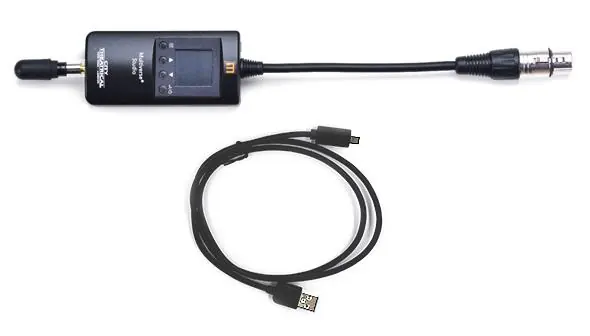
- 2.4GHz Broadcast Radio: Transmit and receive on the 2.4GHz band.
- mDMX and mRDM: Optimized DMX and RDM broadcast modes.
- SHoW Key Security: Optional 3-digit code to prevent interference from other systems.
- Adaptive Spread Spectrum Frequency Hopping: Automatically masks off channels with interference.
- Ultra Low Latency: Total average system latency of 4ms.
Installation and Power
The receiver can be powered by its internal lithium-ion polymer battery or via 5VDC power through the USB-C connector. An external power supply (100-240VAC in, 5VDC out) is included. To turn the unit on or off, press and hold the Power/Enter button.
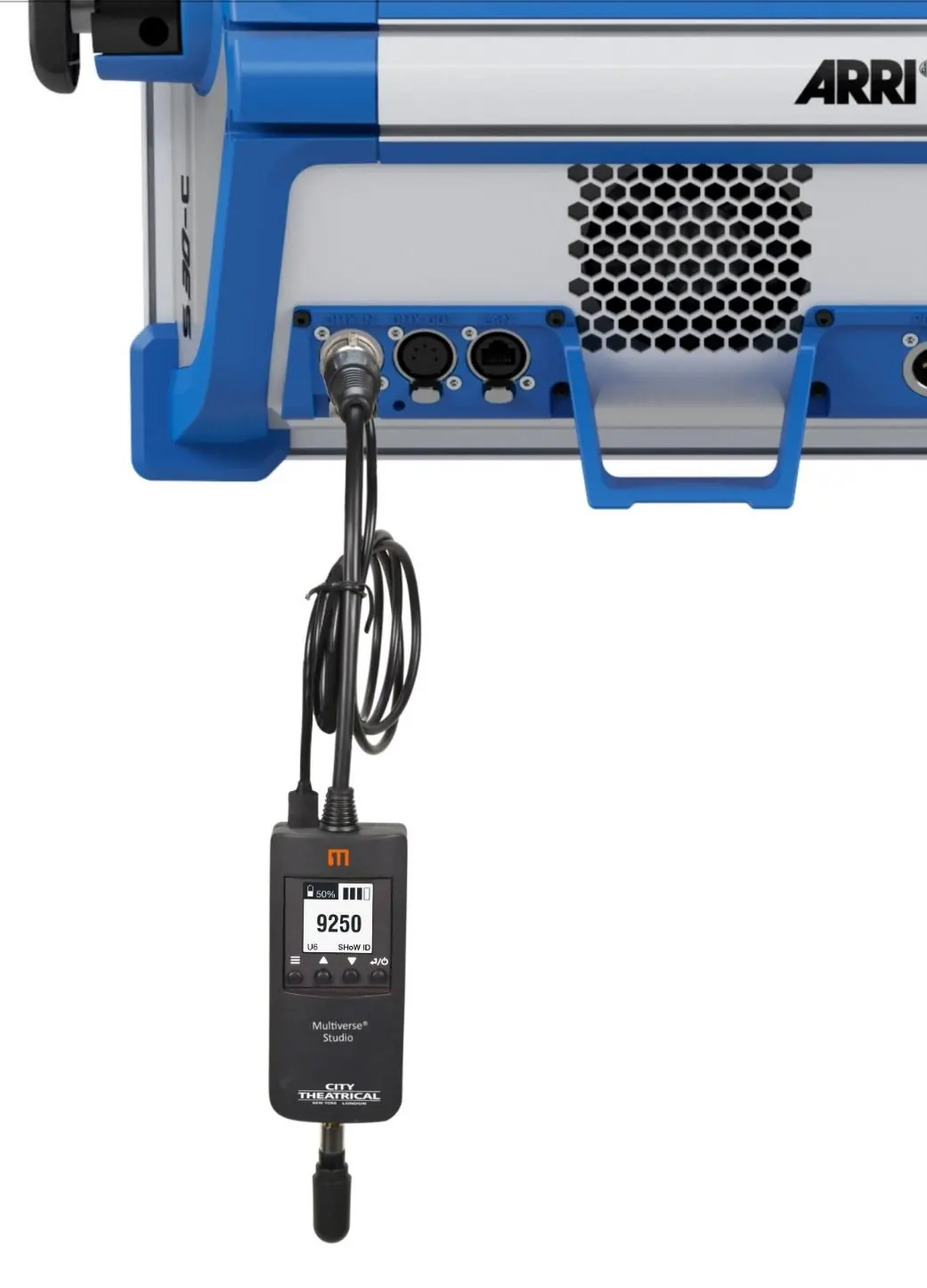
For optimal data fidelity, the DMX corded connector allows the receiver and its external antenna to hang below the lighting fixture.
User Interface and Configuration
The user interface consists of four buttons and a backlit LED display. Upon power-up, the screen displays the SHoW ID, universe, radio signal quality, and DMX connection status.
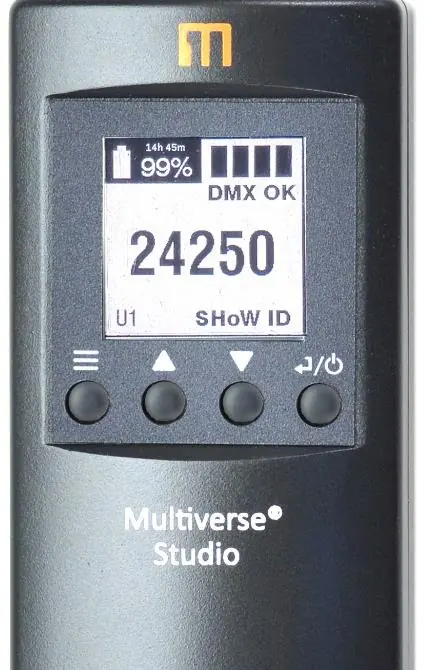
- Up/Down buttons: Navigate to the universe selection screen.
- Enter button: Select SHoW ID or universe for editing; commits changes.
- Menu button: Access the main menu. Hold to cancel the current edit.
SHoW ID and Universe Settings
The SHoW ID determines the transmission method, frequency band, and hopping pattern. The default SHoW ID is 24250. It is recommended to perform a site survey using City Theatrical's RadioScan Spectrum Analyzer before choosing a SHoW ID. The selected universe must match the universe being transmitted by your Multiverse transmitter.
Menu Settings
Access the menu to configure advanced settings:
- Power: Adjust output power (Low, Med, Hi, Max).
- Antenna: Select the antenna type (default omni, panel, or Yagi).
- SHoW Key: Set a security key (0-500).
- Display Color: Change background color (white, magenta, cyan, green, yellow, red).
- RDM Traffic: Toggle RDM data pass-through.
- Auto Off Time: Set timeout for battery saving when no signal is detected.
- Backlight: Adjust timeout and brightness level.
- Lock Screen: Prevent accidental changes.
Troubleshooting
If the unit does not power up, check that the battery has sufficient charge or that the power cable is properly installed. If fixtures connected to the receiver are not responding, verify that the Tx symbol on the transmitter is solid, the DMX symbol is shown on the receiver, and that the SHoW ID, Universe, and SHoW Key match on all devices.
Specifications
The device operates in the 2400-2480 MHz range with an IP61 rating. It supports ANSI E1.11 DMX512-A and E1.20 RDM protocols. The battery provides 20 hours of life on default settings, with a charge time of 2.5 hours via USB-C or 3.5 hours via contactless charger.
Practical help
Common problems
Unit does not power up
Check that the battery has sufficient charge or that the power cable is properly installed.
Fixtures connected to the receiver are not responding
Check that the Tx symbol on the transmitter is solid, the DMX symbol is shown on the receiver, and that the SHoW ID, Universe, and SHoW Key match on all devices.
Before use
- Charge the battery fully before first use.
- Perform a site survey using RadioScan Spectrum Analyzer.
- Ensure the transmitter and receiver are set to the same SHoW ID.
- Ensure the transmitter and receiver are set to the same Universe.
- Verify that the antenna is securely connected.
Images and diagrams
- The face panel displays battery life, signal quality bars, DMX status, SHoW ID, and Universe.
- The receiver is designed to hang below the lighting fixture using the DMX cord.
Model compatibility
- Compatible with all Multiverse and SHoW DMX Neo products.
- Requires 5VDC power input.

Manual page author
Michael Turner
Technical manual editor
Reviews PDF manuals for structure, safety notes, and practical product details so readers can find the right information quickly.