Lighting / Controllers & Dimmers
MiBOXER 2.4GHz Wireless LED Controller User Manual
User guide for the MiBOXER 2.4GHz Wireless LED Controller. Includes instructions for remote linking, unlinking, DMX512 setup, dynamic mode selection, and configuration of the Do Not Disturb mode.
Quick answers from the manual
Quick answer
- To link a remote, switch off the light, wait 10 seconds, switch it on, and short press the 'I' button 3 times within 3 seconds. The light will blink slowly 3 times to confirm. p. 2
Key actions
- Linking remote control p. 2
- Unlinking remote control p. 2
- Switching PWM frequency p. 3
Problems and fixes
Linking failed
Ensure the light is blinking slowly. If not, follow the steps again.
p. 2
Unlinking failed
Ensure the light is blinking quickly. If not, follow the steps again.
p. 2Where to find it in the PDF
- Features p. 1
- Linking/Unlinking Instructions p. 2
- Do Not Disturb Mode p. 3
- DMX512 Setup p. 6
Table of contents
Manual images
Click an image to enlargeQuick guide from the manual
This document provides instructions for operating the MiBOXER 2.4GHz Wireless LED Controller. Key operations include linking and unlinking remote controls, configuring the Do Not Disturb mode, and setting up DMX512 control.
Linking and Unlinking Remote Controls
To control the light with a remote, you must first link them.
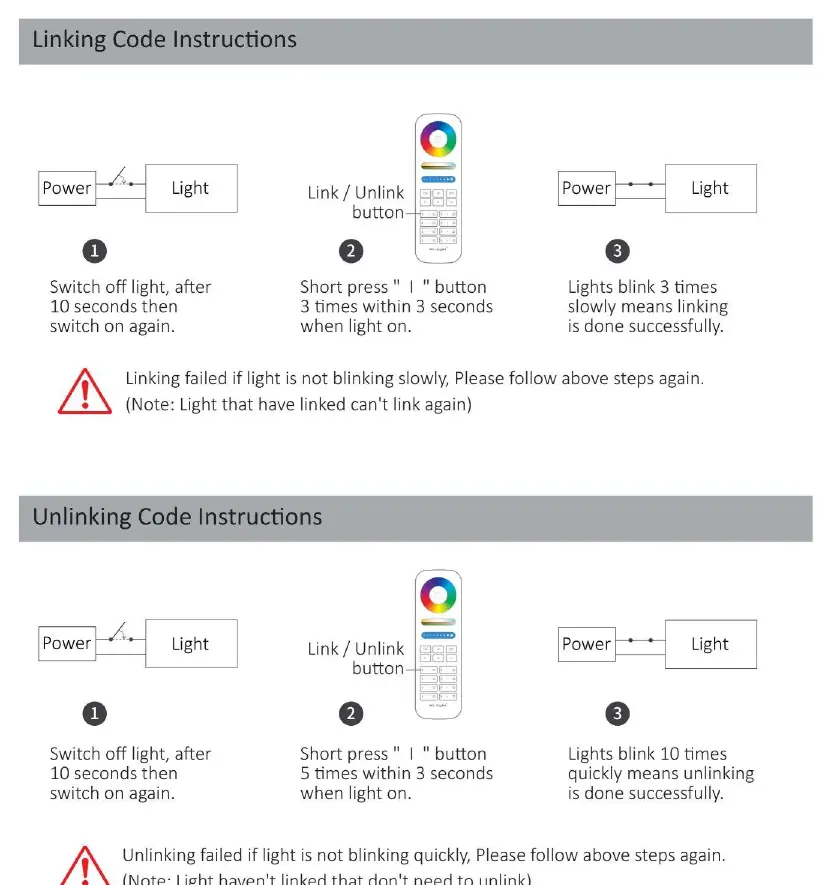
Linking
- Switch off the light.
- After 10 seconds, switch the light on again.
- When the light is on, short press the I button 3 times within 3 seconds.
- The light will blink slowly 3 times, indicating successful linking.
Unlinking
- Switch off the light.
- After 10 seconds, switch the light on again.
- When the light is on, short press the I button 5 times within 3 seconds.
- The light will blink quickly 10 times, indicating successful unlinking.
The mode of Do Not Disturb
This mode is useful in areas with frequent power failures to prevent the light from turning on automatically when power is restored.
Activate
Press the OFF button 3 times within 3 seconds, then press the ON button 3 times. The light will flash 4 times quickly when activated.
Deactivate
Press the ON button 3 times within 3 seconds, then press the OFF button 3 times. The light will flash 4 times slowly when deactivated.
PWM High/Low Frequency Switching
You can switch the PWM frequency to suit different requirements.
- Switch to high frequency: With the light on, short press the OFF button once, then short press the ON button 5 times within 3 seconds. The white light will blink 2 times quickly.
- Switch to low frequency: With the light off, short press the ON button once, then short press the OFF button 5 times within 3 seconds. The white light will blink 2 times slowly.
DMX512 Setup
The controller supports DMX512 transmission. To link a DMX512 transmitter:
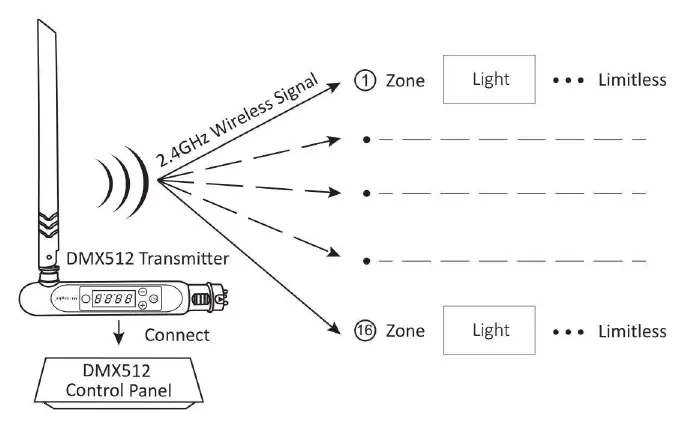
- Choose the zone for the light by pressing + or - on the transmitter.
- Switch off the light, wait 10 seconds, and switch it on again.
- When the light is on, short press the SET button 3 times within 3 seconds.
- The light will blink slowly 3 times, indicating successful linking.
Safety and Installation
- Ensure the power supply voltage matches the light requirements.
- Check the connection of both the cathode and anode carefully; incorrect wiring will damage the light.
- Do not connect wires while the power is on.
- Do not install the light in areas with large metal surfaces or strong electromagnetic waves, as this will significantly reduce the remote control distance.
- Non-professionals should not dismantle the lighting fixtures.
Practical help
Common problems
Linking failed
Ensure the light is blinking slowly during the process. If it does not blink, repeat the steps.
Unlinking failed
Ensure the light is blinking quickly during the process. If it does not blink, repeat the steps.
Remote control distance is short
Avoid installing the light in areas with large metal surfaces or strong electromagnetic interference.
Before use
- Verify the power supply voltage matches the light specifications.
- Check the polarity of the cathode and anode connections.
- Ensure all wiring is completed before turning on the power.
- Confirm the installation location is free from strong electromagnetic interference.
Specs in practice
- 2.4GHz Wireless
- The frequency used for remote control communication and signal transmission.
- PWM Frequency
- Pulse Width Modulation frequency, adjustable for different lighting performance requirements.
Images and diagrams
- The linking diagram illustrates the power cycle and button press sequence required to pair the remote.
- The DMX512 diagram shows the signal flow from the transmitter to the light zones.
Model compatibility
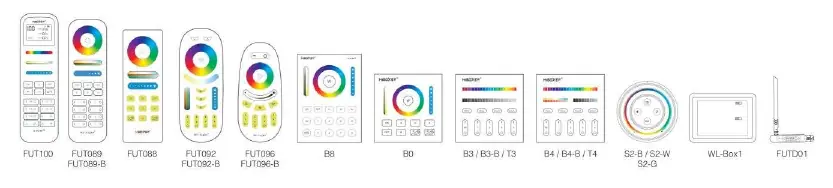
- Compatible with various MiBOXER remote controls (purchased separately).
- Smartphone app control requires a 2.4GHz gateway.
- Third-party voice control requires a 2.4GHz gateway.

Manual page author
Michael Turner
Technical manual editor
Reviews PDF manuals for structure, safety notes, and practical product details so readers can find the right information quickly.