Tools / Saws
User Manual for Craftsman 12V-19.2V Battery Charger 315.CH2030
Quick guide for the Craftsman 12V-19.2V Dual Chemistry Battery Charger (315.CH2030). Learn about LED status indicators, charging procedures for hot/cold batteries, safety rules, and maintenance.
Table of contents
Manual images
Click an image to enlargeQuick Guide from the Manual
This manual provides essential safety and operating instructions for the Craftsman 12V-19.2V Dual Chemistry Battery Charger (Model 315.CH2030). The charger is designed to charge compatible 12V to 19.2V Ni-Cd or Li-Ion battery packs. Always read the safety warnings before use, ensure the charger is used in a well-ventilated area, and never use the charger outdoors or in damp conditions.
Safety Instructions
- Eye Protection: Always wear eye protection with side shields marked to comply with ANSI Z87.1.
- Extension Cords: Avoid using extension cords unless absolutely necessary. If used, ensure they are in good condition and have the correct wire size (16 AWG for up to 100 ft).
- Handling: Do not abuse the cord; never carry the charger by the cord or pull the cord to disconnect.
- Chemicals: Keep gasoline, oils, and petroleum-based products away from plastic parts.
- Storage: Always remove the battery pack before storing the charger or when it is unplugged.
Charging Procedure
- Connect the charger to a standard 120V, 60Hz AC power supply.
- Align the raised ribs on the battery pack with the grooves in the charger and slide the battery onto the charger.
- Press down to ensure the contacts engage properly; the latches should snap into place.
- The battery may feel warm during charging; this is normal.
- Once charging is complete, the green LED will remain on for one hour (Maintenance Mode), then the charger will enter Energy Save Mode.
Charging Hot or Cold Batteries
If a hot or cold battery pack is placed on the charger, the red LED will flash and the green LED will be off. Charging will not begin immediately. The charger will automatically start the fast charge mode once the battery temperature reaches an acceptable range (approximately 40°C/120°F for hot batteries or 0°C/32°F for cold batteries).
LED Status Indicators
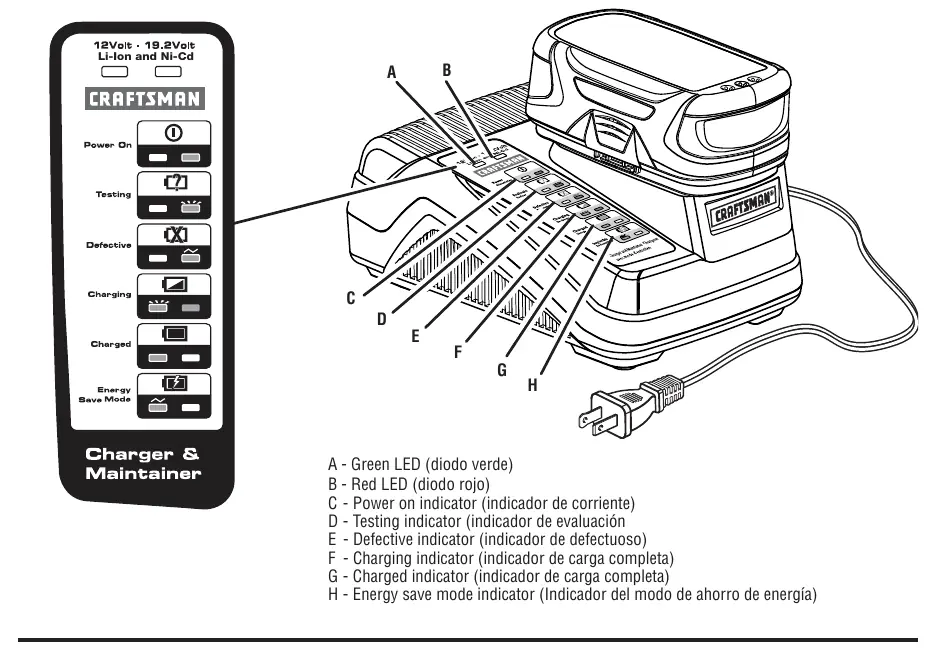
The charger uses LED lights to communicate status:
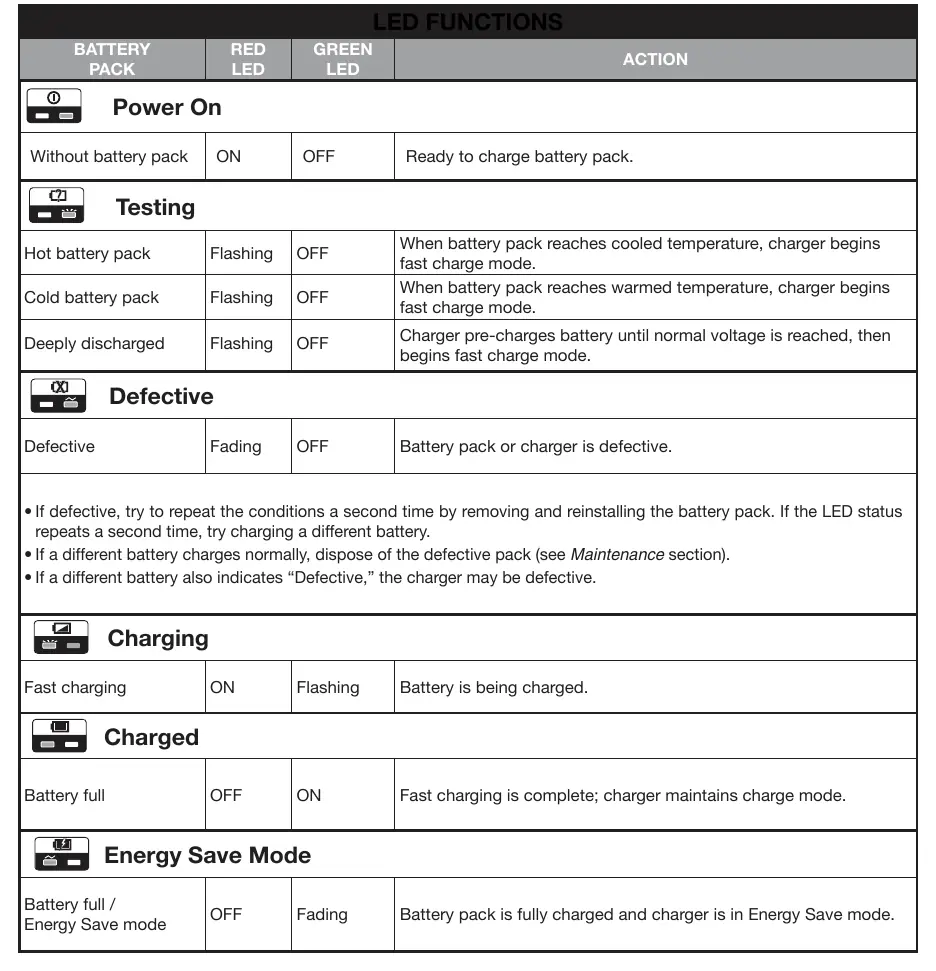
- Red LED on, Green LED off: Power is on.
- Red LED flashing, Green LED off: Battery is being tested.
- Red LED fading, Green LED off: Battery is defective.
- Red LED on, Green LED flashing: Battery is charging.
- Red LED off, Green LED on: Battery is fully charged.
- Red LED off, Green LED fading on/off: Battery is fully charged; charger is in Energy Save mode.
Maintenance
Avoid using solvents when cleaning plastic parts, as most are susceptible to damage. Use clean cloths to remove dirt, dust, oil, and grease. If the charger is damaged, do not disassemble it; take it to an authorized service center.
Manufacturer information
CRAFTSMAN
Practical help
Common problems
Charger LEDs are not lit
Remove the battery pack immediately to avoid damaging the product. Do not insert another battery. Return the charger and battery to an authorized service center.
Battery indicates 'Defective' (Red LED fading)
Try removing and reinstalling the battery. If the status repeats, try charging a different battery. If the second battery charges normally, dispose of the defective pack. If the second battery also indicates 'Defective', the charger may be faulty.
Charging does not start
Ensure the battery is not too hot or too cold. The charger will wait until the battery reaches an acceptable temperature range before starting the charge.
Before use
- Ensure power supply is 120V, 60Hz AC.
- Check that battery contacts are clean.
- Verify battery type is compatible (12V-19.2V Ni-Cd or Li-Ion).
- Ensure charger is in a well-ventilated area.
- Wear ANSI Z87.1 compliant eye protection.
Specs in practice
- Battery Pack Voltage
- Compatible with 12V to 19.2V DC battery packs.
- Charger Input
- Requires 120V, 60Hz AC power.
- Energy Save Mode
- Automatically activates when the battery is fully charged to conserve energy and protect battery cells.
Images and diagrams
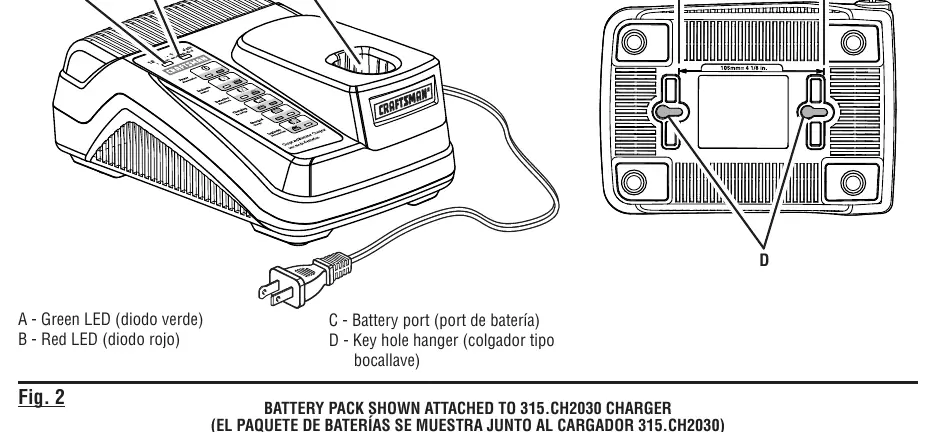
- Fig 1: Identifies charger components including the battery port and key hole hanger.
- Fig 2: Illustrates the LED indicator panel and their specific locations.
- Fig 3: Provides a comprehensive table of LED patterns and corresponding charger/battery states.
Model compatibility
- Compatible with Craftsman 12V-19.2V Ni-Cd or Li-Ion battery packs.
- Do not charge other types of batteries as they may burst.

Manual page author
Emily Carter
User documentation editor
Prepares concise manual descriptions and highlights the most useful setup, operation, and maintenance information for readers.