Home / Garage Door Openers
Owner's Manual for Craftsman 139.53918D Garage Door Opener
Quick guide for the Craftsman 139.53918D garage door opener. Includes installation steps, programming instructions, safety sensor alignment, and troubleshooting.
Table of contents
Quick guide from the manual
This manual provides instructions for the installation, operation, and maintenance of the Craftsman 139.53918D garage door opener. Before beginning, ensure your garage door is properly balanced and that all locks and ropes are removed. The opener requires a 120V, 60Hz power supply.
Assembly
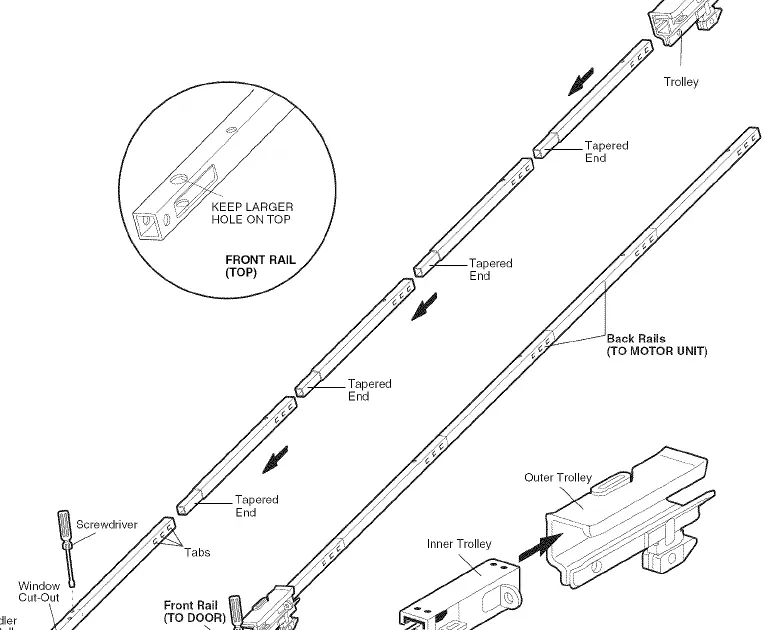
The assembly process involves preparing the rail, installing the trolley, and setting the belt tension. Ensure the rail sections are aligned correctly and the trolley is installed before attaching the rail to the motor unit. The belt must be installed with the ribbed side facing the rail.
Installation
Installation requires mounting the header bracket, positioning the opener, hanging the motor unit, and installing the control console and safety sensors. The header bracket must be securely fastened to structural supports. The safety sensors must be installed no higher than 6 inches from the floor and aligned so the sending and receiving eyes face each other.
Adjustment
After installation, you must program the travel limits and force settings. The travel limits regulate where the door stops when opening and closing. The force setting measures the power required to operate the door. Always test the safety reversal system after making any adjustments.
Operation
The opener can be operated via hand-held remote controls, the wall-mounted control console, or the keyless entry system. The wall console includes a motion detector that turns on the lights when someone enters the garage. The door can be opened manually by pulling the emergency release handle.
Programming
You can add or reprogram hand-held remote controls and keyless entry PINs using the "Learn" button on the motor unit or the motion-detecting control console. To erase all codes, press and hold the "Learn" button until the indicator light goes out.
Troubleshooting
If the door does not close and the lights blink, check the safety sensors for alignment or obstructions. If the remotes do not work, check if the console is in "Lock Mode." Refer to the diagnostic chart in the manual for specific error codes indicated by the flashing LED on the motor unit.
Maintenance
Perform monthly safety checks, including the safety reversal test. Oil door rollers, bearings, and hinges once a year. Do not lubricate the door tracks.
Manufacturer information
CRAFTSMAN
Practical help
Common problems
Door will not close and lights blink
Check safety sensors for proper alignment and obstructions. Ensure wiring is connected correctly.
Remotes will not activate the door
Check if the control console is in 'Lock Mode'. Reprogram remotes if necessary.
Door reverses for no apparent reason
Check door for balance or binding. Adjust force and travel limits.
Motor unit hums briefly
Check if the trolley is against the stop bolt. Adjust belt tension.
Before use
- Disable all garage door locks.
- Remove all ropes connected to the garage door.
- Ensure the garage door is balanced and does not bind.
- Verify 120V, 60Hz power supply.
- Ensure safety sensors are installed no higher than 6 inches from the floor.
Specs in practice
- 1/4 inch (6 mm)
- Maximum gap allowed between the floor and the bottom of the door.
- 6 inches (15 cm)
- Maximum height for safety sensors above the floor.
Images and diagrams
- Assembly diagrams show rail, trolley, and belt installation steps.
- Installation diagrams detail header bracket and door bracket mounting.
- Wiring diagrams illustrate sensor and wall console connections.
Model compatibility
- Compatible with Security+ remote controls.
- Requires reinforcement for lightweight (fiberglass, aluminum, steel) doors.

Manual page author
David Miller
Documentation analyst
Organizes user manual content into clear summaries, with attention to model details, product context, and everyday usability.