Home Appliances / Small Kitchen Appliances
User Manual for CREATE FULLMIX TITAN Cordless Hand Blender
Quick guide for the CREATE FULLMIX TITAN cordless hand blender. Includes assembly, charging instructions, speed settings, safety tips, and maintenance procedures.
Quick answers from the manual
Quick answer
- The CREATE FULLMIX TITAN is a cordless hand blender. To operate, press the unlock button and variable speed button. It takes approximately 3.5 hours to charge and runs for about 15 minutes. p. 9, 10
Key actions
- Charging the blender p. 9
- Assembling the blender p. 9
First start
- Wipe the main unit with a damp cloth and clean attachments in warm soapy water before first use. p. 8
Problems and fixes
Unit stops unexpectedly
Overload protection feature activated. Press the variable speed button to reactivate.
p. 10Maintenance and reset
- Clean main unit with damp cloth; wash blending shaft by hand or in dishwasher top rack. p. 11
Technical specifications
| Parameter | Value | Meaning | Pages |
|---|---|---|---|
| Charging time | 3:30 hours | Time to fully charge the battery | p. 9 |
| Run time | 15 minutes | Approximate usage time on full charge | p. 9 |
Where to find it in the PDF
- Parts List p. 8
- Assembly and Charging p. 9
- Operation and Tips p. 10
- Cleaning and Maintenance p. 11
Table of contents
Manual images
Click an image to enlargeQuick guide from the manual
The CREATE FULLMIX TITAN is a cordless hand blender designed for domestic use. This guide covers essential setup, operation, and maintenance. Always ensure the device is charged before use and handle the sharp blades with care.
Parts list
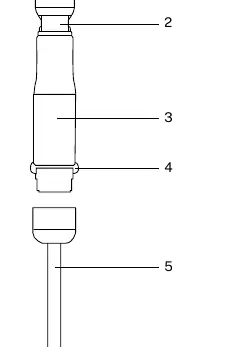
- Measuring cup
- Unlock button and variable speed button
- Motor unit
- Release buttons
- Blending shaft
Assembly
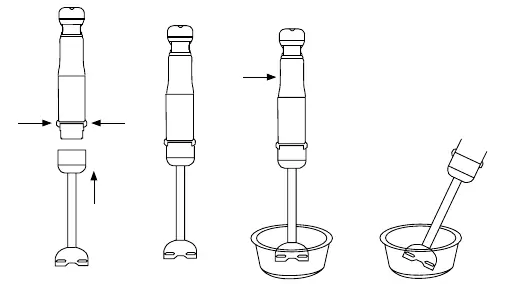
To assemble the blender, insert the blending shaft onto the motor unit until it locks into place. To remove the shaft after use, unplug the device and press the release buttons.
Charging
The blender is not fully charged upon purchase. Charge the unit by inserting the adapter plug into a mains outlet and the lead into the charging port. A full charge takes approximately 3 hours and 30 minutes and provides about 15 minutes of run time.
Battery indicator lights
- Green: 100% to 25% battery power.
- Red: Less than 25% battery power; charge soon.
Operation
To operate the blender, press the unlock button and the variable speed button simultaneously to unlock the appliance. Then, press the variable speed button to start blending. The device features an auto-lock safety function that engages 3 seconds after the variable speed button is released.
Speed settings
Adjust the speed by applying different pressure to the variable speed button. The current speed is indicated by the number of blue lights illuminated (1 is the lowest, 5 is the highest).
Safety and tips
- Hot liquids: Use a large container or process small quantities to avoid splashing and burns. The blending shaft is safe for liquids up to 100°C.
- Overload protection: If the unit stops unexpectedly, it has triggered the overload protection. Press the variable speed button to reactivate.
- Safety: Never leave the blender in a hot pot while not in use. Do not blend hard materials like fruit pits or bones.
Cleaning and maintenance
Always clean the appliance thoroughly after use.
- Main unit: Wipe with a clean, damp cloth. Do not use abrasive cleaners.
- Blending shaft: Wash by hand in warm, soapy water or place on the top rack of the dishwasher. Handle the blades with extreme care as they are very sharp.
Manufacturer information
Create
Practical help
Common problems
Unit stops unexpectedly
Overload protection triggered. Press the variable speed button to reactivate.
Battery indicator light is red
Battery is below 25%. Charge the unit soon.
Before use
- Wipe the main unit with a clean, damp cloth
- Clean attachments in warm soapy water
- Ensure the battery is fully charged (green light)
- Check for any visible damage to the unit or cord
Specs in practice
- Charging time
- Approximately 3 hours and 30 minutes for a full charge
- Speed settings
- 5 levels indicated by blue lights (1 lowest, 5 highest)
Images and diagrams
- The parts diagram identifies the measuring cup, unlock/speed button, motor, release buttons, and blending shaft.
Model compatibility
- Blending shaft is safe for food and liquids up to 100°C

Manual page author
Michael Turner
Technical manual editor
Reviews PDF manuals for structure, safety notes, and practical product details so readers can find the right information quickly.