Hvac / Thermostats Controls
Installation Guide for Danfoss Aero RA click Thermostatic Sensors
Quick installation and configuration guide for Danfoss Aero RA click thermostatic sensors, covering mounting, uninstallation, and temperature limitation settings.
Table of contents
Quick guide from the manual
This document provides instructions for the installation, removal, and temperature limitation of the Danfoss Aero RA click thermostatic sensor series. Ensure the radiator valve body is compatible before proceeding with the click-on installation.
Installation
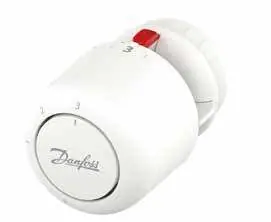
- Ensure the sensor is in the fully open position.
- Align the sensor with the valve body.
- Press the sensor firmly onto the valve until you hear a distinct click, indicating it is securely locked in place.
BIV Installation
- Remove the protective cap from the valve.
- Align the sensor with the valve.
- Press firmly until it clicks into position.
Uninstall
- Grip the sensor firmly.
- Rotate the locking ring or follow the release mechanism to detach the sensor from the valve body.
Temperature Limitation
You can set maximum and minimum temperature limits to control the heating range.
Maximum Temperature Limitation
- Set the sensor to the desired maximum value (e.g., 3).
- Locate the limitation pin.
- Use a tool to insert the pin into the corresponding slot to lock the maximum setting.
Minimum Temperature Limitation
- Set the sensor to the desired minimum value (e.g., 2).
- Locate the limitation pin.
- Use a tool to insert the pin into the corresponding slot to lock the minimum setting.
Blind mark
The sensor features a blind mark indicator to assist with alignment and setting identification.
Manufacturer information
Danfoss A/S
Practical help
Common problems
Sensor does not click onto the valve
Ensure the valve body is clean and the sensor is in the fully open position before attempting to press it on.
Difficulty removing the sensor
Ensure you are applying the correct rotation or release pressure as indicated in the uninstall section.
Before use
- Verify compatibility with your radiator valve body.
- Ensure the sensor is set to the fully open position before installation.
- Have a small tool ready if you intend to set temperature limits.
- Check that the valve is free of debris.
Images and diagrams
- The 'click' icon indicates the successful locking of the sensor onto the valve.
- The limitation pin diagrams show the exact slots for setting min/max temperatures.
Model compatibility
- Designed for use with Danfoss RA click compatible valve bodies.

Manual page author
Michael Turner
Technical manual editor
Reviews PDF manuals for structure, safety notes, and practical product details so readers can find the right information quickly.