Hvac / Thermostats Controls
Installation Guide for Danfoss Aveo RA Click Remote Sensor
A comprehensive installation and configuration guide for the Danfoss Aveo RA Click remote thermostatic sensor, including mounting steps, temperature limitation settings, and uninstallation procedures.
Table of contents
Manual images
Jump to the sectionQuick guide from the manual
This document provides installation and configuration instructions for the Danfoss Aveo RA Click remote thermostatic sensor. It covers standard radiator mounting, BIV installation, remote sensor setup, and temperature limitation procedures.
Installation
The RA Click system is designed for quick mounting:
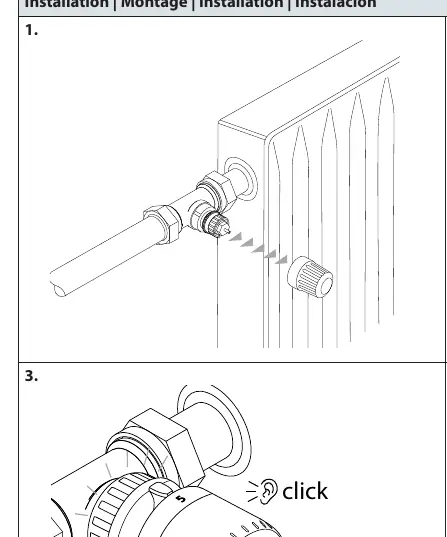
- Remove the existing sensor or protective cap from the valve.
- Ensure the sensor is set to the maximum position (indicated by the dial).
- Push the sensor firmly onto the valve body until you hear a distinct click, confirming it is locked in place.
BIV Installation
For BIV (Built-in Valve) configurations, follow the same sequence: remove the cap, set the sensor to the maximum position, and press onto the valve until it clicks.
Remote sensor
The remote sensor can be positioned up to 2 meters away from the radiator valve. Ensure the sensor unit is mounted securely using the provided bracket. The sensor housing snaps into the wall-mounted bracket with a click mechanism.
Temperature Limitation
You can restrict the temperature range to prevent unauthorized or accidental adjustments:
Maximum Temperature Limitation
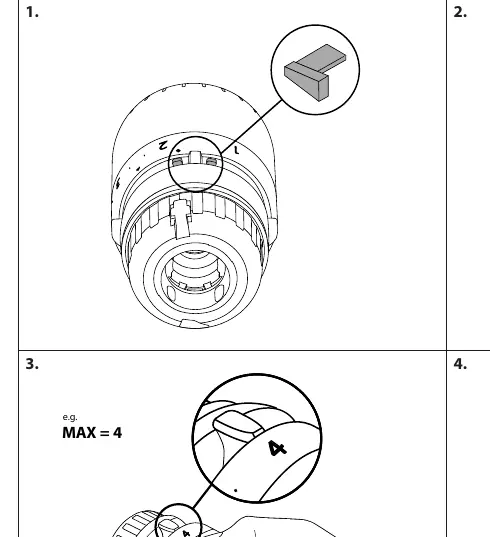
- Insert the limiter pin into the slot on the sensor dial.
- Use a screwdriver to adjust the internal mechanism to the desired maximum setting (e.g., 4).
- Secure the setting to ensure the dial cannot be turned beyond the chosen limit.
Minimum Temperature Limitation
- Insert the limiter pin into the designated slot for minimum settings.
- Adjust the internal mechanism to the desired minimum value (e.g., 2).
- The dial will now be restricted from turning below this set point.
Uninstall
To remove the sensor, rotate the dial to the unlock position, grip the base firmly, and pull it away from the valve body.
Manufacturer information
Danfoss A/S
Practical help
Common problems
Sensor does not click onto the valve
Ensure the sensor dial is set to the maximum position before attempting to mount it.
Cannot adjust temperature beyond a certain point
Check if a temperature limiter pin has been installed inside the sensor dial.
Before use
- Verify the valve type is compatible with RA Click.
- Ensure the sensor dial is set to the maximum position before installation.
- For remote sensors, ensure the cable is not kinked and is within the 2m range.
- Have a small screwdriver ready if you intend to set temperature limits.
Images and diagrams
- The 'click' icon indicates the point where the sensor is fully engaged with the valve.
- The 'MAX/MIN' icons on the dial indicate where the limiter pins should be inserted.
- The 'blind mark' shows the alignment indicator for the sensor position.
Model compatibility
- Compatible with Danfoss RA Click valve systems.
- Remote sensor cable length is fixed at 2 meters.

Manual page author
Michael Turner
Technical manual editor
Reviews PDF manuals for structure, safety notes, and practical product details so readers can find the right information quickly.