Industrial / Pressure Switches
Installation Guide for Danfoss Zigbee Module 088N2108
Quick installation and setup guide for the Danfoss Zigbee Module (088N2108) for Icon Master Controller. Includes mounting instructions, network inclusion steps, LED status patterns, and factory reset procedures.
Table of contents
Manual images
Click an image to enlargeQuick guide from the manual
This document provides installation and configuration instructions for the Danfoss Zigbee Module (088N2108) designed for the Danfoss Icon Master Controller. Ensure the ambient temperature is between 0°C and +40°C for proper operation. Verify that your Icon Master Controller supports the Zigbee module before proceeding.
Installation
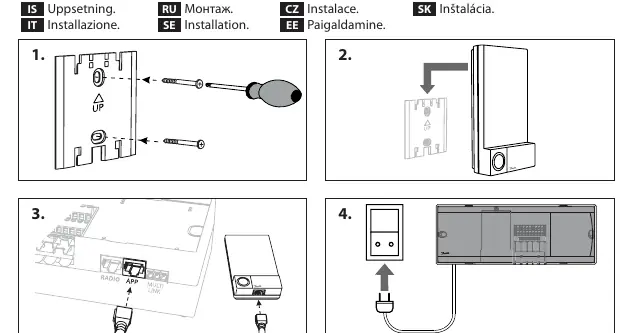
- Ensure the power is off.
- Mount the Zigbee module onto the Icon Master Controller.
- Connect the module cable to the appropriate port on the controller.
- Power on the system.
Including module to Zigbee network
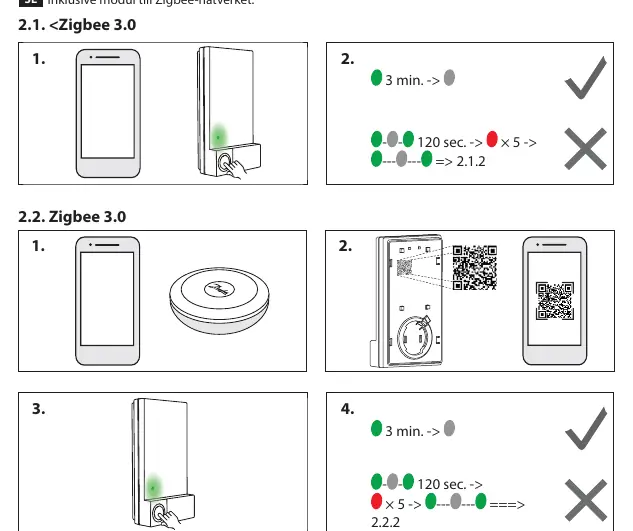
The module supports Zigbee 3.0. Follow the specific inclusion steps provided in the manual for your network setup. The LED will indicate the status of the inclusion process. If the inclusion fails, ensure the controller is in pairing mode and within range.
Ping Test
To perform a ping test from the Zigbee module:
- Initiate the test from the module.
- Observe the LED blinking patterns to confirm the connection status.
LED Blinking patterns
The LED provides visual feedback on the module's status, including network inclusion, identification, and connection status. Refer to the LED patterns section to diagnose connectivity issues.
Lost connection
If the connection to the Zigbee network is lost, the module will indicate this via the LED status. Ensure the network is active and the module is within range.
Updating the Master Controller firmware
During firmware updates, do not disconnect the device. Refer to the Danfoss Icon 24V Master Controller installation guide for detailed update procedures.
Factory reset
To reset the Zigbee module to factory settings:
- Locate the reset button/procedure on the module.
- Follow the sequence shown in the manual to trigger the reset.
- The LED will confirm the reset process.
Manufacturer information
Danfoss A/S
Practical help
Common problems
Icon Master Controller does not support Zigbee module
Verify compatibility of your specific Master Controller model before installation.
Lost connection to Zigbee network
Check network status and ensure the module is within range of the Zigbee gateway.
Before use
- Ensure ambient temperature is between 0°C and +40°C.
- Verify that the Icon Master Controller supports the Zigbee module.
- Ensure you have access to the Icon Master Controller installation guide for firmware updates.
Specs in practice
- Operating Temperature
- 0°C to +40°C; do not install outside this range.
Images and diagrams
- Installation steps show mounting the module onto the controller and connecting the cable.
- Inclusion steps show the LED sequence for pairing.
- Factory reset steps show the physical button interaction.
Model compatibility
- Designed specifically for Danfoss Icon™ Master Controller.

Manual page author
Michael Turner
Technical manual editor
Reviews PDF manuals for structure, safety notes, and practical product details so readers can find the right information quickly.