HVAC / Underfloor Heating
Danfoss Zigbee Repeater 088N2109 Installation Guide
Quick installation and setup guide for the Danfoss Zigbee Repeater (088N2109). Includes placement tips, network inclusion steps, LED status indicators, and factory reset instructions.
Table of contents
Manual images
Click an image to enlargeQuick guide from the manual
This guide provides essential instructions for installing and configuring the Danfoss Zigbee Repeater. Ensure the device is installed in an environment with an ambient temperature between 0°C and +50°C. Avoid placing the repeater near metal or steel structures, as these can significantly block the signal. The device should be within 30 meters of the Zigbee gateway or another connected device.
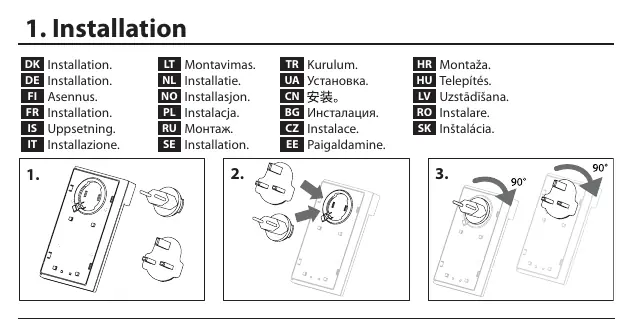
Installation
The repeater is designed to be plugged directly into a wall socket. Ensure the device is oriented correctly as shown in the installation diagrams. Once plugged in, the device is ready for inclusion into your Zigbee network.
Including Repeater to Zigbee network
To include the repeater in your Zigbee network, follow the procedure specific to your network type:
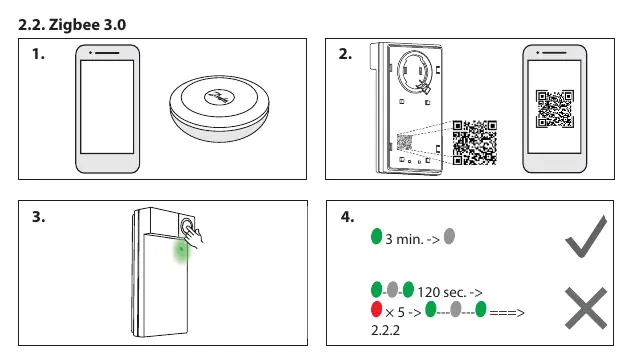
- Zigbee 3.0: Follow the specific inclusion steps provided by your Zigbee gateway or app.
- General Inclusion: Ensure the repeater is powered on. The device will indicate it is ready for inclusion via its LED status.
Ping Test
You can perform a ping test from the Zigbee Repeater to verify its connection to the network. Follow the steps in the manual to initiate the test. The LED will indicate the result of the test.
LED Blinking patterns
The LED on the repeater provides status information:
- Ready for inclusion: The LED will indicate when the device is ready to be paired.
- Identify: You can trigger an identification mode from your app to locate the device.
Factory reset
If you need to reset the device to its factory settings:
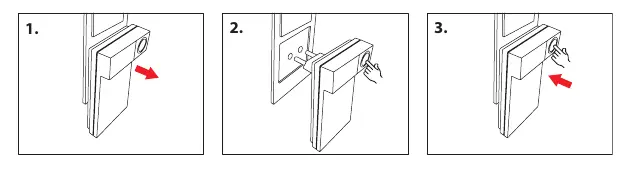
- Ensure the device is powered on.
- Follow the specific button press sequence as illustrated in the manual to perform the factory reset.
Troubleshooting
If you experience a lost connection to the Zigbee network, verify the distance to the gateway and ensure there are no new metal or steel obstructions between the repeater and the gateway. If the issue persists, try performing a factory reset and re-including the device to the network.
Manufacturer information
Danfoss A/S
Practical help
Common problems
Lost connection to Zigbee network
Check the distance to the gateway and ensure no metal or steel obstructions are blocking the signal.
Device not pairing
Ensure the device is within 30m of the gateway and not blocked by metal or steel. Follow the specific inclusion procedure for Zigbee 3.0.
Before use
- Ensure ambient temperature is between 0°C and +50°C.
- Check for metal or steel obstructions near the installation site.
- Ensure the Zigbee gateway is ready for inclusion.
Specs in practice
- Operating Temperature
- 0°C to +50°C
Images and diagrams
- The installation diagrams show the correct orientation of the plug in the socket.
- The range diagram illustrates the 30m limit and the negative impact of metal/steel barriers.
Model compatibility
- Compatible with Zigbee 3.0 networks.

Manual page author
David Miller
Documentation analyst
Organizes user manual content into clear summaries, with attention to model details, product context, and everyday usability.