Computers / Cooling Systems
Deepcool GAMMAXX GT A-RGB CPU Cooler Installation Guide
Installation guide for the Deepcool GAMMAXX GT A-RGB CPU cooler. Includes step-by-step instructions for Intel (LGA 1700/1200/1151/1150/1155) and AMD (AM5/AM4) sockets, plus fan and RGB lighting connection instructions.
Table of contents
Manual images
Click an image to enlargeInstallation Overview
The Deepcool GAMMAXX GT A-RGB is a single tower CPU cooler designed for high-performance cooling. Installation requires specific mounting hardware depending on your CPU socket type. Ensure you have all parts listed in the manual before beginning. Always apply thermal paste to the CPU surface before mounting the cooler.
Intel Installation (LGA 1700/1200/1151/1150/1155)
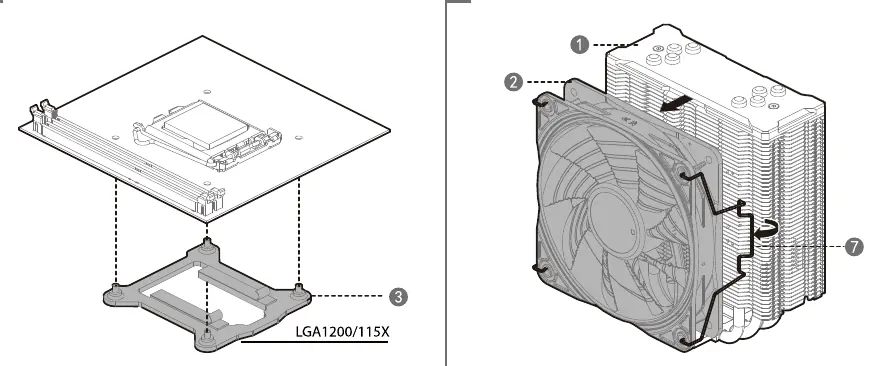
- Prepare the backplate by adjusting the sliders to the correct socket position (LGA1200/115X or LGA1700).
- Install the backplate onto the motherboard from the rear.
- Apply thermal paste to the CPU.
- Secure the mounting brackets to the standoffs using the provided screws.
- Mount the cooler onto the brackets and tighten the screws to secure it in place.
AMD Installation (AM5/AM4)
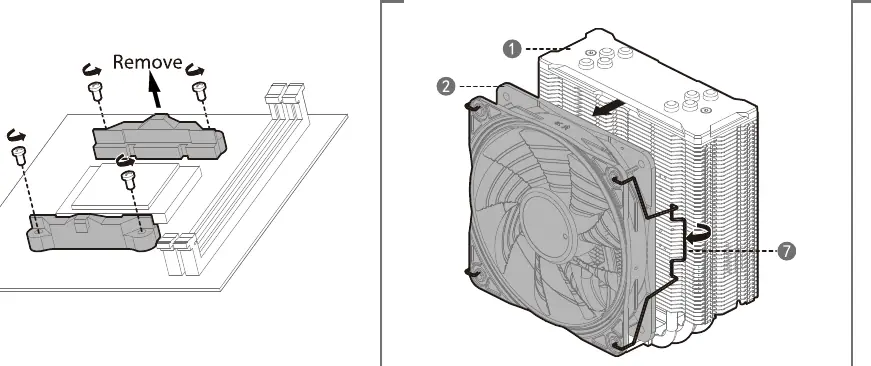
- Remove the stock plastic mounting brackets from the motherboard, but keep the original backplate.
- Install the provided standoffs onto the backplate.
- Apply thermal paste to the CPU.
- Secure the mounting brackets to the standoffs using the provided screws.
- Mount the cooler onto the brackets and tighten the screws to secure it in place.
Fan and RGB Connection
Connect the 4-pin fan cable to the CPU_FAN header on your motherboard to ensure proper fan speed control. For RGB lighting, you have two options:
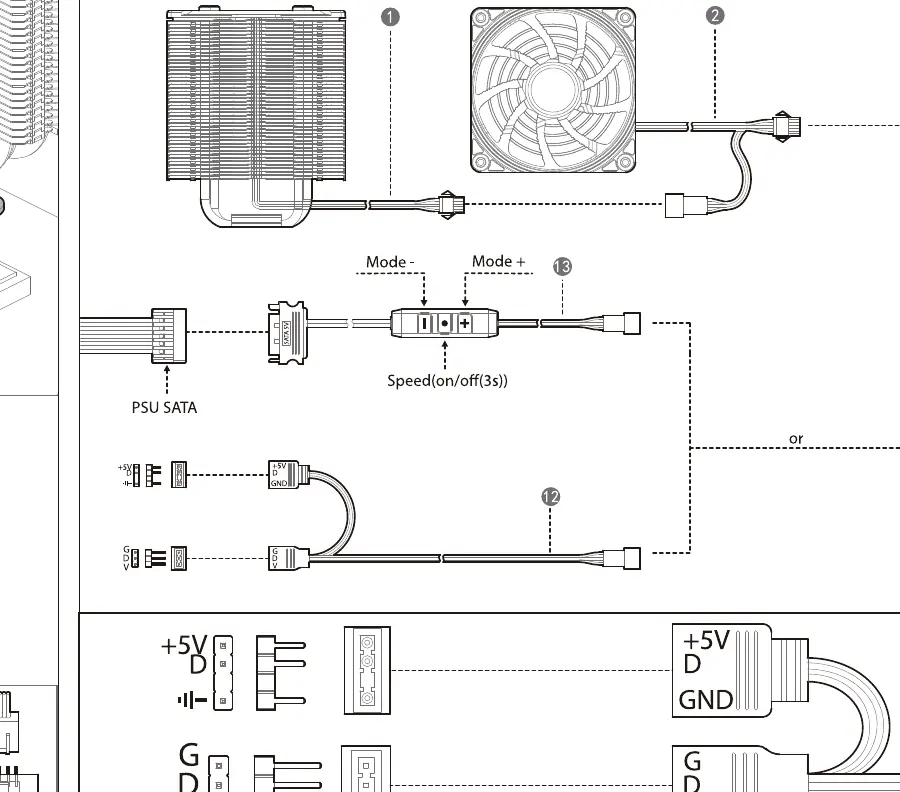
- Controller Mode: Connect the RGB cable to the included controller and power it via the SATA connector. Use the buttons on the controller to adjust lighting modes and speed.
- Motherboard Sync: Connect the 5V 3-pin ARGB cable directly to your motherboard's ARGB header for software synchronization.
Manufacturer information
DeepCool
Practical help
Common problems
RGB lighting not working
Ensure the SATA power cable is connected to the PSU or the 5V 3-pin ARGB cable is correctly seated in the motherboard header.
Fan not spinning
Verify that the 4-pin fan connector is plugged into the CPU_FAN header on the motherboard.
Before use
- Verify CPU socket compatibility (Intel LGA 1700/1200/1151/1150/1155 or AMD AM5/AM4).
- Ensure all mounting parts are present as per the parts list.
- Apply thermal paste to the CPU surface.
- Check for clearance with RAM modules before final tightening.
Specs in practice
- 5V 3-Pin ARGB
- Connector for addressable RGB lighting control via motherboard software.
Images and diagrams
- Intel installation uses a backplate with adjustable sliders for different socket types.
- AMD installation requires removing stock plastic brackets and using provided standoffs.
- The connection diagram shows two methods: using the included controller or direct motherboard sync.
Model compatibility
- Supports Intel LGA 1700, 1200, 1151, 1150, 1155.
- Supports AMD AM5, AM4.

Manual page author
Michael Turner
Technical manual editor
Reviews PDF manuals for structure, safety notes, and practical product details so readers can find the right information quickly.