Computers / Cooling Systems
User Manual for Sharkoon SILENT Storm PWM RGB Fan 120mm
Quick guide for the Sharkoon SILENT Storm PWM RGB Fan 120mm. Includes installation steps for fan and LED connections, vibration damper replacement, and technical specifications.
Table of contents
Manual images
Click an image to enlargeQuick guide from the manual
This document provides installation and technical information for the Sharkoon SILENT Storm PWM RGB Fan. Ensure your motherboard supports 5V addressable RGB headers before installation to avoid damage. The fan features a fluid dynamic bearing and is designed for 120mm mounting locations.
Specifications
General
- Fan Speed: 400~1,400 rpm ± 10%
- Bearing Type: Fluid Dynamic Bearing
- Max. Airflow: 93.6 m³/h
- Max. Air Pressure: 1.91 mm-H2O
- Max. Noise Level: 20.4 dB(A)
- Illumination: 9x Addressable RGB LED
- Dimensions: 120 x 120 x 25 mm
- Weight: 150 g
Electrical Specifications
- Rated Voltage Fan: 12 V
- Rated Voltage LEDs: 5 V
- Rated Current Fan: 0.15 A
- Rated Current LEDs: 0.4 A
- Start Voltage: 7 V
Installation
Connecting the Fan
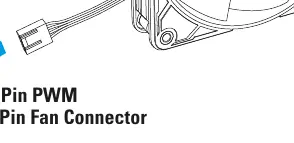
Connect the fan cable to a 4-pin PWM or 3-pin fan header on your motherboard. The PWM control allows for automatic speed adjustment based on system temperature.
Connecting the LED
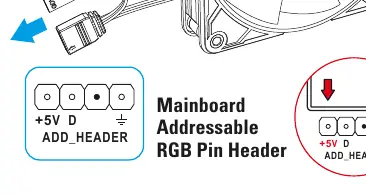
The fan uses an addressable RGB connector. Connect the LED cable to a 5V addressable RGB header on your motherboard. The connector supports both 3-pin (5V-D-G) and 4-pin (5V-D-coded-G) configurations.
Vibration Damper Replacement
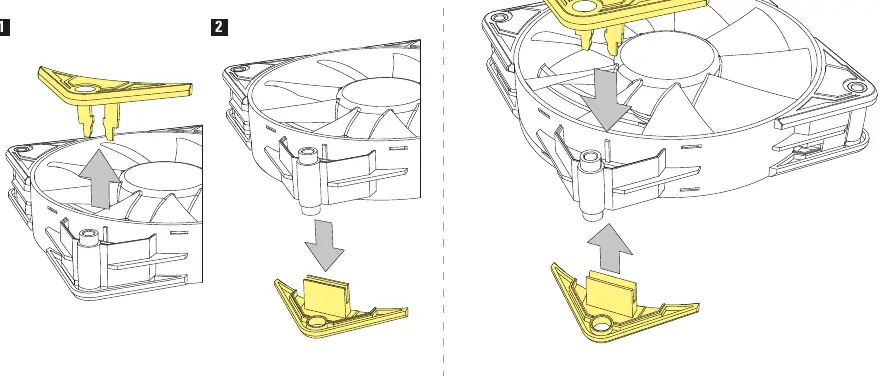
The fan includes swappable vibration dampers on the corners. To replace or remove them, gently pull the damper out from the fan housing and insert the new one into the designated slot.
Contact Information
Sharkoon Technologies GmbHGrüninger Weg 4835415 PohlheimGermanyE-mail: [email protected]: www.sharkoon.com
Official resources from the manual
Practical help
Common problems
Fan does not spin
Ensure the 4-pin PWM cable is securely connected to a motherboard fan header.
RGB lighting does not work or is incorrect
Verify the LED cable is connected to a 5V addressable RGB header. Do not connect to a 12V RGB header as this may damage the LEDs.
Before use
- Verify motherboard has a 4-pin PWM fan header.
- Verify motherboard has a 5V addressable RGB header (3-pin or 4-pin coded).
- Ensure sufficient space for 120x120x25mm fan dimensions.
- Check that the fan is not obstructed by cables.
Specs in practice
- Fluid Dynamic Bearing
- A bearing type designed for lower noise and longer lifespan compared to standard sleeve bearings.
Images and diagrams
- Fan connection: Connect the 4-pin connector to the motherboard fan header.
- LED connection: Connect the RGB cable to the 5V addressable RGB header (V-D-G or +5V-D-coded-G).
- Vibration damper: Shows the removal and insertion process for the corner dampers.
Model compatibility
- Requires 5V addressable RGB header. Not compatible with 12V RGB headers.

Manual page author
Emily Carter
User documentation editor
Prepares concise manual descriptions and highlights the most useful setup, operation, and maintenance information for readers.