Computers / PC Components
User Manual for Cooler Master Mobius 120 Series Case Fan
Quick guide for installing and connecting your Cooler Master Mobius 120 series case fan. Includes connection diagrams for PWM and ARGB models and mounting instructions.
Table of contents
Manual images
Click an image to enlargeQuick guide from the manual
This manual provides installation and connection instructions for the Cooler Master Mobius 120 series fans. Please identify your specific model (Black Edition or ARGB) to ensure you follow the correct connection procedure for your hardware.
Package content
Ensure your package contains the following items:
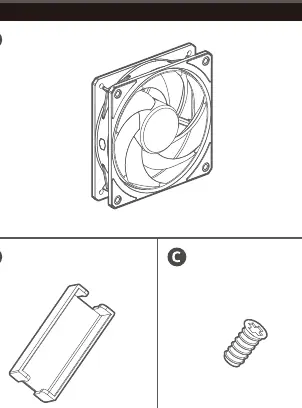
- 1x Fan
- 1x ARGB clip (included only with ARGB models)
- 4x Mounting screws
Connecting the fan
Mobius 120 Black Edition: Connect the PWM cable directly to the motherboard's PWM fan header.
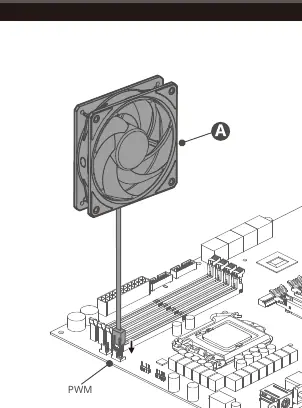
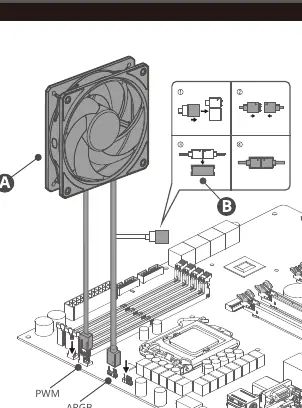
Mobius 120P ARGB / White Edition: Connect both the PWM cable and the ARGB cable to the corresponding headers on your motherboard. Use the provided ARGB clip to secure the connection between the fan's ARGB cable and the motherboard cable.
Fan installation
To install the fan into your PC case:
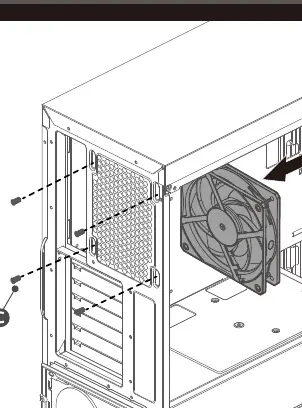
- Position the fan against the mounting location in your case.
- Align the fan's mounting holes with the holes in the case chassis.
- Secure the fan using the four provided screws.
Support information
For the most updated information, please visit the official website at www.coolermaster.com or contact support at https://account.coolermaster.com/. Regional support offices are located in China, Europe, and North America.
Official resources from the manual
Practical help
Common problems
ARGB lighting not working
Ensure the ARGB cable is securely connected to the motherboard ARGB header and the connection is locked with the provided clip.
Fan not spinning
Verify the PWM cable is connected to the correct CPU or System fan header on the motherboard.
Before use
- Identify your specific model (Black Edition or ARGB)
- Ensure you have the 4 mounting screws
- Locate the PWM header on your motherboard
- For ARGB models, locate the ARGB header on your motherboard
Images and diagrams
- The ARGB clip secures the connection between the fan's ARGB cable and the motherboard cable to prevent accidental disconnection.
Model compatibility
- Mobius 120 Black Edition uses only PWM connection.
- Mobius 120P ARGB models require both PWM and ARGB connections.

Manual page author
Michael Turner
Technical manual editor
Reviews PDF manuals for structure, safety notes, and practical product details so readers can find the right information quickly.