HVAC / Air Conditioners
User Manual for Della 048-MS-12 Series Mini Split Air Conditioner
Comprehensive user manual for the Della 048-MS-12 series mini split air conditioner. Includes installation instructions, operation guide, remote control settings, Wi-Fi app connection, maintenance, and troubleshooting error codes.
Table of contents
Manual images
Click an image to enlargeQuick Guide from the Manual
This manual covers the installation and operation of the Della 048-MS-12 series mini split air conditioner. Key procedures include professional installation of indoor and outdoor units, vacuum pumping, and system testing. For operation, the unit supports multiple modes (Auto, Cool, Dry, Heat, Fan) and includes smart features via the Della+ app.
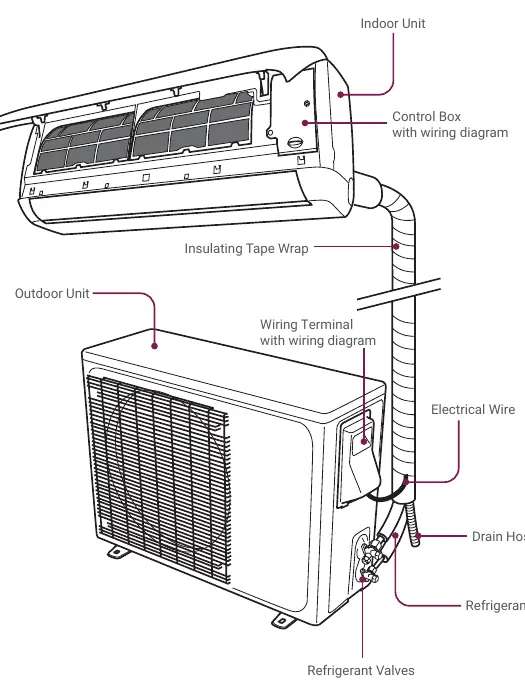
Installation
Installation must be performed by a licensed professional. Key steps include:
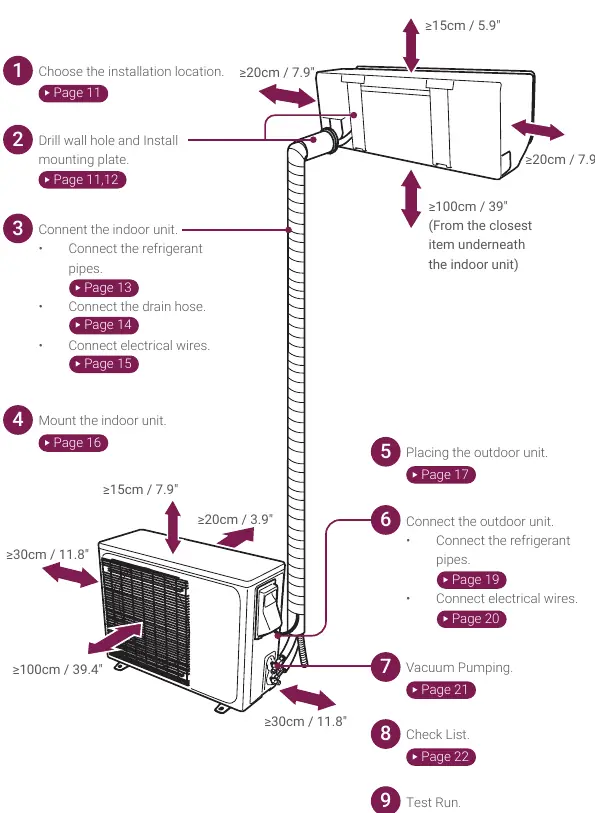
- Location: Ensure the indoor unit is away from heat sources and has proper clearance.
- Mounting: Secure the mounting plate using a spirit level.
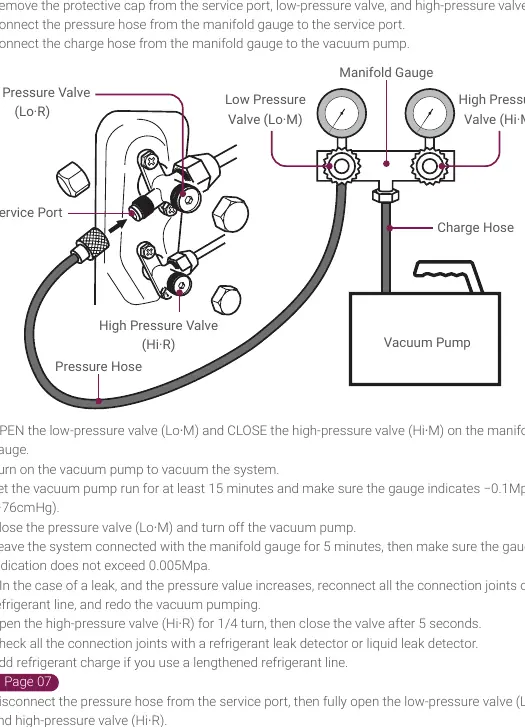
- Piping: Connect refrigerant pipes using a torque wrench according to specified parameters.
- Wiring: Connect electrical wires according to the diagram on the control box cover.
- Vacuum Pumping: Essential for removing air and moisture from the system before operation.
- Test Run: Perform a test run in both Cool and Heat modes to verify proper drainage and operation.
Operation
The unit is controlled via the provided remote control or the Della+ app.
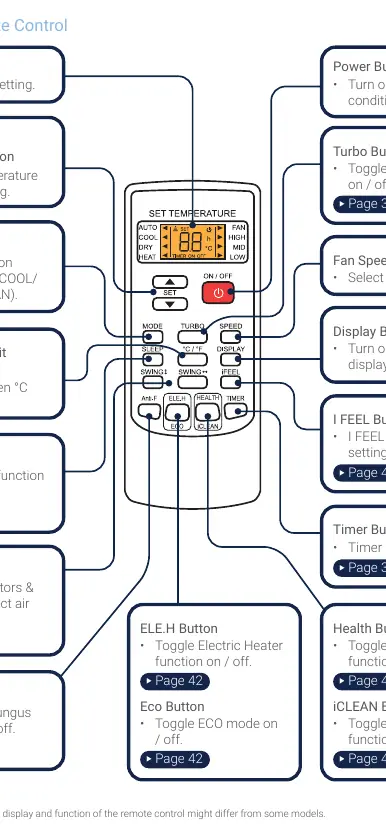
- Modes: Select between Auto, Cool, Dry, Heat, and Fan modes.
- Timer: Set automatic ON/OFF times.
- Special Functions: Includes Turbo, Sleep, I FEEL, and Anti-F (Anti-Fungus) functions.
- Wi-Fi: Connect to a 2.4GHz network using the Della+ app to control the unit remotely.
Maintenance
Regular maintenance is required to ensure efficiency:
- Air Filter: Clean the air filter screen every 3 months using soapy water.
- Unit Cleaning: Wipe the unit with a soft, dry cloth or a cloth dampened with neutral detergent.
- Long Idle Periods: Remove batteries from the remote and disconnect power if the unit will not be used for an extended time.
Troubleshooting
If the unit malfunctions, check the following:
- Non-operational: Check power supply, circuit breaker, or if the unit is in ON-TIMER mode.
- Strange Odor: Clean the air filter.
- Insufficient Airflow: Check for obstructions or dirty filters.
- Error Codes: The indoor unit display will show codes (e.g., E0-F9, FA-P8) to indicate specific faults. Refer to the troubleshooting section for descriptions.
Manufacturer information
Della
Practical help
Common problems
Appliance is non-operational
Check power supply, circuit breaker, or if the unit is in ON-TIMER mode.
Strange odor
Clean the air filter.
Insufficient airflow
Check for obstructions, clean air filter, or adjust fan speed.
Remote control not responding
Check distance, replace batteries, or remove obstacles between the remote and the unit.
Before use
- Ensure power supply voltage matches unit rating.
- Verify electrical wiring is connected and secured.
- Confirm the unit is properly grounded.
- Check that the indoor mounting plate is secure.
- Ensure refrigerant pipes are connected and leak-free.
- Verify refrigerant valves are fully opened.
Specs in practice
- Cooling Capacity
- Measured in Btu/h, indicates the cooling power of the unit.
- Heating Capacity
- Measured in Btu/h, indicates the heating power of the unit.
- Power Supply
- Voltage and frequency requirements (e.g., 115V/60Hz or 208V-230V/60Hz).
Images and diagrams
- Wiring diagram is located on the control box cover.
- Indoor unit installation requires drilling a 70mm hole slanted downward.
- Outdoor unit requires a concrete pad or wall mount bracket.
Model compatibility
- Wi-Fi network must support 2.4GHz; 5GHz is not supported.
- ECO mode only works for inverter models.
- Heating pump models require a drainage joint.

Manual page author
Emily Carter
User documentation editor
Prepares concise manual descriptions and highlights the most useful setup, operation, and maintenance information for readers.