HVAC / Air Conditioners
User Manual for Della Window Air Conditioner
Quick guide for the Della Window Air Conditioner. Learn how to install, operate, clean, and troubleshoot your unit, including safety instructions and control panel settings.
Table of contents
Manual images
Click an image to enlargeQuick Guide from the Manual
This manual provides instructions for the Della Window Air Conditioner (models 048-TL-W8KWD, 048-TL-W10KWD, 048-TL-W12KWD, 048-TL-W14KWD). Key requirements include a grounded 3-prong outlet, proper window dimensions, and a slight backward tilt for drainage. Always wait at least 3 minutes after turning off the unit before turning it back on to prevent compressor damage.
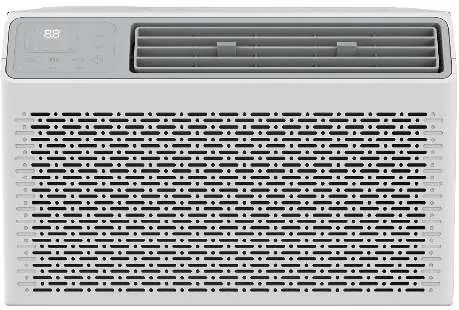
Important Safety Instructions
Warning: To reduce the risk of fire, electrical shock, or injury, follow these precautions:
- Plug into a grounded 3-prong outlet.
- Do not remove the ground prong, use a plug adapter, or use an extension cord.
- Unplug the unit before servicing.
- Use two or more people to move and install the unit.
- The unit uses R32 refrigerant, which is combustible. Ensure the installation site is well-ventilated and free from open flames or heat sources.
Installation & Assembly
The air conditioner is designed for standard double-hung windows. Ensure the unit is tilted about 3 degrees backward for proper condensate drainage.
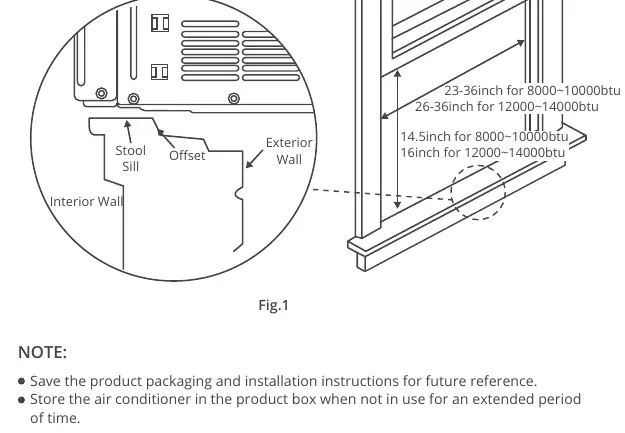
- Window Requirements: 8K-10K BTU models require a window width of 23-36 inches. 12K-14K BTU models require 26-36 inches.
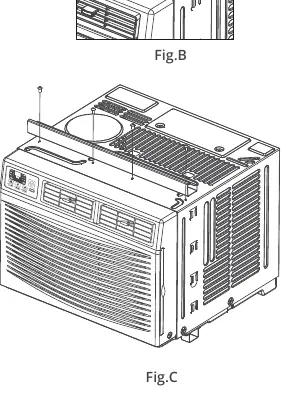
- Top Rail Assembly: Attach the top rail to the unit using the provided 3/8" screws before placing the unit in the window.
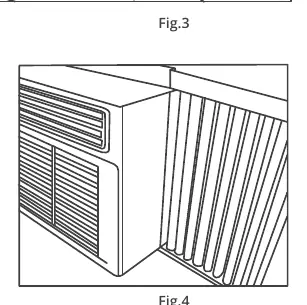
- Side Panels: Install the accordion filler panels into the cabinet rails. Ensure they sit securely.
- Securing the Unit: Use the frame lock and 3/4" screws to secure the unit to the window sill. Use 1/2" screws to secure the frame to the window sash.
- Sealing: Use the foam seal between the upper and lower sashes to prevent air leaks.
Using Your Air Conditioner
The control panel allows you to manage cooling, fan speed, and modes.
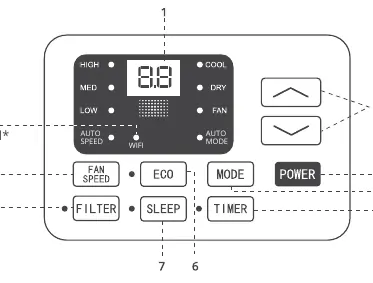
- Cool Mode: Cools the room and reduces humidity. Adjust temperature and fan speed as needed.
- Dry Mode: Reduces humidity through alternating cooling cycles and fan operation.
- Fan Mode: Circulates air without cooling.
- Auto Mode: Automatically selects the operation mode based on room temperature.
- Timer: Allows you to program the unit to turn on or off within 0.5 to 24 hours.
- Eco Mode: The unit turns off once the room reaches the set temperature and turns back on when the temperature rises.
- Sleep Mode: Automatically adjusts temperature and fan speed for comfort during the night.
Care and Cleaning
Regular maintenance ensures optimal performance.
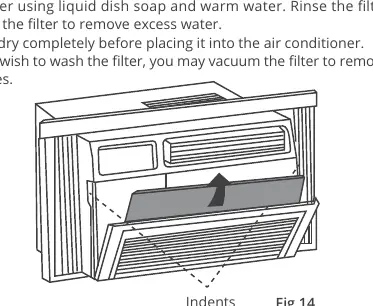
- Air Filter: Check at least once a month. Slide the filter out from the front right side, wash with warm water and mild soap, or vacuum. Let it dry completely before reinstalling.
- Cabinet Cleaning: Unplug the unit. Dust with an oil-free cloth or wash with a damp cloth and mild soap. Do not use harsh cleaners.
- Winter Storage: Remove the unit from the window and store it in the original box or cover with plastic.
Troubleshooting
If you encounter issues, check the following:
- Unit won't start: Check if it is plugged in, check the fuse/circuit breaker, or press the RESET button on the LCDI plug.
- Not cooling: Ensure airflow is not blocked, the thermostat is set correctly, the filter is clean, and the coils are not frozen.
- Water dripping inside: Ensure the unit is tilted slightly backward for proper drainage.
Manufacturer information
Della
Practical help
Common problems
The air conditioner will not start
Check if the unit is plugged in, check the house fuse or circuit breaker, or press the RESET button on the power cord plug.
The air conditioner does not cool as it should
Ensure there are no curtains or furniture blocking the unit, lower the thermostat setting, clean the air filter, or check if the cooling coils are frozen.
Water is dripping inside the room
Ensure the air conditioner is tilted slightly downward from the front to the rear to allow for proper drainage.
Remote control is not working
Check the battery orientation and replace the batteries if necessary.
Before use
- Ensure the outlet is a grounded 3-prong type.
- Do not use an extension cord.
- Verify window width is between 23 and 36 inches (depending on model).
- Install the top rail and side panels before placing the unit in the window.
- Ensure the unit is tilted slightly backward for drainage.
- Wait 3 minutes after turning off before turning back on.
Images and diagrams
- Fig 1: Shows the required window installation dimensions and the necessary backward tilt.
- Fig 14: Illustrates how to slide out and remove the air filter for cleaning.
Model compatibility
- Requires a standard double-hung window.
- 8K-10K BTU models: 23-36 inch window width.
- 12K-14K BTU models: 26-36 inch window width.

Manual page author
Michael Turner
Technical manual editor
Reviews PDF manuals for structure, safety notes, and practical product details so readers can find the right information quickly.