Hvac / Air Conditioners
User Manual for Della 048-OPAC-9B Portable Air Conditioner
Comprehensive user guide for the Della 048-OPAC-9B portable air conditioner. Includes detailed instructions for installation, operation modes, water drainage, maintenance, and troubleshooting.
Table of contents
Manual images
Jump to the sectionQuick guide from the manual
This portable air conditioner requires specific setup to operate safely and efficiently. Always plug the unit directly into a grounded wall outlet; do not use extension cords or power strips. Ensure the unit is placed on flat ground with at least 50 cm (19.7 inches) of clearance from walls or obstacles. If the unit displays an error code or fails to operate, consult the troubleshooting section for common issues like a full water tank or power failure.
Safety and Warnings
- Refrigerant: This unit uses R32 refrigerant. If a leak is suspected, shut down the unit and disconnect power immediately.
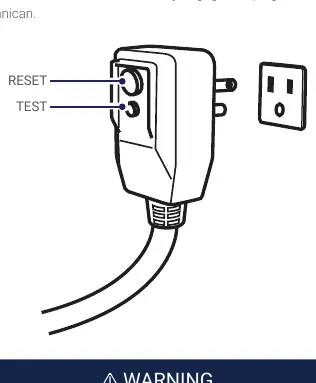
- Electrical: Plug directly into a wall socket. Do not use surge protectors, timers, or extension cords.
- Environment: Designed for indoor use only. Do not use in bathrooms, laundry areas, or near flammable substances.
- Maintenance: Always shut down and unplug the unit before cleaning.
Installation Guide
Proper installation is critical for cooling efficiency.
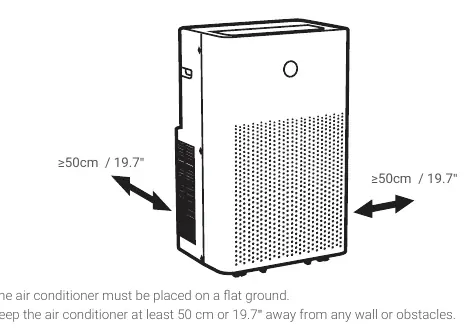
- Location: Place on a flat surface with 50 cm (19.7 inches) clearance. Avoid areas with open flames or gas appliances.
- Exhaust Hose: Connect the exhaust hose to the hose connector and window kit adapter. Keep the hose as straight and short as possible; excessive bending reduces efficiency.
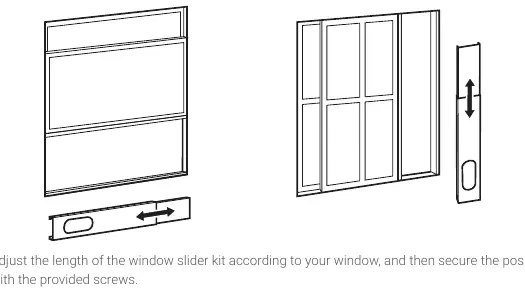
- Window Kit: Adjust the window slider kit to fit your window, secure it with screws, and attach the exhaust hose adapter. Use the provided foam seal to ensure a tight fit.
Operation Instructions
The unit can be controlled via the control panel or the remote control.
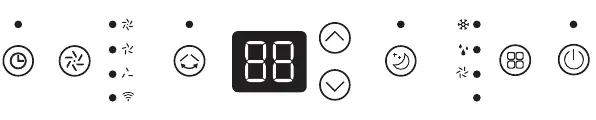
- Modes: Select between Cool, Dry, Fan, and Heat modes using the Mode button.
- Temperature: Adjustable in Cool and Heat modes (61°F - 90°F).
- Fan Speed: Adjustable in Cool, Fan, and Heat modes.
- Sleep Mode: Increases temperature by 2°F after 1 hour and another 2°F after the 2nd hour, then maintains it for 10 hours.
- Timer: Can be set to turn the unit ON or OFF.
- Oscillation: Enables side-to-side vent movement.
Water Drainage
When the internal tank is full, the display will show the "FL" error code.
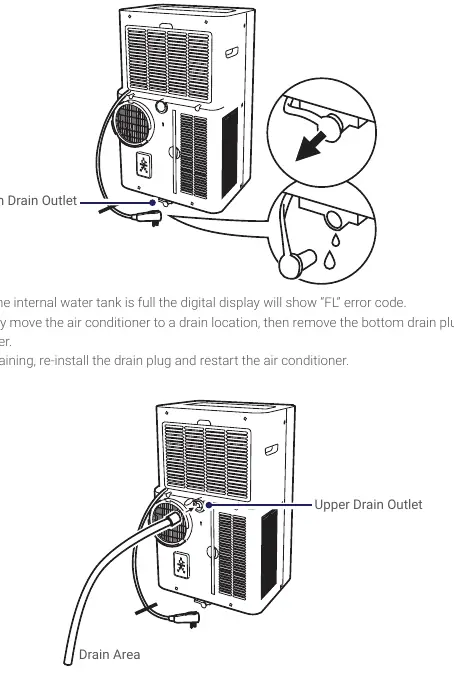
- Bottom Drain: For manual draining, move the unit to a drain location, remove the bottom plug, and drain the water.
- Continuous Drainage (Dry Mode): Remove the upper drain plug and attach a drain hose to allow water to flow into a drain area. Do not submerge the end of the hose.
Care and Maintenance
- Unit Cleaning: Wipe with a soft, dry cloth or a damp cloth with neutral detergent. Do not flush with water.
- Filter Cleaning: Remove the air filter, clean with a vacuum or warm water with mild detergent, dry completely, and reinstall.
- Storage: Unplug, detach hoses, drain all water, clean/dry the filter, and store in an upright position in a dry indoor location.
Troubleshooting
If the unit is non-operational, check for power failure, tripped breakers, or a full water tank. If cooling capacity is reduced, check for vent obstructions, dirty filters, open windows/doors, or improperly attached exhaust hoses. Error codes include:
- 00 / E0: Communication fault.
- E1: Ambient temperature sensor failure.
- E2: Coil temperature sensor failure.
- Ft: Full water tank.
Manufacturer information
Della
Practical help
Common problems
Unit is non-operational
Check if the plug is connected, the power breaker is tripped, the water tank is full, or if the ambient temperature is outside the operating range.
Reduced cooling capacity
Check for obstructions on the vent, clean the air filter, ensure windows/doors are closed, and verify the exhaust hose is properly attached.
Water leak
The internal water tank is likely full. Drain the unit using the bottom drain outlet.
Noise or vibration
Ensure the appliance is placed on a flat, even surface.
Before use
- Ensure the unit is placed on flat ground.
- Maintain at least 50 cm (19.7 inches) of clearance from walls or obstacles.
- Plug directly into a grounded wall outlet (do not use extension cords).
- Install the exhaust hose and window slider kit correctly.
- Check that the air filter is clean and properly installed.
Specs in practice
- Cooling Capacity
- 14000 BTU/h, suitable for rooms up to 550 sq.ft.
- Operation Temperature
- 61°F - 90°F (Cooling Mode); 41°F - 81°F (Heating Mode).
Images and diagrams
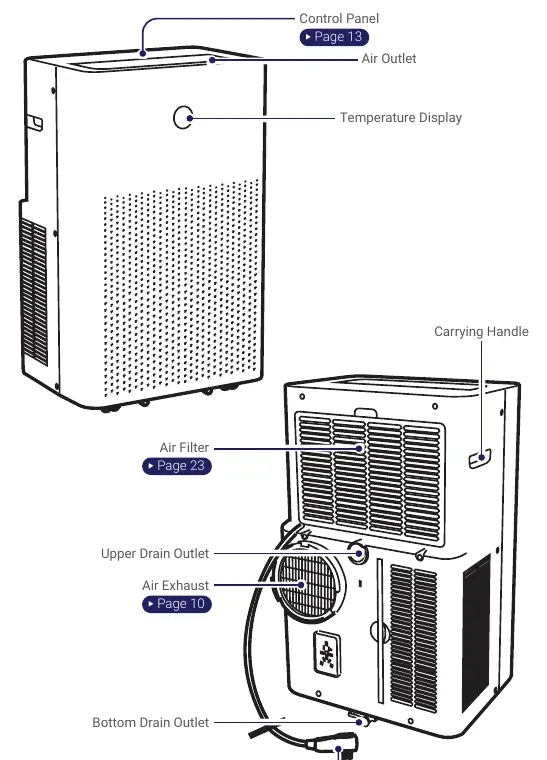
- Control Panel: Displays icons for power, mode, sleep, timer, oscillation, and fan speed.
- Drainage: Shows the bottom drain plug for full tank drainage and the upper drain outlet for continuous drainage.
- Grounding Plug: Features integrated Test and Reset buttons for safety.
Model compatibility
- Indoor use only.
- Do not use in bathrooms, laundry areas, or places with high water contact.

Manual page author
David Miller
Documentation analyst
Organizes user manual content into clear summaries, with attention to model details, product context, and everyday usability.