Hvac / Air Conditioners
Della 048-MS-12 Series Mini Split Air Conditioner User Manual
Quick guide for Della 048-MS-12, 18, 24, and 36 series mini split air conditioners. Includes installation steps, remote control operation, Wi-Fi setup, maintenance, and troubleshooting error codes.
Table of contents
Manual images
Jump to the sectionQuick guide from the manual
This document covers the installation and operation of the Della 048-MS series mini split air conditioners. Key requirements include professional installation for electrical and HVAC systems, a 2.4GHz Wi-Fi network for app connectivity, and adherence to specific clearance distances for both indoor and outdoor units.
Installation overview
Installation must be performed by a licensed professional. Ensure the power supply voltage matches the rating plate. Do not install within 50cm of flammable substances. The system requires a vacuum pump for the leak test and refrigerant charging if lines are extended.
Indoor unit installation
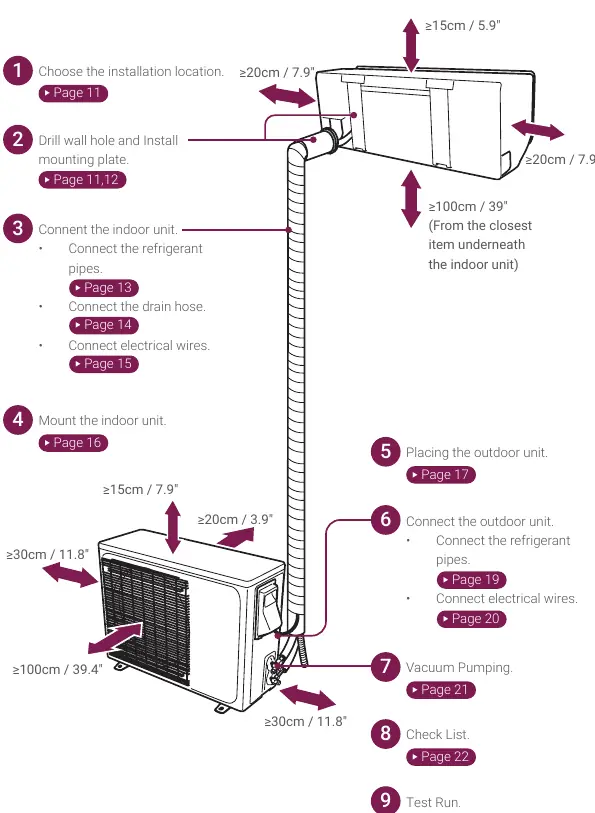
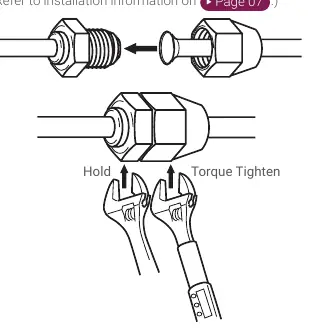
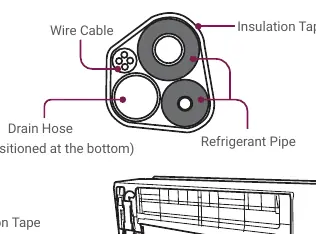
Choose a location that allows for easy drainage and maintenance, at least 3m away from TV or radio appliances. Secure the mounting plate using a spirit level. Drill a 70mm hole slanted downward for piping. Connect refrigerant pipes using a torque wrench, ensuring proper flaring. Bundle pipes, drain hose, and wires with insulation tape before passing through the wall.
Outdoor unit installation
Place the outdoor unit on a solid, level surface, ideally a concrete pad. Ensure adequate clearance for airflow. Install the drainage joint for heating pump models. Secure the unit using a base kit or wall mount bracket. Connect refrigerant pipes and electrical wires according to the wiring diagram on the unit.
Vacuum pumping and leak test
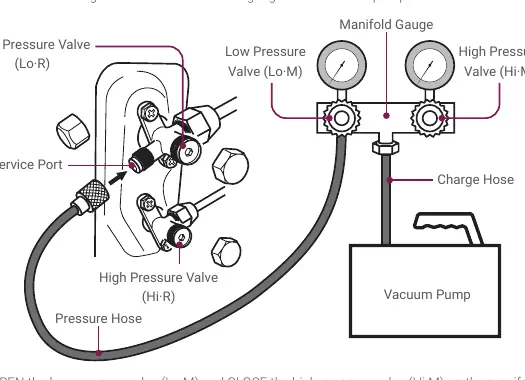
Connect a manifold gauge to the service port and a vacuum pump to the charge hose. Run the pump for at least 15 minutes until the gauge reads -0.1Mpa (-76cmHg). Close the pressure valve and wait 5 minutes to ensure the pressure does not rise, indicating a leak. If no leak is detected, open the valves to release refrigerant.
Remote control operation
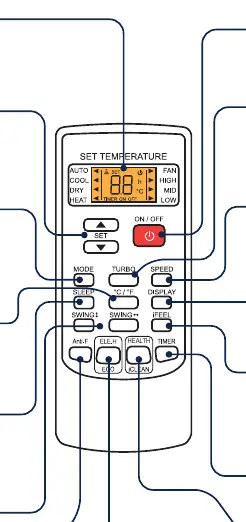
The remote control allows for mode selection (Auto, Cool, Dry, Heat, Fan), temperature adjustment, and fan speed control. Special functions include Sleep, I Feel, Anti-F (prevents mold), Eco mode (inverter models only), Health, and iClean (self-cleaning).
Wi-Fi and app connection
Download the DELLA+ app. Ensure your smartphone is connected to a 2.4GHz Wi-Fi network (5GHz is not supported). Follow the in-app instructions to add the device by scanning the QR code on the unit or packaging.
Care and maintenance
Clean the air filter every 3 months by washing it with soapy water and air drying. Clean the unit exterior with a soft, dry cloth or damp cloth with neutral detergent. Do not flush the unit with water. Call an HVAC technician to check refrigerant levels every 3 to 4 years.
Troubleshooting and error codes
If the unit is non-operational, check for power failure, tripped breakers, or if the unit is in timer mode. If the unit displays an error code, refer to the troubleshooting section. Common codes include E0 (Overcurrent), E1 (Indoor Temp Sensor Error), E4 (Indoor Fan Error), and F3 (Compressor Out of Step Error).
Manufacturer information
Della
Practical help
Common problems
Appliance is non-operational
Check for power failure, loose connections, tripped internal protection, or if the unit is in ON-TIMER mode.
Strange odor
Clean the air filter.
Insufficient airflow
Check for obstructed intakes/outlets, dirty air filter, or ensure fan speed is not set to minimum.
Remote control not responding
Check distance to indoor unit, replace batteries, or remove obstacles between the remote and the unit.
Before use
- Verify power supply and voltage match unit rating.
- Ensure electrical wiring is connected and secured.
- Confirm the air conditioner is properly grounded.
- Check that the power breaker or fuse is installed.
- Ensure the indoor mounting plate is secured.
- Verify the drain hose is properly attached.
- Confirm refrigerant pipes are connected and leak-free.
Specs in practice
- Wi-Fi Frequency
- Supports 2.4GHz networks only; 5GHz is not compatible.
- Operating Temperature (Cool)
- Ambient room temperature must be > 64.4°F (18°C).
- Operating Temperature (Heat)
- Ambient room temperature must be > 80.6°F (27°C).
Images and diagrams
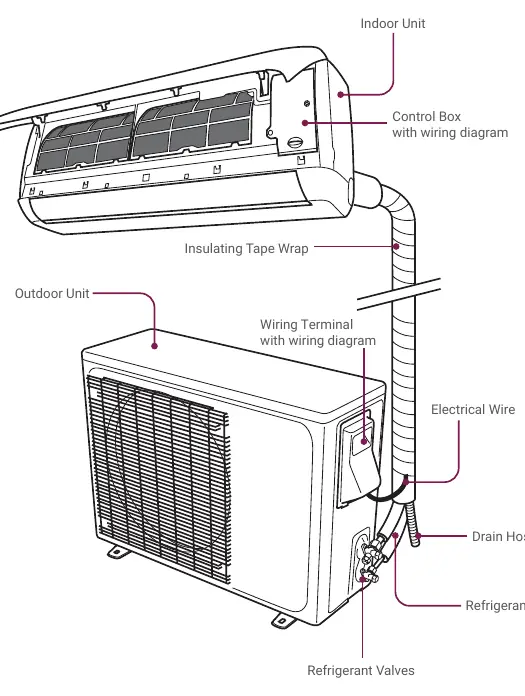
- Name of Parts: Overview of indoor and outdoor unit components.
- Pre-installation: Clearance requirements for optimal airflow.
- Refrigerant Connection: Proper use of torque wrench for pipe tightening.
- Vacuum Pumping: Setup of manifold gauge and vacuum pump.
- Remote Control: Layout of buttons and display indicators.
Model compatibility
- Requires professional installation by a licensed HVAC technician.
- Wi-Fi app requires 2.4GHz network.
- Eco mode is only available for inverter models.
- Electric heating function is not available on North America models.

Manual page author
Emily Carter
User documentation editor
Prepares concise manual descriptions and highlights the most useful setup, operation, and maintenance information for readers.