Hvac / Air Conditioners
User Manual for Della 048-TL-W8KI Smart Inverter Window Air Conditioner
Comprehensive user guide for the Della 048-TL-W8KI Smart Inverter Window Air Conditioner. This manual provides detailed instructions on installation, remote control operation, maintenance, and troubleshooting.
Table of contents
Manual images
Jump to the sectionQuick Guide from the Manual
This document provides essential instructions for the Della 048-TL-W8KI series air conditioner. Before operation, ensure the unit is installed in a properly grounded outlet and that the power cord's current interrupter device is tested. The unit uses R32 refrigerant, which requires specific safety precautions during installation and maintenance. Always ensure the unit is tilted slightly outward to allow for proper condensate drainage.
Important Safety Instructions
Read all instructions before use. Key safety points include:
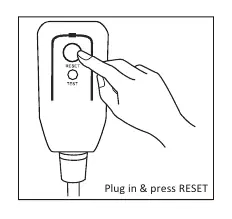
- Electrical Safety: Use a properly grounded wall receptacle. Do not use extension cords or modify the power cord.
- R32 Refrigerant: This unit uses flammable R32 refrigerant. Installation and maintenance must be performed by qualified technicians in well-ventilated areas. Keep away from open flames or spark-generating devices.
- Power Cord: The power cord includes a current detection device. Always test it by pressing the TEST button, then the RESET button before operation.
- General Safety: Do not operate if the unit is damaged. Keep air inlets and outlets unobstructed.
Installation
The air conditioner is designed for standard single-hung or double-hung windows.
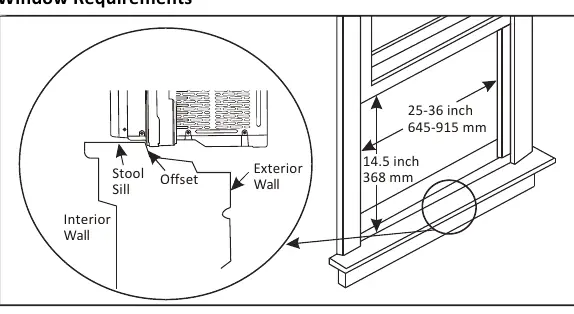
- Window Requirements: Width between 25" and 36" (645mm - 915mm). Requires 14.5" of vertical clearance.
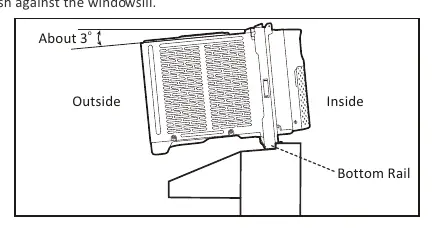
- Placement: The unit must be tilted about 3 degrees outward for proper drainage.
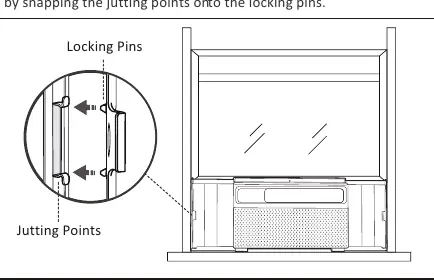
- Securing: Use the provided side brackets and screws to secure the unit to the window frame.
- Sealing: Use the included foam seals and plasticene to fill gaps between the unit and the window frame.
- Security: Install the security bracket on top of the window sash.
Using Your Air Conditioner
The unit can be controlled via the control panel or the included remote control.
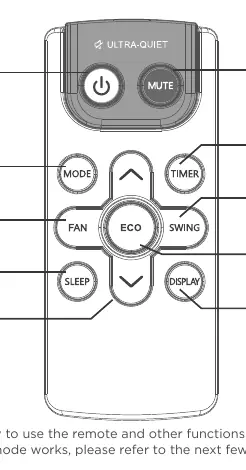
- Modes: Cool, Dry (dehumidifier), Fan, and Auto.
- Fan Speed: Adjustable (Low, Med, High, Auto) in Cool and Fan modes.
- Special Features: ECO mode for energy saving, Sleep mode for comfort, and Mute mode for quiet operation.
- Timer: Set a timer from 0.5 to 24 hours for automatic start/stop.
- Memory: The unit remembers previous settings (except timer) if it remains connected to power.
Cleaning and Maintenance
Regular maintenance ensures optimal performance.
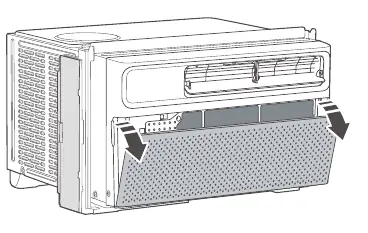
- Air Filter: Check monthly. Pull the grille from the indents, remove the filter, wash with warm water and mild soap, and let it dry completely before re-installing.
- Cabinet: Dust with an oil-free cloth or wipe with a damp cloth and mild soap. Do not use harsh cleaners.
- Winter Storage: Remove from the window and store in the original box.
Troubleshooting
If you encounter issues, check the following:
- Unit won't start: Check if plugged in, check house fuse/breaker, or press the RESET button on the power cord plug.
- Not cooling: Ensure airflow is not blocked, clean the filter, or lower the thermostat setting.
- Water dripping inside: Ensure the unit is tilted slightly outward.
- Noise: A "da-da" sound at startup is normal due to the compressor.
Manufacturer information
Della
Practical help
Common problems
The air conditioner will not start.
Ensure the plug is pushed completely into the outlet. Check the house fuse or circuit breaker. Press the RESET button on the power cord plug.
The air conditioner does not cool as it should.
Check for obstructions blocking the front of the unit. Clean the air filter. Ensure the thermostat is set correctly.
Water is dripping inside.
The unit is likely not tilted correctly. Ensure it is tilted slightly toward the outside to allow for water drainage.
The remote control is not working.
Check the battery orientation or replace the batteries.
Before use
- Verify window width is between 25 and 36 inches.
- Ensure the electrical outlet is properly grounded.
- Remove all packaging materials from the unit.
- Ensure the unit is tilted about 3 degrees outward for drainage.
- Test the power cord current interrupter device (TEST/RESET buttons).
Specs in practice
- RATED Capacity (Btu/h)
- The cooling power of the unit; higher numbers indicate greater cooling capacity.
- Refrigerant type (R32)
- The type of refrigerant used; requires specific safety handling due to flammability.
- Application area
- The recommended room size for the unit to operate efficiently.
Images and diagrams
- Window installation diagram illustrates the required 3-degree tilt for drainage.
- Remote control diagram identifies all function buttons including Mute, Eco, and Timer.
- Filter removal diagram shows how to access the filter from the front grille.
Model compatibility
- Designed for standard single-hung or double-hung windows.
- Requires 14.5 inches of vertical clearance when the window is open.

Manual page author
David Miller
Documentation analyst
Organizes user manual content into clear summaries, with attention to model details, product context, and everyday usability.