Hvac / Air Conditioners
Della Mini-Split Air Conditioner Wi-Fi Setup Guide
A comprehensive guide for setting up and operating the Wi-Fi module for your Della Mini-Split Air Conditioner. Includes app installation, device pairing (EZ and AP modes), remote control interface explanations, advanced functions, and...
Table of contents
Manual images
Jump to the sectionQuick guide from the manual
This document provides instructions for connecting your Della Mini-Split Air Conditioner to the DELLA+ app. To ensure a successful setup, ensure your smartphone is running Android 5.0+ or iOS 9.0+ and that you have a 2.4GHz Wi-Fi network available. The 5GHz band is not supported. Ensure the indoor unit is powered on and the Wi-Fi module is accessible for the reset procedure.
App installation
Download the DELLA+ app by scanning the QR code provided in the manual or by searching for "DELLA+" in the Google Play Store or Apple App Store. During installation, you must grant the app permissions for Storage, Location, and Camera to ensure proper functionality.
Connecting the device
There are two primary modes for adding your air conditioner to the app:
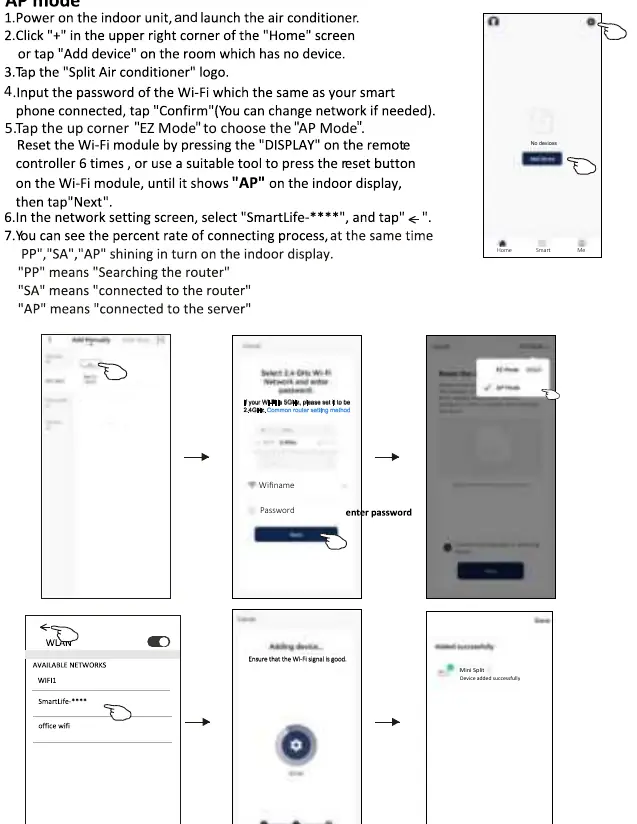
- EZ Mode (Quick Connection): Power on the unit, tap "Add device" in the app, and select your Wi-Fi network. Reset the Wi-Fi module by pressing the "DISPLAY" button on the remote controller 6 times or using the reset button on the module until "CF" appears on the indoor display. Follow the app prompts to complete the connection.
- AP Mode (Access Point): If EZ Mode fails, use AP Mode. Reset the Wi-Fi module until "AP" appears on the display. In your phone's Wi-Fi settings, connect to the "SmartLife-****" network, then return to the app to finish the setup.
Air conditioner control
The app offers two control interfaces depending on the firmware version. Both interfaces allow you to:
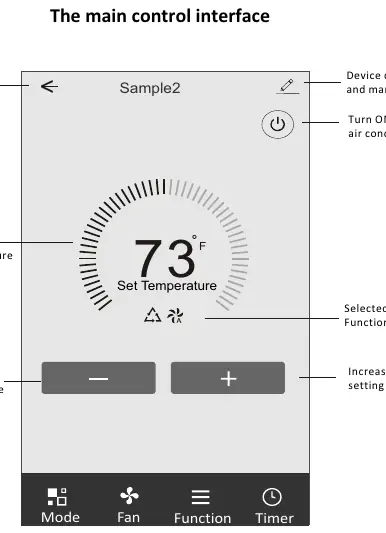
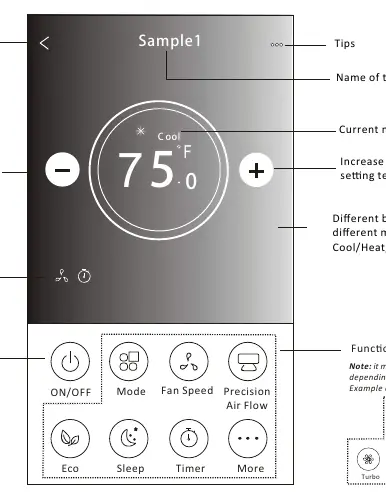
- Mode Selection: Choose between Feel, Cool, Heat, Dry, and Fan modes.
- Fan Speed: Adjust speed settings (High, Med, Low, Auto).
- Air Flow: Control swing directions (Up-Down, Left-Right).
- Temperature: Increase or decrease the set temperature.
Advanced functions
Depending on your specific model, you can access additional features via the "More" button:
- ECO Function: Optimizes energy consumption.
- Sleep Function: Adjusts settings for comfortable sleeping conditions.
- Timer: Schedule automatic on/off times.
- Anti-Mildew: Dries residual moisture after the unit is turned off.
- Health: Activates the antibacterial ionizer (if equipped).
- GEN Mode: Allows current limitation to save energy.
- Electricity Monitoring: Tracks energy usage statistics.
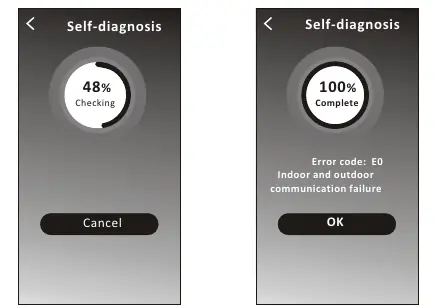
- Self-diagnosis: Automatically checks for errors and displays codes (e.g., E0 for communication failure).
Device sharing
You can share control of the air conditioner with other accounts. Navigate to the device details screen, select "Share Device," and choose the sharing method. The recipient must refresh their device list to see the shared unit.
Troubleshooting
If you encounter issues, verify the following:
- Ensure the Wi-Fi password is correct and the router is working.
- Check if the air conditioner is in configuration status.
- Ensure the device is within the Wi-Fi signal range.
- If the app shows "Identification failed" or "Air conditioner out of line," reset the connection or delete and re-add the device in the app.
Manufacturer information
Della
Practical help
Common problems
Air conditioner cannot be configured successfully
Verify Wi-Fi password, ensure the unit is in configuration status, check for firewall restrictions, and confirm the router is functioning within signal range.
Mobile cannot control the air conditioner
If the app shows 'Identification failed', the unit may have been reset. Reconnect the Wi-Fi to restore permissions. If it shows 'out of line', check network connectivity and power.
Mobile cannot find the air conditioner
Ensure the air conditioner and router are powered on, and the mobile device is connected to the same network (or the correct network for remote control).
Before use
- Smartphone with Android 5.0+ or iOS 9.0+.
- 2.4GHz Wi-Fi network (5GHz is not supported).
- DELLA+ app installed.
- Permissions enabled (Storage, Location, Camera).
- Indoor unit powered on.
- Wi-Fi module reset button accessible.
Specs in practice
- Network frequency
- 2.400 - 2.500GHz (Required for Wi-Fi module).
- WLAN Standards
- IEEE 802.11 b/g/n (channels 1-14).
- Security support
- WEP/WPA/WPA2/AES128.
Images and diagrams
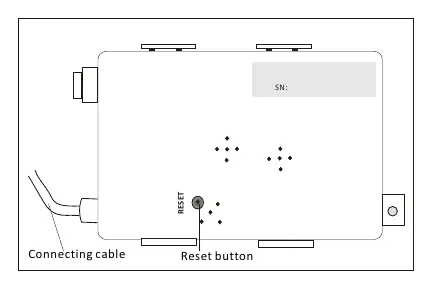
- The Wi-Fi module is located behind the front panel of the indoor unit, near the electric box cover.
- The reset button on the Wi-Fi module is used to initiate pairing modes (EZ or AP).
Model compatibility
- Some functions (e.g., Anti-Mildew, Health, GEN Mode) are model-dependent and may not appear if the unit does not support them.
- ECO mode is disabled in Fan, Dry, and Auto modes on some models.

Manual page author
Emily Carter
User documentation editor
Prepares concise manual descriptions and highlights the most useful setup, operation, and maintenance information for readers.