Electronics / Audio
Owner's Manual for DigiTech Whammy DT Pedal
Quick guide for the DigiTech Whammy DT pedal. Learn how to set up, use Whammy and Drop Tune effects, calibrate the expression pedal, and configure MIDI settings.
Table of contents
Quick guide from the manual
The Whammy DT is a pitch-shifting pedal that combines classic Whammy effects with Drop Tuning and Raised Tuning capabilities. To get started, connect your instrument to the Input Jack and your amplifier to the Output Jack. Connect the provided power supply to the Power Input. Use the footswitches to enable Whammy or Drop Tune effects and rotate the corresponding selector knobs to choose your desired effect.
Device Overview
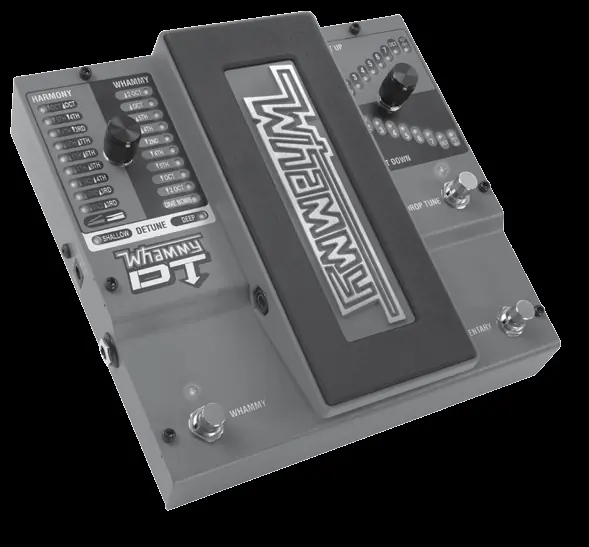
The pedal features two main sections: the Whammy side (left) and the Drop Tune side (right). The Whammy side includes the Effect Switch, Status LED, Effect Selector Knob, and the Expression Pedal for controlling pitch bend. The Drop Tune side includes the Effect Switch, Status LED, Effect Selector Knob, and a Momentary Switch for hammer-on and pull-off effects.
Making Connections
- Connect your instrument to the instrument Input Jack.
- Connect the Whammy's Output Jack to your amplifier or distortion pedal.
- Connect the power supply between an AC outlet and the Power Jack.
- Turn on your amplifier and adjust the volume.
- Use the footswitches to enable effects and rotate the knobs to select the desired settings.
Effects
Whammy Effects: These bend the input signal up or down. Settings include 2 Octave Up/Down, 5th/4th intervals, and the Dive Bomb effect. The expression pedal controls the bend amount.
Harmony Effects: These add a harmony note to your signal. The input signal remains unchanged while the harmony note bends between two intervals.
Detune Effects: These create a detuned copy of your signal and mix it with the dry signal. Options include Shallow and Deep.
Drop Tune Effects: These transpose your instrument up or down by up to one octave. Includes Octave + Dry settings for 12-string guitar simulation.
MIDI Functions
The Whammy DT supports MIDI for remote effect selection and expression pedal control. To change the MIDI channel: disconnect power, press and hold the Whammy Effect Footswitch while reconnecting power, use the Whammy Effect Knob to select the channel, and press the footswitch again to exit.
Bypass Modes
The pedal offers two bypass modes:
- True Bypass: The circuitry is completely bypassed when effects are off.
- DSP Bypass: Allows for smoother transitions when using the Momentary footswitch.
To switch modes, disconnect power, press and hold the Momentary Footswitch while applying power, and release when the Drop Tune LED flashes (Red for True Bypass, Green for DSP Bypass).
Calibrating the Expression Pedal
If the pedal does not respond correctly, re-calibration may be required:
- Disconnect power.
- Press and hold the Whammy Effect Footswitch while reconnecting power.
- Rock the expression pedal fully forward (toe down) and press the Drop Tune Footswitch until the LED turns green.
- Rock the pedal fully back and forward at least twice.
- Press the Whammy Effect Footswitch to exit.
FS3X Footswitch
An optional FS3X footswitch can be connected to the Footswitch Input for hands-free effect selection. Use the Mode switch to select the side (Whammy or Drop Tune) and the Up/Down switches to cycle through effects.
Specifications
- Input: 1/4 inch Unbalanced TS
- Output: 1/4 inch Unbalanced TS
- Power: 9 VDC External Adapter
- Frequency Response: 20 Hz to 20 kHz
- Sample Rate: 44.1 kHz
Practical help
Common problems
Expression pedal not responding or note not bending correctly
Perform the expression pedal re-calibration procedure.
MIDI messages not being received
Ensure the MIDI channel is correctly set on the pedal to match your controller.
Drop Tune footswitch transition issues
Switch from True Bypass to DSP Bypass mode for smoother transitions.
Before use
- Connect your instrument to the Input Jack.
- Connect the Output Jack to your amplifier or distortion pedal.
- Connect the provided 9V DC power supply.
- Ensure the pedal is on a stable surface.
Specs in practice
- Input Impedance
- 1 MΩ, suitable for standard guitar pickups.
- Power Requirements
- 9 VDC external adapter required.
Images and diagrams
- Front Panel: Contains Whammy and Drop Tune effect switches, selector knobs, and status LEDs.
- Rear/Side Panel: Includes Instrument Input, MIDI Input, Footswitch Input, Power Input, and Output Jack.
Model compatibility
- Requires Class II power adapter conforming to EN60065, EN60742, or equivalent.
- Optional FS3X Footswitch requires a 1/4 inch TRS cable.

Manual page author
David Miller
Documentation analyst
Organizes user manual content into clear summaries, with attention to model details, product context, and everyday usability.