Electronics / Audio
User Guide for DigiTech Jimi Hendrix Experience Artist Series Pedal
Quick guide for the DigiTech Jimi Hendrix Experience Artist Series Pedal. Learn how to set up, calibrate the expression pedal, select output modes, and understand the seven signature tone models.
Table of contents
Manual images
Jump to the sectionQuick Start Guide
Before using your DigiTech Jimi Hendrix Experience Artist Series Pedal, ensure you have all included items: the pedal, gig bag, guitar pick, PS0913B power supply, manual, warranty card, and brochure. Note that this unit does not support battery power and must be used with the included power supply.
To set up the pedal:
- Turn down the volume on your amplifier or mixer.
- Connect the pedal output to your amplifier or mixer input.
- Connect your guitar to the pedal input.
- Set the LEVEL control to the minimum position.
- Connect the power supply to the pedal.
- Select an output mode if necessary.
- Turn up your amplifier/mixer volume.
- Turn on the effect by pressing the TOE or HEEL SWITCH and adjust the LEVEL control.
Device Overview
The pedal features several controls and inputs:
- Inputs/Outputs: Includes an instrument input, footswitch jack (for optional FS3X), OUT 1 (AMP), and OUT 2 (MIXER).
- Knobs: Controls include GAIN, LEVEL, HIGH, LOW, REVERB, and a model-dependent CONTROL knob.
- Expression Pedal: Serves as a variable control for effects and activates the HEEL and TOE switches.
- Indicator LED: Shows the current mode (OFF=bypass, GREEN=toe mode, RED=heel mode 1, YELLOW=heel mode 2).
Flexible Output Modes
The pedal offers three output modes to suit your setup:
- Mode 1 (Mono): Default mode when one cord is plugged into either OUT 1 or OUT 2.
- Mode 2 (Stereo Mixer): Enabled when two cords are plugged into both outputs. This is the factory default stereo mode.
- Mode 3 (Stereo Amp): Enabled via the Flexible Output Mode Setup.
To select the output mode, power up the pedal, select Model 7, press and hold the HEEL SWITCH for five seconds until the LED flashes yellow, then turn the MODEL knob to select Mode 6 (Stereo Amp) or leave at Model 7 (Stereo Mixer). Press the TOE SWITCH to exit.
Using the Expression Pedal and Models
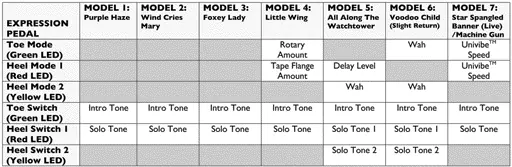
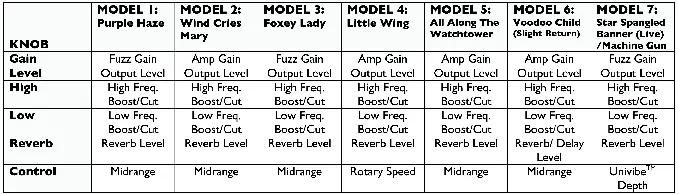
The pedal includes seven signature Jimi Hendrix tone models, selectable via the MODEL knob. Each model offers different intro and solo tones, which can be toggled using the TOE and HEEL switches. The expression pedal's function changes depending on the selected model (e.g., controlling Wah, Rotary Speed, or Univibe Speed).
Calibrating the Expression Pedal
If the expression pedal's range diminishes over time, recalibrate it:
- Select Model 1.
- Press and hold the HEEL SWITCH for five seconds until the LED flashes green.
- Rock the pedal all the way forward (toe down).
- Select Model 2; the LED flashes yellow.
- Rock the pedal all the way back (toe up).
- Select Model 3; the LED should flash green three times and turn off.
Optional FS3X Footswitch
The optional FS3X footswitch provides hands-free access to models and switching between heel and toe modes. Connect it to the FOOTSWITCH jack using the included stereo TRS cable.
Specifications
- Controls: GAIN, LEVEL, HIGH, LOW, REVERB, CONTROL
- Jacks: INPUT, FOOTSWITCH, OUT 1 (AMP), OUT 2 (MIXER)
- Input Impedance: 1M Ohms
- Output Impedance: 200 Ohms
- Power Consumption: 4.5 Watts
- Weight: 3.38 lbs
Practical help
Common problems
Expression pedal range is diminished
Perform the calibration procedure: Select Model 1, hold HEEL SWITCH for 5 seconds, rock pedal forward, select Model 2, rock pedal back, select Model 3.
Unit will not power on
Ensure you are using the included PS0913B power supply. The unit does not support battery power.
Calibration fails
If the LED flashes red during step 6, the calibration failed. Select Model 1 and repeat the calibration steps.
Before use
- Turn down the volume on your amplifier or mixer.
- Connect the pedal output to the amplifier/mixer input.
- Connect the guitar to the pedal input.
- Set the LEVEL control to the minimum position.
- Connect the included PS0913B power supply.
Specs in practice
- Input Impedance
- 1M Ohms, standard for guitar instruments.
- Output Impedance
- 200 Ohms, suitable for standard amp/mixer inputs.
- Power Consumption
- 4.5 Watts, requires the specific PS0913B power supply.
Images and diagrams
- The I/O diagram shows the correct connection points for the guitar, amplifier, mixer, and optional FS3X footswitch.
- The control tables provide a quick reference for what the knobs and expression pedal control for each of the seven models.
Model compatibility
- Requires PS0913B power supply (100V, 120V, 230V, or 240V versions depending on region).
- Compatible with optional FS3X footswitch for hands-free control.

Manual page author
Michael Turner
Technical manual editor
Reviews PDF manuals for structure, safety notes, and practical product details so readers can find the right information quickly.