Electronics / Audio
Owner's Manual for DigiTech Whammy 5 Pitch Shift Pedal
Quick guide for the DigiTech Whammy 5 pitch shift pedal. Learn how to connect, calibrate the expression pedal, use MIDI functions, and understand effect settings.
Table of contents
Quick guide from the manual
The DigiTech Whammy 5 is a pitch-shifting pedal designed for both guitar and bass. To get started, connect your instrument to the Input, connect the Output to your amplifier or distortion pedal, and plug in the included power supply. Use the Effect On/Off footswitch to engage the effect, and the Selector Knob to choose your desired pitch-shifting mode. If the pedal does not respond correctly, perform the calibration procedure outlined in this guide.
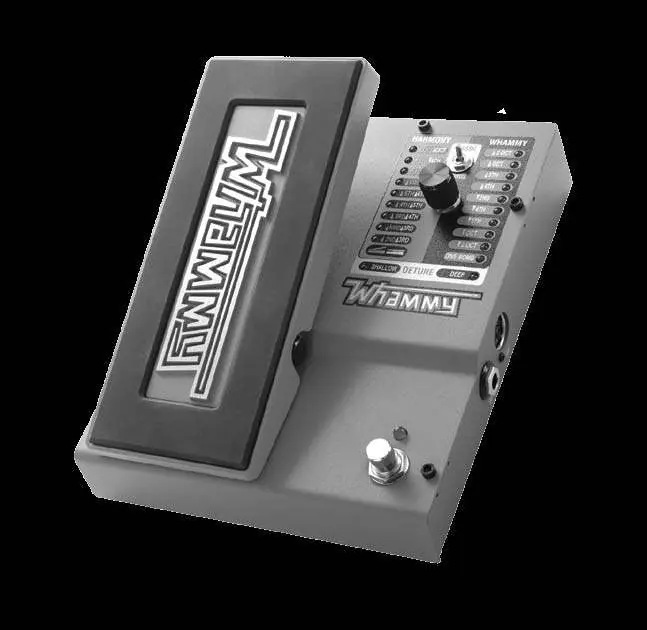
Detailed Description
The pedal interface consists of several key components:
- Expression Pedal: Controls the amount of pitch bending. Rocking forward (toe down) increases the effect; rocking back (toe up) decreases it.
- Classic/Chords Switch: Toggles between the classic Whammy algorithm (single notes) and the modern Whammy DT algorithm (full chords).
- Selector Knob: Used to select between Whammy, Harmony, or Detune effects.
- LEDs: Indicate which effect type is currently selected (Harmony, Whammy, or Detune).
- Status LED: Indicates if the effect is active or bypassed.
Making Connections
- Connect your instrument to the Input Jack.
- Connect the Output Jack to your amplifier or other pedals.
- If using MIDI, connect your external MIDI device to the MIDI Input.
- Connect the included power supply to the Power Input and an AC outlet.
- Turn on your amplifier and adjust the volume.
- Engage the effect using the Effect On/Off Footswitch.
Effects
The Whammy 5 offers three categories of effects:
- Whammy Effects: Bends the incoming signal up or down. Options range from 2 octaves up to 3 octaves down (Dive Bomb).
- Harmony Effects: Adds a harmony note to your signal, mixing the dry and wet signals.
- Detune Effects: Creates a copy of your signal, shifts the pitch slightly, and mixes it back with the dry signal (Shallow or Deep settings).
MIDI Functions
The Whammy 5 supports MIDI for remote control of effect selection and expression pedal position.
- MIDI Channel: To change the MIDI channel, disconnect power, hold the Effect On/Off footswitch while reconnecting power, use the Selector Knob to choose the channel, and press the footswitch again to exit.
- Continuous Control: MIDI CC11 can be used to control the expression pedal position (0 = toe up, 127 = toe down).
Calibrating the Expression Pedal
If the pedal does not bend to the correct pitch or respond properly, recalibrate it:
- Disconnect power.
- Press and hold the WHAMMY Effect Footswitch while reconnecting power.
- Wait for a Whammy LED to flash, then release the footswitch.
- Rock the Expression Pedal fully forward and back at least twice. The Harmony LEDs will light up to indicate calibration is in progress.
- Press the WHAMMY Effect Footswitch again to exit and return to normal operation.
Specifications
- Input: 1/4" Unbalanced TS, 1 MΩ impedance.
- Output: 1/4" Unbalanced TS, 1 kΩ impedance.
- Sample Rate: 44.1 kHz.
- Power: 9 VDC External Adapter (2.4 Watts).
- Dimensions: 6.5" (W) x 7.75" (D) x 2.5" (H).
Safety Instructions
For your protection, observe the following:
- Do not open the unit; there are no user-serviceable parts inside.
- Do not use near water or expose to rain/moisture.
- Clean only with a dry cloth.
- Do not block ventilation openings.
- Use only the included power supply.
- Disconnect during lightning storms.
Practical help
Common problems
Pedal does not respond properly or note does not bend to the correct pitch.
Perform the Expression Pedal re-calibration procedure.
MIDI control is not working.
Verify the MIDI channel settings by entering the MIDI setup menu.
Liquid spilled on the unit.
Shut off immediately and take to a dealer for service.
Before use
- Connect instrument to the Input Jack.
- Connect Output Jack to amplifier or distortion pedal.
- Connect the included power supply.
- Turn on amplifier and adjust volume.
- Engage effect using the Effect On/Off Footswitch.
Specs in practice
- Input Impedance
- 1 MΩ, suitable for standard guitar pickups.
- Power Requirements
- 9 VDC External Adapter; do not use other power supplies.
Images and diagrams
- 1: Expression Pedal for controlling pitch bend amount.
- 2: Harmony LEDs indicating selected harmony effect.
- 3: Classic/Chords switch for selecting algorithm type.
- 4: Selector Knob for choosing effect type.
- 5: Whammy LEDs indicating selected Whammy effect.
Model compatibility
- Requires Class II power adapter conforming to EN60065, EN60742, or equivalent.
- Compatible with external MIDI devices for remote control.
- Designed for both guitar and bass.

Manual page author
Michael Turner
Technical manual editor
Reviews PDF manuals for structure, safety notes, and practical product details so readers can find the right information quickly.