Power / Batteries & Chargers
User Manual for Digitech AC1820 Composite AV to HDMI Converter
Quick guide for the Digitech AC1820 Composite AV to HDMI Mini Converter. Learn how to connect your analog devices to HDMI displays, understand supported video formats, and view technical specifications.
Table of contents
Manual images
Click an image to enlargeQuick guide from the manual
The Digitech AC1820 is a universal converter designed to transform analog Composite AV signals into digital HDMI signals. It features an integrated 1080p scaler, allowing you to connect older devices (like game consoles or DVD players) to modern HDMI displays. The device is plug-and-play, requiring no driver installation, but it does require a USB power connection to function.
Product Description
This module employs 10-bit, 162 MSPS sampling to convert composite signals to 1080p (60Hz) output. It includes features such as black/white level expansion, color transition improvement, dynamic range expansion, and blue stretch to enhance video quality.
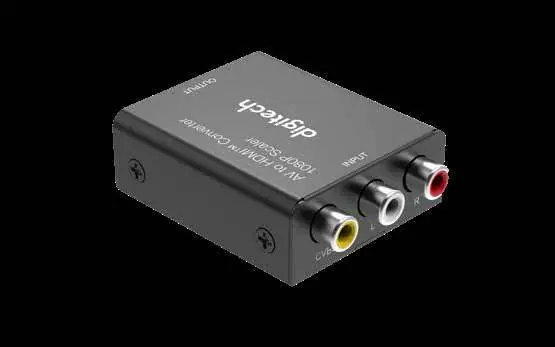
Box Contents
- HDMI to AV Converter
- USB Power Cable
- User Manual
Features
- Up-scales AV input to HDMI 720p or 1080p
- Plug and play functionality; no drivers required
- Advanced signal processing for precision and detail
- Supports standard TV formats: PAL, NTSC3.58, NTSC4.43, SECAM, PAL/M, PAL/N
Connection & Operation
To set up the device, follow these steps:
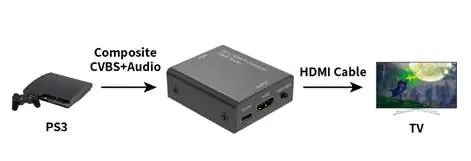
- Connect your Composite AV source (Yellow, White, Red cables) to the input ports on the converter.
- Connect an HDMI cable from the converter's output port to your TV or display.
- Connect the provided USB power cable to the converter to supply power.
- Ensure your TV is set to the correct HDMI input source.
Specifications
- Input Video Signal: Composite Signal (Yellow, White, Red)
- Output Signal: HDMI Signal
- HDMI Output: 1080p/60Hz, 720p/60Hz
- Dimensions: 58(D) x 50(W) x 20(H) mm
- Weight: 32g
- Power Supply: USB Power Cable
- Power Consumption: 5W
- Operating Temperature: 0°C - 70°C
Warranty Information
The product is covered by a 12-month warranty against manufacturing defects. This warranty does not cover misuse, abuse, modifications, or normal wear and tear. For claims, contact the place of purchase with your receipt.
Practical help
Common problems
No image on TV
Ensure the USB power cable is connected and the converter is receiving power. Verify that the TV is set to the correct HDMI input channel.
Incorrect video format
The device supports PAL, NTSC, and SECAM. Ensure your source device is outputting a compatible format.
Before use
- Verify you have a Composite AV cable (Yellow, White, Red) for the input device.
- Ensure you have an HDMI cable for the output display.
- Confirm a USB power source is available for the converter.
- Check that your TV supports 720p or 1080p HDMI input.
Specs in practice
- Composite Input
- Supports multiple global standards including PAL, NTSC3.58, NTSC4.43, SECAM, PAL/M, and PAL/N.
- Power Consumption
- Requires 5W of power, supplied via the included USB cable.
Images and diagrams
- The converter acts as a bridge: Composite AV (Yellow/White/Red) goes into the converter, and HDMI comes out to the TV.
- The USB port on the side of the converter must be connected to power for the unit to operate.
Model compatibility
- Compatible with standard TV formats: PAL, NTSC, and SECAM.
- Requires external USB power to function.

Manual page author
Emily Carter
User documentation editor
Prepares concise manual descriptions and highlights the most useful setup, operation, and maintenance information for readers.