Music / Guitar Effects
User Manual for DigiTech HammerOn Instantaneous Pitch Shifter Pedal
Quick guide for the DigiTech HammerOn pitch shifter pedal. Learn how to connect, use pitch modes (Hammer-On, Impossible, Sequence), adjust settings, and perform factory resets.
Table of contents
Manual images
Click an image to enlargeQuick guide from the manual
The DigiTech HammerOn is an instantaneous pitch shifter pedal designed to add sonic complexity to guitar riffs and chord progressions. It allows for foot-controlled pitch jumps, trills, and sequences. For best performance, place the pedal first in your signal chain.
Connections
To set up the pedal:
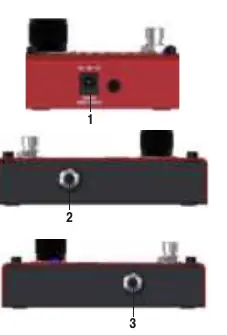
- Connect your guitar or instrument to the Instrument Input jack using a high-quality 1/4" cable.
- Connect the Output Jack to your amplifier or the next pedal in your signal chain.
- Connect the included 9V DC power supply to the Power Input.
User Interface
The pedal features several controls for shaping your sound:
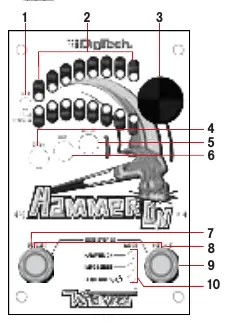
- Selector Knob: Selects pitch shift amount and adjusts TRILL speed.
- DRY+ Button: Adds dry, unprocessed signal to the pitch-shifted signal for harmony effects.
- TRILL Button: Enables automatic on-off oscillation of the selected footswitch.
- MODE Button: Cycles through operation modes (Hammer-On, Impossible, Sequence).
- Pitch 1 & 2 Footswitches: Trigger the pitch shift effects.
Operating Modes
The HammerOn offers three primary modes of operation, indicated by the Mode LED color:
- Hammer-On Mode (Purple): Provides instantaneous momentary pitch shifts. PITCH 1 and PITCH 2 act as two independently selectable pitch effects.
- Impossible Mode (Red): Alternates between two selectable pitch shift amounts with each press of the PITCH 2 footswitch.
- Sequence Mode (Blue/Teal/Green): Cycles through a user-definable sequence of pitch transpositions. Options include 2-note (Blue), 3-note (Teal), and 5-note (Green) sequences.
Advanced Features
- Harmony-On: Press the DRY+ button to mix your dry guitar signal with the pitch-shifted signal.
- Trill: Press the TRILL button to create rapid-fire pitch shifts. The rate can be adjusted via the Selector Knob or Tap-Tempo (hold TRILL button for 2 seconds).
- Classic vs. Chords Mode: The pedal offers two algorithms. Classic is ideal for single-note soloing, while Chords is optimized for bending full chords. Change this by holding the DRY+ button for 2 seconds.
Technical Specifications
- Sample Rate: 44.1 kHz (Classic), 22 kHz (Chords).
- Input Impedance: 1 MΩ.
- Power Requirements: 9V DC, 1300 mA (External Adapter included).
- Dimensions: 5.12" (L) x 3.57" (W) x 1.84" (H).
Maintenance and Safety
The unit contains no user-serviceable parts. Do not open the chassis. If the unit requires service, contact a qualified technician. To perform a factory reset, hold down the PITCH 1 footswitch while plugging in the power cord until all LEDs light up, then release and press/hold again until LEDs flash twice.

Practical help
Common problems
Unit does not power on
Ensure the included 9V DC power supply is connected correctly. If using a power brick, ensure it provides at least 300mA at 9V DC.
Signal issues or noise
Ensure the HammerOn is placed first in your signal chain for best operation.
Need to reset to factory settings
Hold PITCH 1 footswitch while plugging in power, wait for LEDs to light, release, and press/hold again until LEDs flash twice.
Before use
- Connect 9V DC power supply.
- Connect guitar to Input jack.
- Connect Output to amplifier or next pedal.
- Ensure pedal is first in signal chain.
- Verify Mode LED color for desired operation.
Specs in practice
- Input Impedance
- 1 MΩ, suitable for standard guitar pickups.
- Power Consumption
- 2.3 Watts (258 mA @ 9VDC) typical.
Images and diagrams
- Pitch Select LEDs indicate the current pitch shift amount.
- Mode LED colors: Purple (Hammer-On), Red (Impossible), Blue/Teal/Green (Sequence).
Model compatibility
- Requires 9V DC power adapter.
- Best performance when placed first in the signal chain.

Manual page author
Michael Turner
Technical manual editor
Reviews PDF manuals for structure, safety notes, and practical product details so readers can find the right information quickly.