Electronics / Audio
User Manual for Digitech 2-in-One Waterproof 360 Speaker XC5242
Quick guide for the Digitech 2-in-One Waterproof 360 Speaker (XC5242). Learn how to pair via Bluetooth, use TWS mode, charge, and troubleshoot common issues.
Quick answers from the manual
Quick answer
- The Digitech XC5242 is a 2-in-1 waterproof speaker that can be used as a single unit or separated into two speakers for true stereo sound. It supports Bluetooth 5.0 and has an IPX7 waterproof rating. p. 1, 2
Key actions
- Pairing via Bluetooth p. 1
- Separating for TWS Mode p. 2
- Charging the device p. 2
First start
- Power on and pair p. 1
Show 4 more answers Show less
Problems and fixes
Speaker shuts down automatically
It shuts down after 10 minutes if no Bluetooth device is paired.
p. 2Maintenance and reset
- Disconnect TWS pairing p. 2
- Disconnect Bluetooth device p. 2
Technical specifications
| Parameter | Value | Meaning | Pages |
|---|---|---|---|
| Bluetooth Version | 5.0 | Wireless connectivity standard | p. 2 |
| Output Power | 15W RMS | Audio output capability | p. 2 |
| Playback Time | 3-15 Hours | Battery life duration | p. 2 |
| Charging Time | 3-4 Hours | Time to fully charge | p. 2 |
Where to find it in the PDF
- Product Overview and Pairing p. 1
- TWS Mode, Specs, and FAQ p. 2
Table of contents
Manual images
Click an image to enlargeQuick guide from the manual
The Digitech XC5242 is a versatile 2-in-1 waterproof speaker system. It can be used as a single unit or separated into two individual speakers for true stereo sound. This guide covers the essential operations including Bluetooth pairing, TWS (True Wireless Stereo) setup, and charging.
Product Overview
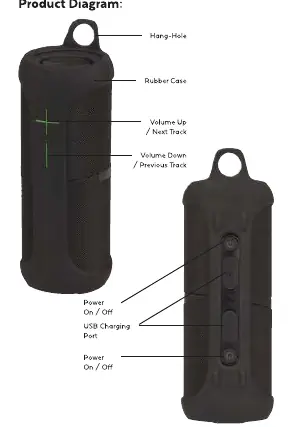
The speaker features a rubber case with a hang-hole. Key controls include a Power/Call button, Volume Up/Next Track, and Volume Down/Previous Track. The USB charging port is located under the rubber cover.
Bluetooth Pairing
To connect your smartphone:
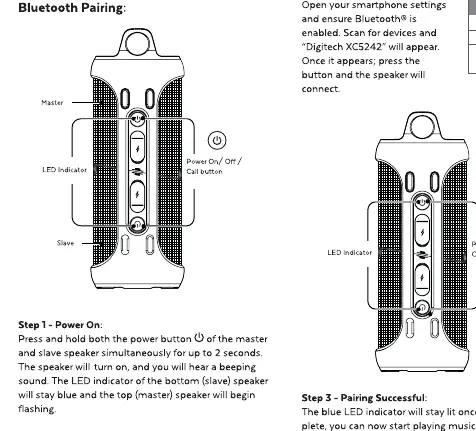
- Press and hold the power button on the master speaker for up to 2 seconds to turn it on.
- Open your smartphone's Bluetooth settings.
- Search for devices and select "Digitech XC5242" to connect.
True Wireless Stereo (TWS) Pairing
To use the speakers as a stereo pair:
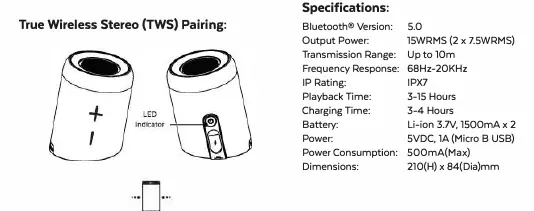
- Remove the silicon rubber cover and twist/rotate the speakers to separate them.
- Press and hold the power button on both speakers simultaneously for up to two seconds.
- The speakers will connect to one another automatically.
Charging
Use a 5VDC, 1A USB mains power adaptor or a standard USB 500mA computer port to charge the device. The LED indicator will turn red while charging and turn off when fully charged.
LED Status Indicators
- Blue Flashing: Bluetooth Pairing / Out of Range
- Blue On: Bluetooth Connected Successfully
- Red On: Charging
- Red Flashing: Low Battery
- LED Off: Fully Charged / Power Off
Troubleshooting
- Background noise: Ensure the device is within the 10m Bluetooth range.
- Speaker shuts down: The unit automatically shuts down after 10 minutes if no Bluetooth device is paired to save battery.
- Connection issues: Remove "Digitech XC5242" from your phone's Bluetooth list and restart the pairing process.
- Won't turn on: Connect the speaker to a charger and allow it to charge for a few minutes.
Practical help
Common problems
Speaker shuts down during use
The speaker automatically shuts down after 10 minutes if no Bluetooth device is paired to save battery.
Cannot connect to a previously paired phone
Remove 'Digitech XC5242' from your phone's Bluetooth device list and restart the pairing mode.
Background noise during playback
Reduce the distance between the speaker and the audio source; the range is up to 10m.
Speaker will not turn on
The battery may be flat. Plug the speaker into a charger and try again after a few minutes.
Before use
- Ensure the speaker is fully charged before first use.
- Check that your smartphone Bluetooth is enabled.
- Keep the speaker within 10 meters of the audio source.
- Ensure the rubber cover is properly sealed if using in wet conditions.
Show more Show less
Images and diagrams
- The master speaker controls the main volume when connected in TWS mode.
- The power button is used for pairing, answering calls, and TWS disconnection.
- Volume buttons control track skipping (hold) and volume adjustment (press).
Model compatibility
- Compatible with Bluetooth 5.0 devices.
- Can be used as a single speaker or separated into two for stereo sound.

Manual page author
Michael Turner
Technical manual editor