Home Appliances / Cooktops Hobs
User Manual for Dometic 230V/12V Converters for Recreational Vehicles
Comprehensive user and installation guide for Dometic 230V/12V converters. Includes mounting instructions, safety guidelines, troubleshooting, and technical specifications for Type I and Type II models.
Quick answers from the manual
Quick answer
- Dometic 230V/12V converters provide a continuous 12V power supply for recreational vehicles, prioritizing 230V AC mains power and automatically switching to 12V DC (battery) when mains power is unavailable. p. 1, 5
Key actions
- Replace a blown fuse p. 6
- Mount the converter p. 7
First start
- Switching on Type I p. 5
Show 4 more answers Show less
Problems and fixes
12V output not working on mains
Check 12V pin fuses; replace if the red LED is lit.
p. 6
Unit shuts down due to overheating
Disconnect from 230V mains to reset, improve ventilation, and restart.
p. 5Maintenance and reset
- Resetting after thermal overload p. 5
Technical specifications
| Parameter | Value | Meaning | Pages |
|---|---|---|---|
| Max Ambient Temp (Vertical) | 50°C | Maximum operating temperature for vertical mounting. | p. 7 |
| Max Ambient Temp (Horizontal) | 40°C | Maximum operating temperature for horizontal mounting. | p. 7 |
Where to find it in the PDF
- General Information p. 3
- Installation p. 7
- Technical Specifications p. 8, 9, 10, 11
Table of contents
Manual images
Click an image to enlargeQuick Guide
The Dometic 230V/12V converters are designed to provide a continuous 12V power supply for recreational vehicles. The system prioritizes 230V AC mains power when available, automatically switching to a 12V DC source (such as a battery) if mains power is disconnected. These units are not battery chargers.
Operation
Switching On: Type I units feature an ON/OFF switch. A green LED indicates that 230V AC input is available. If the LED is off, check the input power or if the unit has shut down due to overheating. Type II units do not have a main switch or fan and activate automatically when 230V is applied.
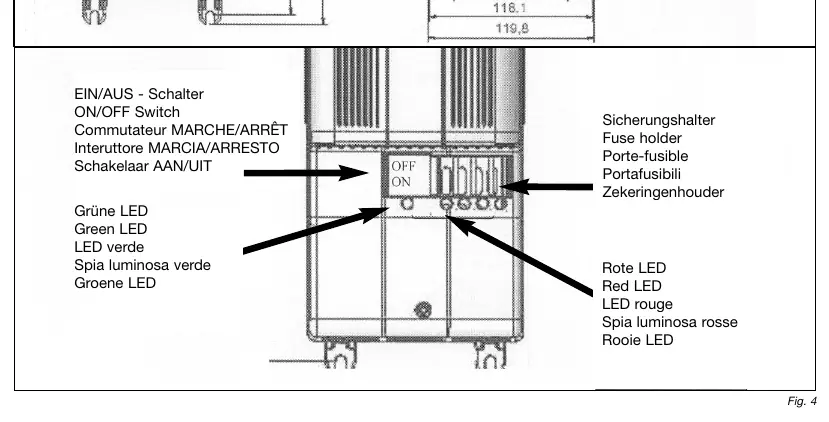
Protection Devices: The converters are equipped with internal protection against overheating, short-circuits, and overloads. If the thermal overload protection triggers, disconnect the unit from the 230V mains to reset it. Ensure adequate ventilation if the unit shuts down repeatedly.
Installation
Mounting: Converters must be installed in a well-ventilated, dry area. Avoid proximity to flammable materials like textiles or paper.
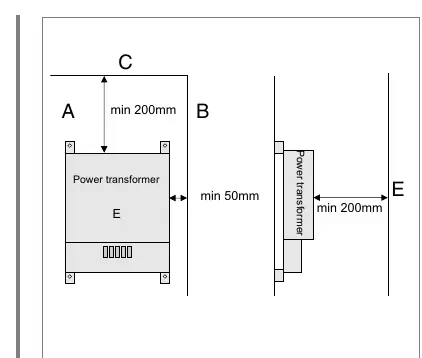
- Vertical Mounting: Optimal position. Maximum ambient temperature: 50°C. Maintain at least 200mm clearance above the unit.
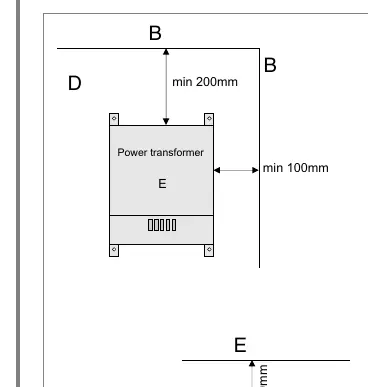
- Horizontal Mounting: Maximum ambient temperature: 40°C (50°C is acceptable at max 75% load). Maintain at least 200mm clearance above the unit.
Important: The converter must only be operated with a sinusoidal power supply. If using a generator, an overvoltage protection unit must be installed upstream.
Troubleshooting
If the 12V or 230V outputs are not working:
- Check Fuses: A red LED near the fuse indicates a blown fuse. Replace only with an ATO LITTLEFUSE of the same amperage. Always turn off the unit or disconnect from mains before replacing.
- Check Power Source: Verify the 230V line or the 12V battery connection.
- Overheating: If the unit shuts down, turn it off, wait 2 minutes, and ensure better ventilation before restarting.
Technical Specifications
The converters are available in various configurations (Type I, Type IIa, Type IIb) with power outputs ranging from 240W to 600W and currents from 19A to 47A. Refer to the product label and the table in the manual for specific model ratings (e.g., 70270.9701, 70270.9714).
Manufacturer information
Dometic
Practical help
Common problems
12V output not working on mains
Check the 12V pin fuses. A red LED indicates a blown fuse. Replace with an ATO LITTLEFUSE of the same amperage.
Unit shuts down repeatedly
Check for overheating. Ensure the unit has proper ventilation and is not covered. If it persists, contact Dometic service.
No power on 12V or 230V
Check the input power line and the automatic circuit breaker in the vehicle's fuse box.
Before use
- Ensure the installation area is dry and well-ventilated.
- Verify that the power supply is sinusoidal.
- Check that the unit is not covered or obstructed.
- Ensure the fuse rating matches the load (max 75% of nominal value).
- Confirm the mounting orientation (vertical is optimal).
Show more Show less
Images and diagrams
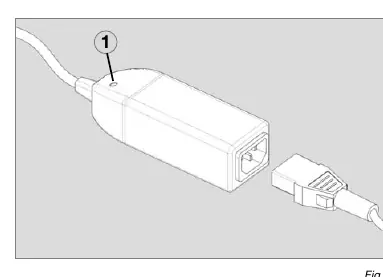
- Fig 1: Overvoltage protection unit (OVP) installation.
- Fig 2: Vertical mounting spacing requirements (min 200mm).
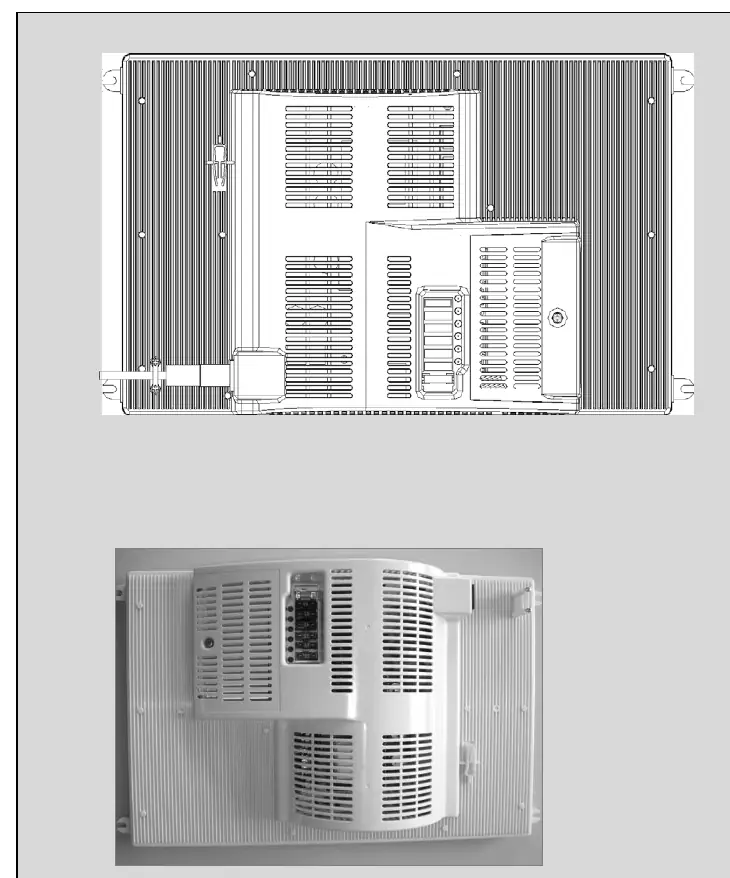
- Fig 3: Horizontal mounting spacing requirements.
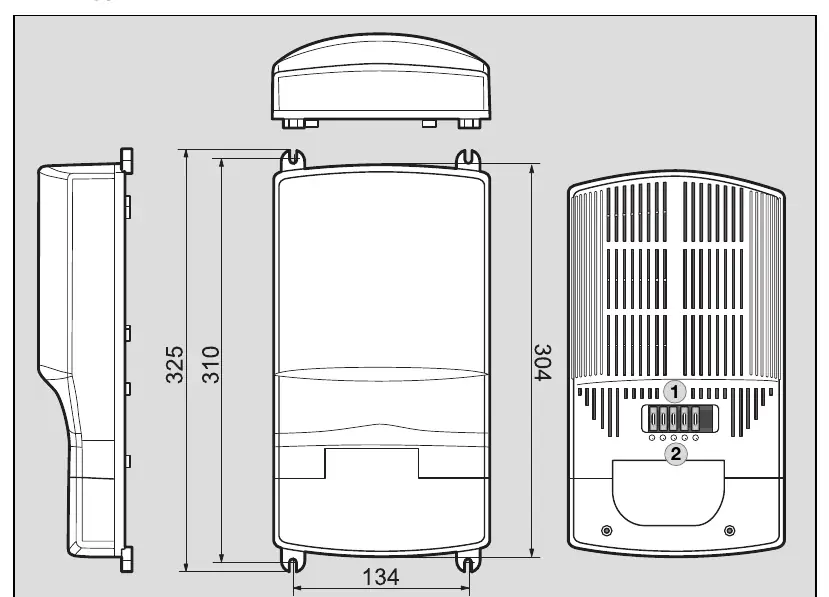
- Fig 4: Type I controls (Switch, Fuse holder, LEDs).
Model compatibility
- Not a battery charger.
- Requires sinusoidal input voltage.
- Type II models have no main switch or fan.

Manual page author
David Miller
Documentation analyst