Power / Solar Inverters
Enerdrive 12V 600W Inverter User Guide
Quick guide for the Enerdrive 12V 600W Inverter. Learn about installation, wiring, safety precautions, status indicator meanings, and troubleshooting steps.
Table of contents
Manual images
Click an image to enlargeQuick Guide
The Enerdrive 12V 600W Inverter provides reliable AC power for boats, caravans, 4WDs, and commercial vehicles. This device converts 12V DC battery power into 230V AC power. Before use, ensure the unit is installed in a well-ventilated area with at least 75mm of clearance. Always read the safety warnings regarding fire, shock, and explosion hazards before installation.
Installation
Proper installation is critical for safety and performance. Use a 12V battery bank and ensure all wiring is performed by a certified technician.
- Battery Bank: Use a deep cycle battery. Ensure the system is 12V.
- Fuse/Circuit Breaker: A DC-rated fuse or circuit breaker with a minimum 70A/16V rating must be installed on the positive DC line.
- Cabling: Use a minimum 16mm² cable with a maximum length of 1.5m for DC connections.
- Mounting: Choose an appropriate location. For RVs, mount horizontally. Ensure the DC input panel is not facing downwards.
- Wiring: Connect the positive (+) and negative (-) cables to the inverter terminals, then connect to the battery bank via the fuse/breaker. Ensure all connections are tight.
Operation
The inverter features a simple interface for power control and monitoring.
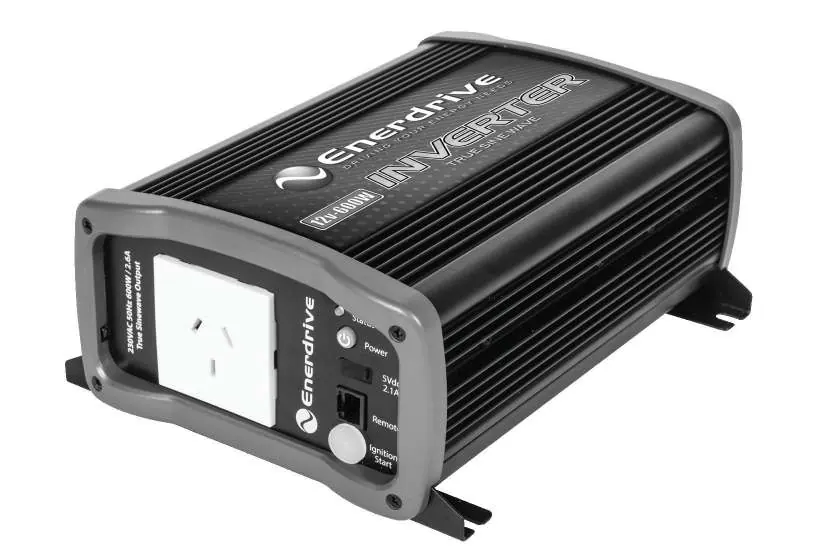
- Turning On/Off: Press and hold the green On/Off button for 1-2 seconds.
- Power Save Function: When enabled, the unit provides continuous AC output for loads >10W. If the load drops below 10W, the output pulses every 5 seconds. The default setting is OFF. To toggle, hold the On/Off button for more than 5 seconds until the status light flashes three times.
- Ignition Start: The unit can be turned on/off using a +12V signal connected to the Ignition Start port (1/4" spade terminal).
- USB Port: Provides 5V, 2.1A output for charging devices.
Status Indicators
The status indicator light provides feedback on the unit's condition:
- Solid Green: Normal operation, continuous AC output available.
- Solid Green with alarm: Warning detected (DC Over/Under Voltage or Over Temperature), but AC output is still available.
- Flashing Green: Normal operation with Power Save ON.
- Flashing Amber/Red: Normal operation with Power Save ON, but load is low (<10W).
- Solid Red with alarm: Shutdown due to DC Over/Under Voltage, AC Output Overload, or Over Temperature.
Troubleshooting
If the unit fails to operate, check the following:
- No AC Output: Ensure the unit is turned on. Check if the main fuse is blown or the circuit breaker is tripped.
- Shutdown (Solid Red): Check for AC overload, battery voltage issues, or overheating. Reduce load or improve ventilation.
- Warning (Flashing/Beeping): Verify the warning condition (voltage or temperature) and adjust accordingly.
Specifications
The Enerdrive 12V 600W Inverter operates within a DC input range of 10.5 – 15.9VDC. It provides a True Sine Wave output at 230Vac 50Hz. The unit weighs 2.0 kg and has dimensions of 237 x 175 x 89mm. Operating temperature range is 0°C to 40°C.
Manufacturer information
Dometic
Practical help
Common problems
No AC output and 'Power' indicator is off
Turn on the unit using the green power button. Check if the main fuse is blown or the circuit breaker is switched off.
Status indicator is solid red with alarm
The unit has shut down due to DC Over/Under Voltage, AC Output Overload, or Over Temperature. Check the battery voltage, reduce the AC load, or improve ventilation.
Status indicator is flashing green/amber/red with alarm
The unit has detected a warning (voltage or temperature). Verify the warning condition and make adjustments.
Before use
- Ensure the battery bank is 12V.
- Install a 70A/16V DC-rated fuse or circuit breaker on the positive line.
- Use minimum 16mm² cable for DC connections (max 1.5m length).
- Ensure at least 75mm of clearance around the unit for ventilation.
- Verify all DC connections are tight before operation.
- Do not install in corrosive environments or near flammable fumes.
Specs in practice
- AC Output Power
- 600 Watts continuous power capacity.
- DC Operating Range
- 10.5 – 15.9VDC; the unit will shut down if voltage is outside this range.
- AC Output Waveform
- True Sine Wave (<5% THD), suitable for sensitive electronics.
Images and diagrams
- The wiring diagram illustrates the connection from the 12V battery bank, through a fuse or circuit breaker, to the inverter's DC terminals.
- The front panel features the AC outlet, status indicator, power button, USB port, remote port, and ignition start terminal.
- The rear panel contains the negative and positive DC terminals and the cooling fan opening.
Model compatibility
- Use only with 12V battery systems.
- Not for use with life support systems or medical equipment.
- Not for use by children or persons with reduced capabilities.

Manual page author
David Miller
Documentation analyst
Organizes user manual content into clear summaries, with attention to model details, product context, and everyday usability.