Power / Solar Panels
User Manual for EcoFlow 110W Solar Panel
Quick guide for the EcoFlow 110W Solar Panel. Learn how to set up, connect in series or parallel, optimize charging, and maintain your solar panel for maximum efficiency.
Table of contents
Manual images
Click an image to enlargeQuick guide from the manual
The EcoFlow 110W Solar Panel is designed to charge portable power stations. For optimal performance, ensure the panel is not shaded and that sunlight hits the surface at a 90-degree angle. The kickstand feature should only be used before 10:00 am or after 2:00 pm; during midday, place the panel flat on the ground.
In the box
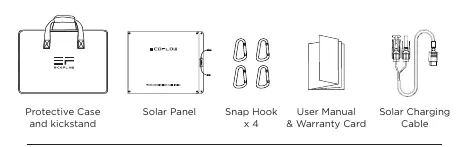
- Solar Panel
- Protective Case and Kickstand
- Snap Hooks (x4)
- Solar Charging Cable (MC4 to XT60)
- User Manual & Warranty Card
How it works
The solar panel connects to EcoFlow power stations (such as the DELTA or RIVER series) via the included Solar Charging Cable. The MC4 output controller is used to interface between the panel and the charging cable.
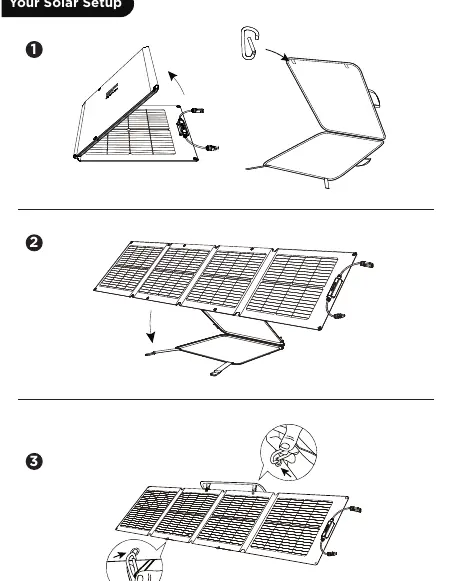
Setup and angle adjustment
To set up the panel: unfold the panel, attach the snap hooks to the protective case/kickstand, and adjust the angle. The protective case can be used as a kickstand to prop the panel at an angle between 25° and 80° for improved charging results.
Speed up solar charging
Parallel Connection: Connect the positive poles of two solar panels using an MC4 parallel cable, then repeat for the negative poles. Connect the output side to the Solar Charging Cable (MC4 to XT60) and plug into the power station. Note: Only use two 110W panels in parallel unless the power station's maximum solar input current is higher than 20A.
Series Connection: Snap the male connector of one panel into the female connector of the next. Use the Solar Charging Cable to connect the remaining open ends to the power station. Refer to the manual for the maximum number of panels supported by specific EcoFlow power stations (e.g., DELTA Pro supports up to 6 panels in series).
Important safety and usage warnings
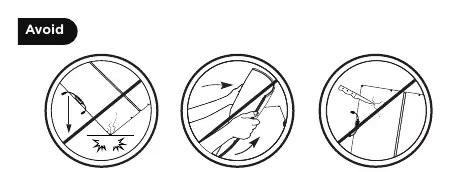
- Only the main body of the product is waterproof. Do not immerse the junction box or connection points in water.
- Do not use sharp objects on the panel surface.
- Do not drop, pierce, bend, or sit on the panel.
- Avoid contact with highly corrosive substances.
- When storing, ensure positive and negative terminals are not exposed to sunlight.
- The panel should be opened or disassembled only by qualified personnel.
FAQs
Does the panel generate a full 110W? It is normal for panels not to deliver full nominal power. Factors like light intensity, surface temperature (lower is better), sunlight angle, and shading significantly affect output.
Can I use non-EcoFlow power stations? Yes, provided they are compatible with MC4 standards, though performance may vary.
Can I mix panel sizes? It is not recommended to connect panels of different sizes in series, as the current will be limited to the lowest-rated panel.
Technical specifications
- Rated Power: 110W (+/- 5W)
- Open Circuit Voltage: 21.8V
- Running Voltage: 18.4V
- Short Circuit Current: 6.5A
- Running Current: 6.0A
- Efficiency: 22.8%
- Cell Type: Monocrystalline silicon
- Connector Type: MC4
- Operating Temperature: -20°C to 85°C (-4°F to 185°F)
Manufacturer information
EcoFlow
Practical help
Common problems
Panel not delivering full power
Ensure the panel is not shaded, the sun's rays are hitting at a 90° angle, and the surface temperature is not excessively high.
Panel damaged
Do not drop, pierce, bend, or sit on the panel. Damage from improper use is not covered by the free warranty.
Connection issues
Ensure compatibility with MC4 standards. Do not mix different panel sizes in series.
Before use
- Ensure the panel is not shaded by shadows, foreign objects, or glass.
- Check that the sun's rays hit the panel at a 90° angle for best performance.
- Verify the power station is compatible with MC4 standards.
- Use the kickstand only before 10:00 am or after 2:00 pm.
- Place the panel flat on the ground during midday sun.
Specs in practice
- Open Circuit Voltage
- 21.8V; the voltage when no load is connected.
- Running Voltage
- 18.4V; the voltage during normal operation.
- Short Circuit Current
- 6.5A; the maximum current the panel can output.
Images and diagrams
- Parallel connection: Connect positive poles together and negative poles together using MC4 parallel cables.
- Series connection: Connect male connector of one panel to female of another to daisy-chain.
Model compatibility
- Compatible with EcoFlow power stations and other stations supporting MC4 standards.
- Do not connect more than two 110W panels in parallel unless the power station input current is >20A.

Manual page author
Michael Turner
Technical manual editor
Reviews PDF manuals for structure, safety notes, and practical product details so readers can find the right information quickly.