Power / Batteries & Chargers
EcoFlow RAPID Mag Power Bank User Manual
Quick guide for the EcoFlow RAPID Mag Power Bank (EF-MB-001A). Learn how to operate, charge, and safely use your magnetic power bank with this essential manual.
Table of contents
Quick guide from the manual
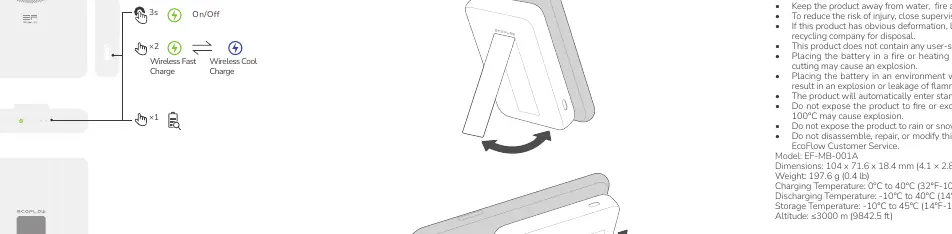
The EcoFlow RAPID Mag Power Bank is operated using a single button interface. To turn the device on or off, press and hold the button for 3 seconds. To activate Wireless Fast Charge, press the button once. To activate Wireless Cool Charge, press the button twice.
Safety Instructions
- Do not open, crush, heat above 45°C, or incinerate the power bank.
- Do not use the power bank if it has been soaked in water.
- Keep the product away from water, fire, and heat sources.
- If the product shows obvious deformation, leakage, or damage, stop using it immediately and contact a recycling company.
- This product does not contain user-serviceable parts; the battery is not replaceable.
- Do not expose the product to fire or excessive temperatures (above 100°C may cause explosion).
- Do not expose the product to rain or snow.
- Do not disassemble, repair, or modify the product yourself.
Usage Guidelines
To ensure optimal performance and longevity:
- Recharge the power bank regularly.
- Ensure the charging voltage of your digital device is consistent with the voltage output of the power bank.
- Use the original charging cable of your digital device.
- The product will automatically enter standby mode when not in use.
Technical Specifications
- Model: EF-MB-001A
- Dimensions: 104 x 71.6 x 18.4 mm
- Weight: 197.6 g
- Charging Temperature: 0°C to 40°C
- Discharging Temperature: -10°C to 40°C
- Storage Temperature: -10°C to 45°C
- Altitude: ≤3000 m
Manufacturer information
EcoFlow
Practical help
Common problems
Device not charging
Check if the charging voltage of your digital device is consistent with the voltage output of the power bank.
Power bank soaked in water
Stop using immediately and contact a battery recycling company for disposal.
Deformation, leakage, or damage
Stop using the device immediately and contact a recycling company for disposal.
Before use
- Read the full product documentation.
- Ensure the charging voltage of your digital device matches the power bank output.
- Use the original charging cable of your digital device.
- Check the device for any obvious deformation or damage.
Specs in practice
- Charging Temperature
- 0°C to 40°C (32°F-104°F)
- Discharging Temperature
- -10°C to 40°C (14°F-104°F)
- Storage Temperature
- -10°C to 45°C (14°F-113°F)
Images and diagrams
- 3s On/Off: Press and hold for 3 seconds to turn on or off.
- x1: Press once to activate Wireless Fast Charge.
- x2: Press twice to activate Wireless Cool Charge.
Model compatibility
- Ensure digital device charging voltage is consistent with power bank output.

Manual page author
David Miller
Documentation analyst
Organizes user manual content into clear summaries, with attention to model details, product context, and everyday usability.