Power / Solar Panels
EcoFlow 110W and 60W Solar Panel User Manual
Quick guide for EcoFlow 110W and 60W Solar Panels. Learn how to set up, connect to power stations like EF DELTA or R600, adjust the kickstand for efficiency, and connect multiple panels in parallel.
Table of contents
Manual images
Click an image to enlargeQuick Start Guide
The EcoFlow Solar Panel is designed to provide portable power for your devices and power stations. Before using, ensure you have all the components included in the box:
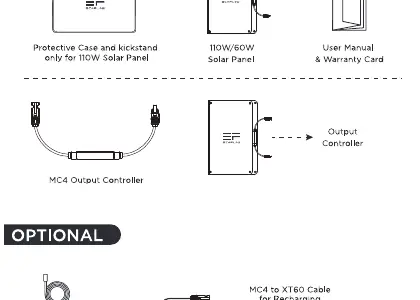
- Solar Panel (110W or 60W model)
- Protective case and kickstand
- User Manual and Warranty Card
- MC4 Output Controller
Note: The MC4 to XT60 cable required for charging EF DELTA or R600 power stations is sold separately.
Setting Up Your Solar Panel
To achieve maximum efficiency, proper positioning is essential. Use the included protective case as a kickstand to prop up your solar panel.

- Angle Adjustment: Position the panel at a 60-90 degree angle relative to the sun for the best efficiency.
- Placement: Ensure the panel is placed in direct sunlight, free from obstructions like trees or buildings.
Charging Your Devices
You can use the solar panel to recharge compatible power stations such as the EF DELTA or R600.
- Connect the MC4 output ports of the solar panel to the MC4 to XT60 cable.
- Plug the XT60 connector into the input port of your power station (e.g., R600 or EF DELTA).
- The charging time will vary based on weather conditions and the angle of the panel.
Advanced Power Configurations
For higher power output, you can connect multiple panels in parallel. Note: Series connection is not supported.
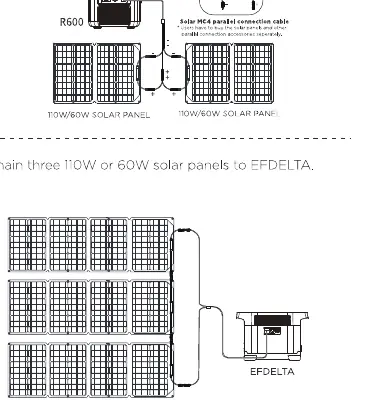
- Connecting to R600: You can connect up to two 110W or 60W solar panels to the R600 using a parallel connection cable.
- Connecting to EF DELTA: You can chain up to three 110W or 60W solar panels to the EF DELTA.
Technical Specifications
110W Solar Panel:
- Rated Power: 110W
- Open Circuit Voltage: 21.7V
- Short Circuit Current: 6.3A
- Efficiency: 21-22%
- Weight: 13.2 lbs (6kg)
60W Solar Panel:
- Rated Power: 60W
- Open Circuit Voltage: 21.6V
- Short Circuit Current: 3.5A
- Efficiency: 21-22%
- Weight: 8.8 lbs (4kg)
For further support, contact EcoFlow at [email protected] or visit www.ecoflow.com.
Official resources from the manual
Manufacturer information
EcoFlow
Practical help
Common problems
Cannot charge R600 or EF DELTA
Ensure you are using the MC4 to XT60 cable (sold separately) and that it is securely connected to the correct input port.
Low power output
Check the angle of the panel relative to the sun. Adjust the kickstand to maintain a 60-90 degree angle for optimal efficiency.
Cannot chain multiple panels
Verify you are using a parallel connection. Series connection is not supported. R600 supports a maximum of two panels; EF DELTA supports up to three.
Before use
- Verify the package includes the protective case/kickstand.
- Purchase the MC4 to XT60 cable if you intend to charge a power station.
- Ensure the solar panel surface is clean and free of debris.
- Identify a location with direct, unobstructed sunlight.
Specs in practice
- Open Circuit Voltage
- The voltage of the panel when it is not connected to any load.
- Short Circuit Current
- The maximum current the panel can produce when the output is shorted.
Images and diagrams
- Kickstand setup: Use the protective bag to prop the panel at a 60-90 degree angle.
- Parallel connection: Use a parallel connection cable to link two panels to the R600.
Model compatibility
- Compatible with EF DELTA and R600 power stations.
- Series connection is not supported.
- MC4 to XT60 cable is required for power station charging and is sold separately.

Manual page author
David Miller
Documentation analyst
Organizes user manual content into clear summaries, with attention to model details, product context, and everyday usability.