Music / Instruments
Electro Harmonix BASS9 Bass Machine User Guide
Quick guide for the Electro Harmonix BASS9 Bass Machine, covering setup, control functions, preset descriptions, and performance tips for achieving realistic bass sounds with an electric guitar.
Table of contents
Quick guide from the manual
The BASS9 Bass Machine is designed to transpose electric guitar signals one to two octaves down, providing realistic bass sounds without the need for special pickups. For best results, use a bass amplifier, especially for live performances, and play with your fingers rather than a pick.
Getting started
Connect the supplied power adapter to the 9V power jack. Plug your instrument into the INPUT jack and your amplifier into the EFFECT OUTPUT jack. Start with the DRY knob at minimum and other top-row knobs at 12 o'clock. Select a preset, such as PRECISION, and engage the footswitch to activate the effect.
Controls and I/O jacks
- DRY VOL: Controls the volume of the untreated instrument signal at the EFFECT OUTPUT jack.
- EFFECT VOL: Controls the overall volume of the selected bass patch.
- MODE KNOB: Selects the bass patch.
- INPUT JACK: Connect your instrument or another effects pedal here.
- DRY OUTPUT JACK: Outputs the dry signal from the input, buffered.
- EFFECT OUTPUT JACK: Outputs the mixed signal (dry and effect) or the buffered bypass signal.
- BYPASS FOOTSWITCH: Toggles between effect mode and buffered bypass.
Preset descriptions
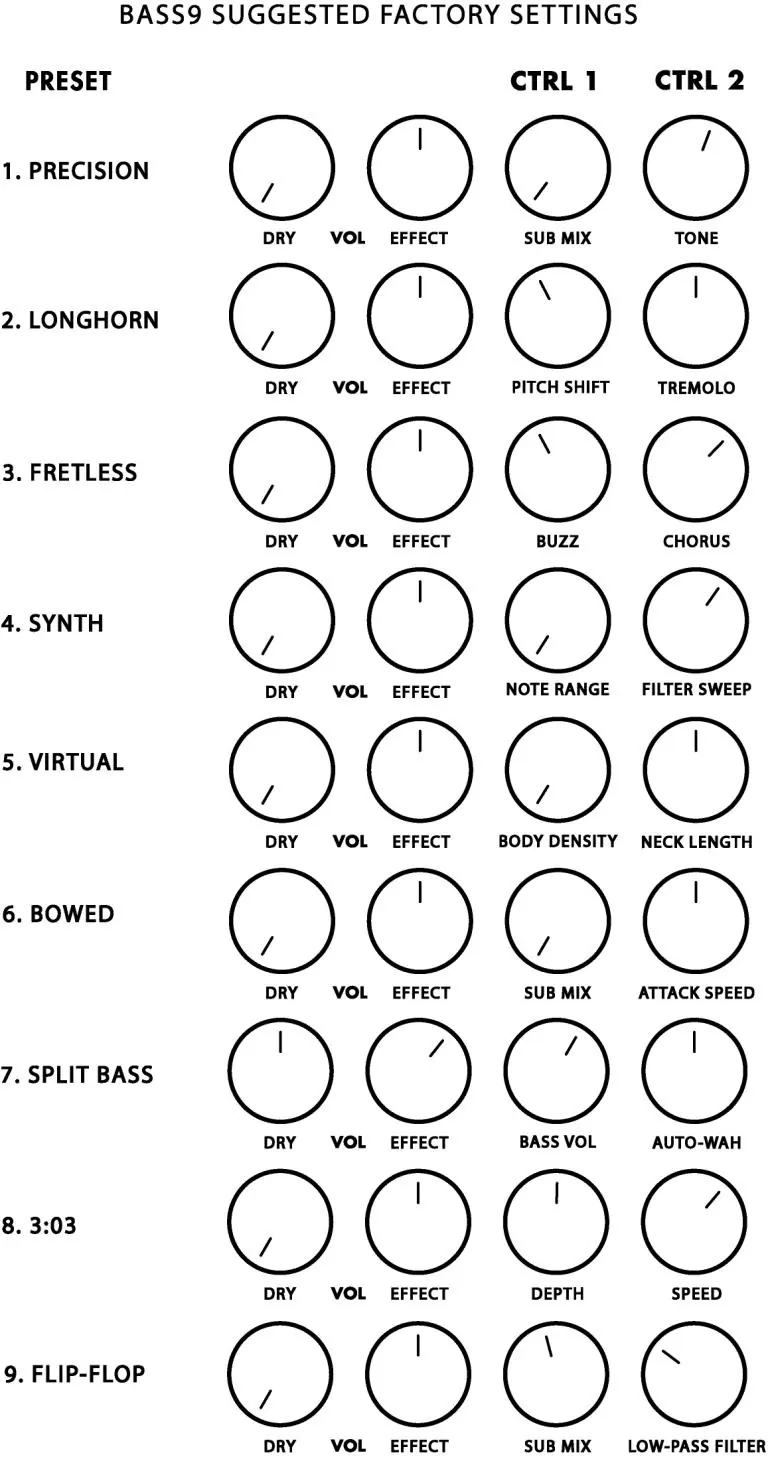
The BASS9 features nine distinct bass patches, each with unique CTRL 1 and CTRL 2 functions to shape the sound, ranging from standard bass emulations (PRECISION) to synth-like textures (SYNTH, 3:03, FLIP-FLOP) and specialized effects like BOWED or SPLIT BASS.
Performance tips
- Place the BASS9 as the first pedal in your effects chain for best tracking.
- Avoid placing distortion or overdrive pedals before the BASS9, as this can muddy the signal.
- Experiment with your guitar's pickup positions and picking styles to influence the final bass tone.
Specifications
- Buffered bypass: Yes
- Input impedance: 1M Ohm
- Output impedance: 500 Ohm
- Current draw: 100mA
Practical help
Common problems
Unstable tracking or muddy sound
Ensure no distortion or overdrive pedals are placed before the BASS9 in the signal chain.
Poor performance in an effects loop
The BASS9 is designed to be used as the first pedal in an effects chain, not in a guitar amp's effects loop.
Before use
- Use the supplied Electro-Harmonix 9.6DC-200BI power supply.
- Ensure the power supply provides 9VDC with a center negative plug.
- Connect the instrument to the INPUT jack.
- Connect the amplifier to the EFFECT OUTPUT jack.
- Set the DRY knob to minimum initially for testing.
Specs in practice
- Input impedance
- 1M Ohm, standard for high-quality instrument inputs.
- Current draw
- 100mA, ensure your power supply can provide at least this amount.
Images and diagrams
- The manual provides a 'Suggested Factory Settings' chart showing knob positions for each of the 9 presets.
- A 'User Settings' template is included for users to record their own favorite sound configurations.
Model compatibility
- Works with standard electric guitars; no special pickups required.
- Best results achieved when using a dedicated bass amplifier.

Manual page author
David Miller
Documentation analyst
Organizes user manual content into clear summaries, with attention to model details, product context, and everyday usability.