Music / Guitar Effects
Electro-Harmonix RING THING Single Sideband Modulator
Quick start guide and operational manual for the Electro-Harmonix RING THING. Learn how to use the four modulation modes, save presets, connect an expression pedal, and tune the modulator.
Table of contents
Manual images
Click an image to enlargeQuick guide from the manual
The Electro-Harmonix RING THING is a versatile single sideband modulator pedal. To get started, connect your instrument to the INST Input Jack and your amplifier to the MONO/L output jack. Use the supplied 9.6VDC 200mA power supply (center negative). The pedal features four primary modes: Ring Modulation (RM), Upper Band Modulation (UB), Lower Band Modulation (LB), and Pitch Shift (PS). You can save and recall up to 9 presets using the MODE knob and PRESET/TUNE footswitch.
Modes Overview
The RING THING offers four distinct modes, each providing a different sonic palette:
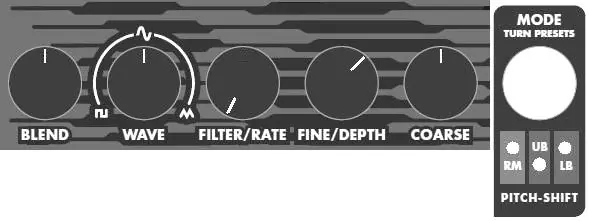
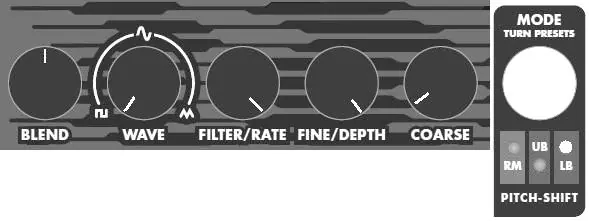
- Ring Modulation (RM): A standard ring modulator with selectable carrier waveforms, a sweepable filter, and expression pedal control.
- Upper Band Modulation (UB): Splits the signal, outputting the upper sideband to the Left output and the lower sideband to the Right output.
- Lower Band Modulation (LB): Splits the signal, outputting the lower sideband to the Left output and the upper sideband to the Right output.
- Pitch Shift (PS): A powerful pitch shifter with a range of +/- 2 octaves, capable of detune, vibrato, chorus, and whammy effects.
Controls and Indicators
The pedal features five main control knobs and two footswitches:
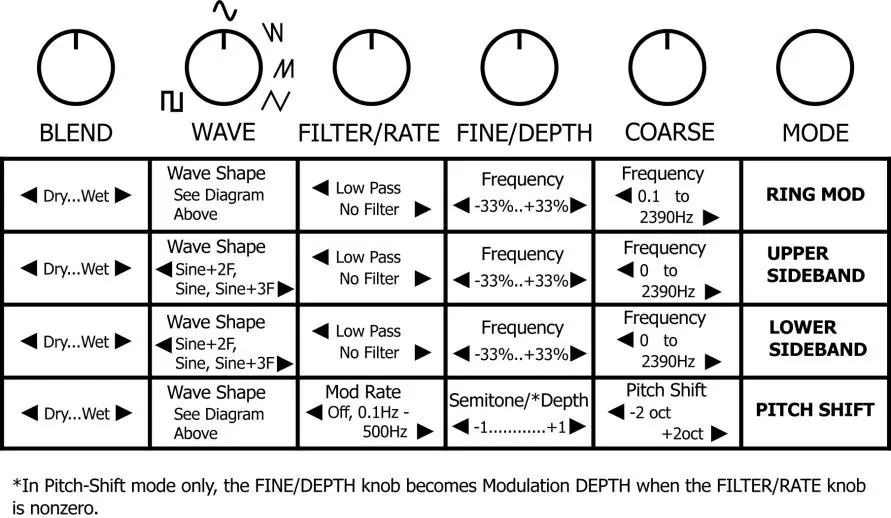
- BLEND: Sets the wet/dry mix.
- WAVE: Sets the carrier or modulation waveform (Square, Sine, Ramp Down, Ramp Up, Triangle).
- FILTER/RATE: Controls the low pass filter cutoff frequency in RM/UB/LB modes, or the modulation rate in Pitch Shift mode.
- FINE/DEPTH: Fine-tunes the carrier/modulation frequency or sets modulation depth.
- COARSE: Tunes the carrier/modulation frequency over a wide range or sets the pitch shift amount.
- MODE Knob: A rotary encoder used to select modes and scroll through presets.
- BYPASS Footswitch: Toggles between effect and bypass modes.
- PRESET/TUNE Footswitch: Used for loading presets and automatically tuning the modulator to an incoming signal.
Preset Management
The RING THING allows you to save and recall 9 fully programmable presets:
- Saving: Turn the MODE knob to the desired preset number, then press and hold the MODE knob for 3 seconds until the LEDs stop blinking.
- Loading: Use the MODE knob to select the preset, then press and release the PRESET/TUNE footswitch.
- Unloading: Turn the MODE knob clockwise until no LEDs are lit to return to the current knob settings.
Connections and External Control
The pedal supports several external connections:
- INST Input Jack: Main mono input for your instrument.
- MOD Input Jack: Allows for an external oscillator/modulation source. Set the WAVE knob to full counter-clockwise to enable.
- EXP Input Jack: Connect an expression pedal (Tip-Ring-Sleeve plug) to control modulation frequency or pitch shift amount. In RM/UB/LB modes, the FINE knob must be set fully counter-clockwise to enable the expression pedal.
Troubleshooting
If you are not hearing the effect or experiencing unexpected behavior, check the following:
- Ensure the BLEND knob is set to 50% or higher.
- Check that the FILTER/RATE knob is not turned to full counter-clockwise (which may disable the effect or modulation).
- If using an expression pedal, ensure the FINE knob is set fully counter-clockwise (in RM/UB/LB modes).
- If the preset LEDs are blinking rapidly, a knob has been moved from its saved position. Press the PRESET footswitch to revert to the saved setting.
Practical help
Common problems
Not hearing the Ring Modulator or effect
Check that the BLEND knob is at 50% or higher and the FILTER/RATE knob is not turned to full counter-clockwise.
Expression pedal not working
In RM/UB/LB modes, the FINE knob must be set fully counter-clockwise to enable the expression pedal function.
Preset LEDs blinking rapidly
This indicates a knob has been moved from its saved position. Press the PRESET footswitch to revert to the saved preset settings.
Before use
- Use the supplied 9.6VDC 200mA power supply (center negative).
- Connect your instrument to the INST Input Jack.
- Connect your amplifier to the MONO/L output jack.
- Ensure the correct mode is selected using the MODE knob.
- If using an expression pedal, ensure it uses a Tip-Ring-Sleeve (TRS) plug.
Specs in practice
- A/D and D/A Resolution
- 24 bits
- Processed Audio Resolution
- 32 bits
- Input Impedance
- 2 MΩ (for both INST and MOD inputs)
Images and diagrams
- The control panel features five knobs: BLEND, WAVE, FILTER/RATE, FINE/DEPTH, and COARSE, plus a MODE knob for selecting effects and presets.
Model compatibility
- Requires 9VDC power supply with center negative polarity.
- Expression pedal must have a Tip-Ring-Sleeve (TRS) plug.
- Compatible with standard guitar, bass, or keyboard amplifiers.

Manual page author
Emily Carter
User documentation editor
Prepares concise manual descriptions and highlights the most useful setup, operation, and maintenance information for readers.