Music / Instruments
User Manual for Electro-Harmonix Ravish Sitar Emulator
Comprehensive user guide for the Electro-Harmonix Ravish Sitar. Learn how to set up the pedal, manage presets, use key and custom scale modes, and understand technical specifications.
Table of contents
Quick guide from the manual
The Ravish Sitar is a sitar emulator. To get started, connect your instrument to the INPUT jack and your amplifier to the MAIN OUT jack. Use the included 9V DC center-negative power supply. Press the BYPASS footswitch to activate the effect; the status LED will light up.
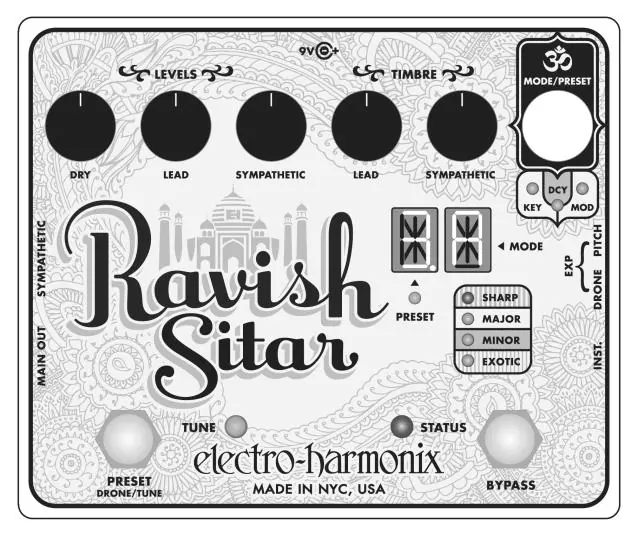
Knob Functions
- DRY LEVEL: Controls the volume of your original instrument signal.
- LEAD LEVEL: Controls the volume of the lead sitar signal.
- SYMPATHETIC LEVEL: Controls the volume of the sympathetic strings.
- LEAD TIMBRE: Adjusts the "buzz" or "zing" of the lead tone.
- SYMPATHETIC TIMBRE: Adjusts the "buzz" or "zing" of the sympathetic strings.
Switch Functions
- MODE/PRESET Encoder: Used to cycle through modes (Preset, Key, Decay, Modulation, Pitch, Q) and save presets.
- BYPASS Footswitch: Toggles between Effect and Bypass modes.
- PRESET Footswitch: Loads presets, engages custom tuning, or freezes sympathetic strings.
Key Mode and Custom Tuning
Press the MODE/PRESET encoder to enter KEY MODE. Rotate the knob to select the desired key and scale (Major, Minor, Exotic). To create a custom scale:
- Enter KEY MODE.
- Press and hold the PRESET footswitch for two seconds.
- Play the notes of your scale one by one.
- Release the PRESET footswitch to save the custom scale.
Presets
The Ravish Sitar has 10 programmable presets. To save a preset, create your sound, turn the MODE/PRESET knob to the desired slot, and hold the knob for 3 seconds. To load a preset, use the PRESET footswitch.
I/O Connections
The pedal features a MAIN OUT and a SYMPATHETIC OUT. Plugging into the SYMPATHETIC OUT removes sympathetic strings from the MAIN OUT. You can connect expression pedals to the DRONE EXP (for sympathetic string control) or PITCH EXP (for lead pitch bending) jacks.
Technical Specifications
- Power: 9V DC, 160mA, center negative.
- Sample Rate: 36082 Hz.
- Bit Resolution: 24-bit A/D, 32-bit processing.
- Input Impedance: 2.2 MΩ.
- Output Impedance: 680 Ω.
Practical help
Common problems
No sound output
Ensure the power supply is connected, the BYPASS footswitch is engaged (Status LED on), and the level knobs are turned up.
Preset not saving
Ensure you hold the MODE/PRESET knob down for 3 seconds until the preset digit stops blinking.
Pitch estimator unreliable (Custom Tuning)
Play the desired note loudly and clearly, especially when using bass or low-tuned instruments.
Before use
- Use only the supplied 9V DC center-negative power supply (160mA).
- Connect instrument to the INPUT jack.
- Connect amplifier to the MAIN OUT jack.
- Ensure expression pedals use a Tip-Ring-Sleeve connection.
- Check that the BYPASS LED is lit to activate the effect.
Specs in practice
- Input Impedance
- 2.2 MΩ, suitable for standard guitar pickups.
- Output Impedance
- 680 Ω, standard for connecting to amplifiers.
Images and diagrams
- The pedal interface includes five black knobs for controlling Dry, Lead, and Sympathetic levels and timbres.
- A white MODE/PRESET encoder is used for menu navigation and saving.
- Two footswitches control Preset selection and Bypass status.
- LED indicators show the current mode (Key, Decay, Mod, etc.) and preset status.
Model compatibility
- Requires 9V DC center-negative power supply (Boss/Ibanez style).
- Expression pedals must have a Tip-Ring-Sleeve connection.
- Control voltage range for expression jack is 0V to 5V.

Manual page author
David Miller
Documentation analyst
Organizes user manual content into clear summaries, with attention to model details, product context, and everyday usability.